Decide Jira vs. Asana in Three Weeks for PMs and Hiring Leads
Choose Jira if your team runs on sprints, story points, and issue tracking. Choose Asana if your team runs on deliverables, deadlines, and cross-department visibility. Most engineering organizations lean toward Jira; most marketing, ops, and product teams lean toward Asana, and plenty of companies run both at once, syncing at the edges rather than forcing everyone onto one tool.
TL;DR:
- Jira offers deeper agile support, native sprint management, and advanced query language, making it ideal for engineering teams with complex workflows.
- Asana provides easier onboarding and collaboration features, with a focus on cross-functional project visibility and visual task views for non-technical teams.
- Cost-wise, Jira generally has a larger free tier and lower per-seat pricing at scale, while Asana’s paid plans emphasize user experience and reporting.
- Integration options differ: Jira connects deeply with developer tools and pipelines, whereas Asana links more broadly with business and creative tools like Slack and Google Workspace.
- Successful adoption depends on aligning the tool to the team’s primary language of work, whether story-driven or deliverable-focused, rather than feature parity alone.
Table of Contents
- Jira vs. Asana: The Quick-Reference Comparison
- Issues, Tasks, and Views: How the Two Tools Actually Work
- What Do Jira and Asana Cost at Different Team Sizes?
- Which Integrations Does Each Tool Actually Support?
- How Do Reporting and Agile Metrics Compare?
- How Hard Is It to Roll Out Jira vs. Asana?
- What Security and Compliance Features Should You Confirm?
- Which Should You Choose: A Decision Framework
- Can You Run Jira and Asana Together?
- How Does Tool Choice Affect Nearshore Hiring and Onboarding?
- Editorial Take: Stop Optimizing for Features, Start Optimizing for Fit
- Need Help Rolling Out Jira or Asana? Consider Nearshore Engineering Support
- Sources
- FAQ
Jira vs. Asana: The Quick-Reference Comparison
The fastest way to see where these two products diverge is side by side, across the criteria that actually decide adoption: cost, ceiling, and how much structure your team wants imposed on it.
| Dimension | Jira | Asana |
|---|---|---|
| Best for | Engineering teams running Scrum or Kanban, release and issue tracking | Marketing, ops, product, and cross-functional teams needing fast rollout and portfolio views |
| Pricing | Generally the more budget-friendly option at scale | Priced for polished UX and executive reporting, typically higher per seat |
| Free tier limits | Larger free tier, more generous seat allowance | Smaller free tier, fewer advanced views unlocked |
| Integrations | Deep Atlassian suite and DevOps pipeline connections | Broad business and creative tool connectivity (Slack, Google Workspace, Adobe) |
| Agile support | Native sprints, backlogs, velocity, and burndown reporting | Basic timeline and board views; no native sprint engine |
| Ease of use / onboarding | Steeper learning curve, more admin configuration | Faster onboarding, intuitive for non-technical staff |
| Reporting & analytics | Deep, queryable agile analytics via JQL | Executive dashboards and portfolio-level rollups |
| Scalability & enterprise features | Strong for large engineering orgs with complex workflows | Strong for large cross-functional orgs tracking many parallel initiatives |
Jira’s standout is JQL, its query language for slicing issue data any way an engineering lead needs, paired with deep Atlassian ecosystem ties. Asana’s standout is the Work Graph, which lets one task live in several projects at once, plus dashboards built for people who don’t want to learn a query language just to see project status.
Issues, Tasks, and Views: How the Two Tools Actually Work
The real difference between Jira and Asana isn’t the color scheme or the pricing page. It’s the data model underneath, and that model quietly dictates how much friction your team feels every single day.
Jira organizes work as issues nested under epics, moving through workflows you define and enforce. A bug can’t skip from “Open” to “Done” without passing through whatever states your admin configured, and that rigidity is the point. Every issue lives inside a project, gets a type (story, bug, task, subtask), and carries fields your team decides matter: story points, sprint, fix version, component. Then there’s JQL, Jira’s query language, which lets you ask things like “show me every unresolved bug tagged critical, assigned to the mobile team, opened in the last sprint” and get an answer in seconds.
Asana takes a different structural bet. Its Work Graph lets a single task exist in multiple projects simultaneously, which solves a problem Jira makes painful: cross-team dependencies. If marketing, design, and product all need visibility into the same launch task, Asana lets all three see and update it without duplicating it three times. Views stack on top of that same task data: List for straightforward to-dos, Board for kanban-style visual tracking, Timeline for Gantt-style scheduling, and Calendar for date-driven work. None of it requires a query language.
Where each model wins and where it drags:
- Jira wins when you need strict state transitions, for example a bug cannot be marked resolved until QA approves it, and when audit trails matter for compliance or client reporting.
- Jira introduces overhead for teams that don’t need workflow gates. A five-person marketing team forcing content approvals through Jira’s issue states usually ends up fighting the tool instead of using it.
- Asana wins for dependency-heavy cross-functional launches, where the same deliverable touches engineering, design, and marketing and everyone needs the same live status.
- Asana introduces overhead for engineering teams that need sprint velocity, burndown charts, or granular issue typing. Asana’s task model wasn’t built to enforce a release pipeline.
Pro Tip: Before committing either tool company-wide, map your team’s actual state transitions on a whiteboard. If you count more than four or five required approval steps for a piece of work, that’s a signal you need Jira’s workflow engine, not Asana’s flexibility.
What Do Jira and Asana Cost at Different Team Sizes?
Cost comparisons get murky fast because both vendors bundle features differently across tiers, but the pattern holds consistently across independent reviews: Jira tends to be the more budget-friendly option with a larger free tier, while Asana’s pricing reflects its investment in polished UX and faster onboarding.
Jira’s free tier supports a generous number of seats before you hit a paywall, which matters if you’re a startup engineering team testing the tool before buying in. Asana’s free tier caps out sooner and locks timeline views, advanced reporting, and workflow rules behind paid plans.
Neither vendor publishes a single “true cost” number that survives contact with reality, so budget for these add-ons regardless of which platform you pick:
- Marketplace apps for missing functionality (time tracking, advanced reporting, resource management) that both ecosystems rely on for gaps in native features.
- Admin hours spent configuring workflows, permission schemes, and custom fields, which scales with team complexity, not headcount.
- Migration services if you’re moving historical data from a legacy tool like Trello or spreadsheets, particularly attachments and comment history.
- Training time during rollout, which tends to run shorter for Asana given its simpler interface and longer for Jira given its configuration depth.
A rough illustration: at 5 seats, both tools sit close to free-tier territory and the cost gap barely registers. At 15 seats, you’re solidly into paid plans for both, and Jira’s lower per-seat list pricing starts to show up on the invoice. At 50 seats, the gap compounds, especially once you add marketplace apps on either side, and that’s when procurement teams usually run a real quote request instead of trusting the pricing page.
Which Integrations Does Each Tool Actually Support?
Jira and Asana didn’t build their ecosystems around the same buyer, and that shows up immediately once you start connecting tools.
Jira integrates natively with the Atlassian suite (Confluence, Bitbucket) and connects deeply into professional DevOps pipelines: GitHub, GitLab, Jenkins, CircleCI, and most CI/CD platforms treat Jira as a first-class citizen for linking commits, pull requests, and deployments back to issues. If your team already lives in a GitHub or GitLab workflow, Jira closes that loop with almost no friction.
Asana’s integration strength runs toward business and creative tools instead: Slack, Google Workspace, Microsoft Teams, and Adobe Creative Cloud all connect cleanly, which is exactly what a marketing or ops team needs day to day. Asana’s broader business connectivity reflects that focus, while Jira’s cleaner executive dashboards come second to its developer-facing depth.
A few practical notes before you commit either way:
- If your team lives in code, test the GitHub or Bitbucket integration during a trial, not after signing an annual contract.
- If your team lives in Slack threads and shared docs, verify Asana’s Slack integration handles your notification volume without becoming noise.
- Marketplace breadth matters less than depth on your three or four most-used tools. A thousand available integrations you never touch don’t help you; the one you use every day does.
- Run a two-week pilot connecting your critical stack (CI/CD for engineering, Slack and calendar for business teams) before rolling out to the full org.
How Do Reporting and Agile Metrics Compare?
Jira’s native agile reporting includes velocity charts, burndown and burnup graphs, sprint reports, and cumulative flow diagrams, all generated automatically from sprint data your team is already producing by moving issues through workflows. Add JQL-powered custom reports or marketplace apps like eazyBI, and you get analytical depth that most competing tools simply don’t attempt to match.
Asana’s reporting philosophy points a different direction: portfolios, workload views, and dashboards designed to be read by a vice president in thirty seconds, not queried by an analyst for thirty minutes. According to comparative reviews, Asana’s reporting and portfolio views suit executives tracking cross-department work, while Jira’s breadth of agile and issue-analysis reports suits teams tracking engineering performance specifically.
The practical rule: if your primary audience for reports is a scrum master or engineering director who needs to know why velocity dropped last sprint, Jira wins outright. If your primary audience is a chief marketing officer who wants a single glance at whether twelve campaigns are on track, Asana’s dashboards get there faster with less setup.
How Hard Is It to Roll Out Jira vs. Asana?
Onboarding time is where the two tools diverge most sharply in day-to-day experience. Multiple hands-on reviews report that Asana is easier to learn while Jira delivers more power and customizability for engineering workflows, and that tradeoff plays out almost exactly as expected during rollout.
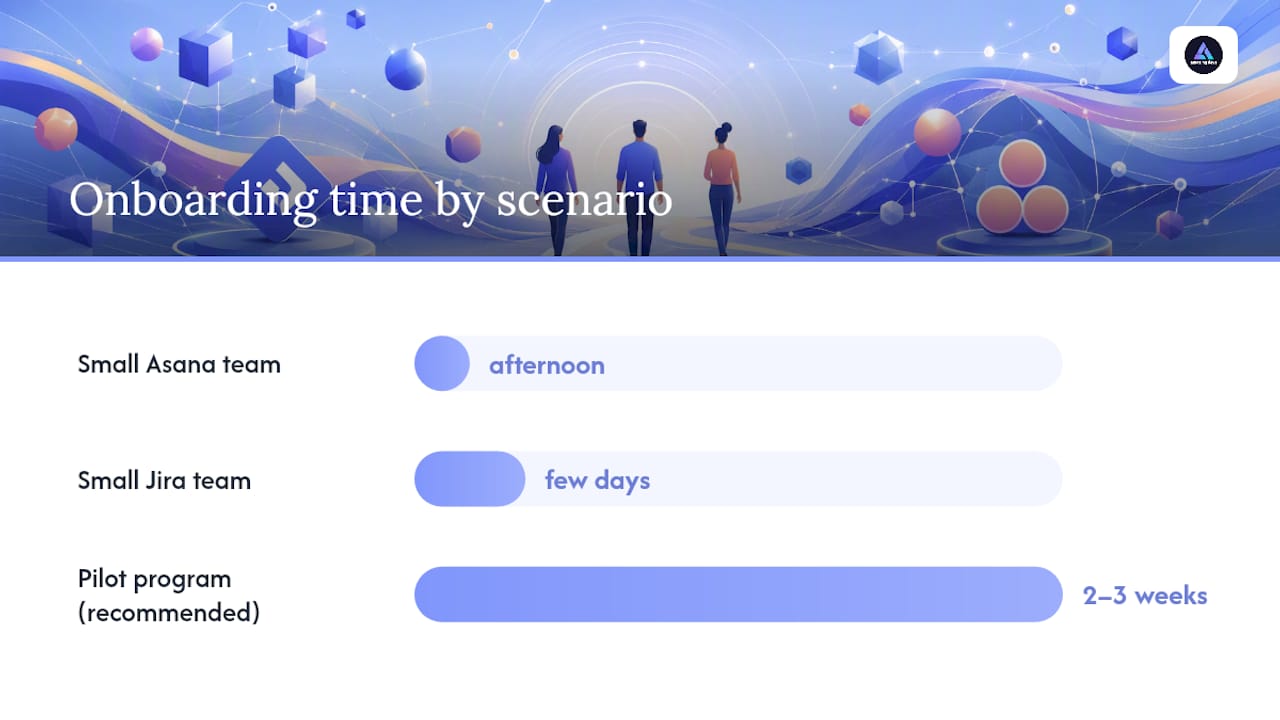
A small Asana team can go from signup to functional project boards in an afternoon. A small Jira team usually needs a few days to configure workflows, permission schemes, and issue types correctly, especially if nobody on staff has administered Jira before. Larger organizations flip that math somewhat, since Jira’s enterprise-grade admin controls (fine-grained permissions, custom workflow schemes) become an asset once you have hundreds of users and multiple departments needing different rules.
A simple rollout sequence that works for either tool:
- Pick one pilot team, not the whole company, and give them two to three weeks to work inside the new tool before expanding.
- Build two or three project templates in advance so new teams don’t start from a blank board.
- Assign one internal admin champion per department who owns configuration questions instead of routing everything to IT.
- Run a feedback session at the two-week mark and fix the friction points before scaling further.
- Expand company-wide only after the pilot team can answer “would you go back to your old tool” with a clear no.
Pro Tip: Give your pilot squad real work, not a sandbox project. Teams that test new tools on fake tasks always report smooth results, then hit the actual friction points once live client deadlines enter the picture.
What Security and Compliance Features Should You Confirm?
Both platforms provide enterprise-grade security fundamentals: encryption in transit and at rest, and support for GDPR compliance obligations, so neither is a differentiator by itself. Where they actually diverge is in which controls sit behind which paywall.
According to a detailed feature comparison, specific admin controls and sandbox environments are commonly gated to higher tiers on both platforms, not just one. Single sign-on, detailed audit logs, and sandbox testing environments typically require enterprise-level plans from either vendor, so don’t assume a mid-tier plan includes them just because the marketing page mentions security.
Before signing a contract, confirm these items directly with the vendor rather than assuming based on tier name:
- Whether SSO and SCIM provisioning are included at your target tier or require an upgrade.
- Whether audit logs capture the granularity your compliance team actually needs (who changed what, when, from where).
- Whether a sandbox or staging environment is available for testing workflow changes before they hit production.
- Data residency options if your organization has contractual or regulatory requirements about where data physically lives.
- The specific language in the vendor’s data processing agreement if you operate under GDPR or similar frameworks.
Which Should You Choose: A Decision Framework
The single question that resolves most Jira versus Asana debates faster than any feature comparison: what is your team’s primary language of work? Teams that think in story points, sprints, and release versions belong in Jira. Teams that think in deliverables, due dates, and campaign timelines belong in Asana. Experts consistently recommend matching the tool to that language rather than picking based on brand recognition or what a competitor uses.
Once you know your primary language, work through this checklist before signing anything:
- Team size and composition. Is this mostly engineers, mostly non-technical staff, or a genuine mix that needs both?
- Sprint or release cadence. Do you ship on fixed sprints with velocity tracking, or on rolling deadlines with no formal sprint structure?
- Integration must-haves. Which three tools does your team refuse to give up, and does your candidate platform connect to all three cleanly?
- Admin capacity. Do you have someone who can own Jira’s configuration depth, or do you need something closer to plug-and-play?
- Reporting audience. Are your reports going to an engineering lead who wants raw data, or an executive who wants a dashboard?
- Budget tolerance at scale. Run the seat math at your projected headcount twelve months out, not just today’s team size.
During any vendor trial, run these three exercises before deciding:
- Import a real, messy chunk of your current backlog or task list, not a clean demo dataset, and see how much manual cleanup it requires.
- Connect your single most critical integration (GitHub for engineering, Slack for business teams) and confirm it behaves the way your team needs.
- Have your most skeptical team member run a full week of real work inside the tool, then ask them directly whether they’d choose it again.
Can You Run Jira and Asana Together?
Plenty of organizations never fully choose. Engineering runs Jira, marketing and ops run Asana, and a thin integration layer keeps both sides visible to each other without forcing a single migration. Practical guidance on this pattern points toward running developers in Jira and business teams in Asana, with a small set of syncs rather than a full two-way mirror, since trying to keep every field in perfect sync across both tools usually breaks down within a few months.
A coexistence pattern that holds up: pick one tool as the canonical source of truth for any given workflow, sync only the fields that both teams genuinely need to see (status, owner, due date), and assign clear ownership for who updates what. Avoid syncing everything just because the integration allows it.
If you’re migrating fully instead of coexisting, work through this checklist:
- Map every custom field in your current tool to its closest equivalent before moving a single ticket.
- Audit which custom fields are actually used versus legacy clutter nobody’s touched in a year.
- Run a sample export and import with a small batch before committing the full dataset.
- Decide your attachments strategy early. Large file libraries are the most common migration failure point.
- Build a rollback plan and a pilot window before you deprecate the old tool entirely.
Pro Tip: If your internal team lacks bandwidth to run a clean migration alongside regular sprint work, bringing in outside help for the two or three weeks of heavy lifting usually costs less than the productivity lost to a botched cutover.
How Does Tool Choice Affect Nearshore Hiring and Onboarding?
The tool your team runs on changes what you should screen for when hiring engineers, including nearshore developers. A Jira-heavy shop needs candidates comfortable with sprint ceremonies, JQL, and workflow discipline; an Asana-heavy shop needs developers who can context-switch across cross-functional deliverables without a rigid issue hierarchy to lean on.
Amazing Devs builds tool fit into its vetting process for nearshore Brazilian developers, checking not just technical skill but familiarity with the specific workflow language a client team already uses. That matters more than it sounds. A developer who’s spent three years inside Jira’s ceremony structure onboards into a new Jira-based team in days; dropped into an unfamiliar Asana workflow, that same developer needs longer to adjust, and vice versa.
Cultural and workflow fit assessment, paired with onboarding checklists tailored to the client’s existing tool, is exactly the kind of alignment work that prevents a strong technical hire from underperforming for entirely avoidable reasons in the first month.
Editorial Take: Stop Optimizing for Features, Start Optimizing for Fit
Most Jira versus Asana debates get stuck arguing over feature checklists, and that’s the wrong fight entirely. Feature parity between these two tools is closer than either vendor’s marketing admits. The decision that actually matters is cultural: does your team think in sprints or deadlines?
Conventional advice treats this like a shopping decision, weighing integrations against price against reporting depth. That misses the real risk, which is forcing a tool that contradicts your team’s dominant workflow language. A brilliant engineering team forced into Asana’s looser structure will build workarounds that recreate Jira badly. A fast-moving marketing team forced into Jira’s workflow gates will spend more time fighting ticket states than shipping campaigns.
My honest read: don’t run a six-month evaluation committee. Pick based on the primary team’s language of work, pilot it for three weeks with real work, and adjust. The teams that struggle longest with either tool are usually the ones that picked based on what a sister company uses, not what their own people actually need day to day.
— Gabriel
Need Help Rolling Out Jira or Asana? Consider Nearshore Engineering Support
Neither Jira nor Asana installs itself well without the right hands configuring workflows, wiring integrations, and training a team that’s never touched agile ceremonies or Work Graph views before. If your internal team is already stretched thin, that rollout work competes directly with the sprint work everyone actually cares about.
Nearshore staffing services can provide developers familiar with Jira’s sprint discipline or Asana’s cross-functional structure to help ensure a tool rollout doesn’t stall your delivery timeline. Developers typically undergo technical and cultural fit assessments before placement, which helps ensure alignment with team workflows, whether that’s story points and JQL or task boards and portfolios.
Consider nearshore staffing providers when your internal team lacks the bandwidth to run a clean migration alongside normal sprint commitments, when your rollout timeline is tighter than your hiring pipeline can support, or when you need nearshore engineering talent quickly without the traditional recruiting delay. Explore nearshore staffing options and see how quickly a properly vetted developer can plug into your existing workflow.
Sources
- Asana vs. Jira (G2 Learn)
- Asana vs. Jira: Which is best? (Zapier)
- Jira vs Asana Comparison (TaskGuru)
- Asana vs. Jira: Comparison & Expert Reviews (The Digital Project Manager)
FAQ
Who Is Jira’s Biggest Competitor?
Asana is widely considered Jira’s closest competitor for general project management, though Trello and ClickUp also compete for teams that want lighter-weight task tracking without Jira’s configuration depth.
Is Jira Being Phased Out?
No. Jira remains a dominant issue-tracking platform for software teams, and Atlassian continues investing in its cloud roadmap; the tool isn’t disappearing, though some non-technical teams migrate away from it toward simpler platforms like Asana.
What Are the Top Project Management Tools Teams Compare Most?
Jira and Asana top most shortlists, alongside Trello for lightweight kanban boards, ClickUp for teams wanting an all-in-one workspace, and Monday.com for visual, template-driven planning.
Who Are Asana’s Main Competitors?
Asana competes most directly with Jira for teams considering both, and also faces competition from ClickUp and Monday.com, both of which target the same cross-functional, non-technical team audience.
Should a Team Ever Use Both Jira and Asana at the Same Time?
Yes. Many organizations run engineering on Jira and business teams on Asana, connecting the two with a light integration layer so each side keeps visibility into the other’s progress without forcing a single migration.