10 GPU Cloud Providers for AI and HPC Teams: Stack, Scaling, Staffing
For most AI and HPC teams, Runpod is the strongest default pick thanks to its serverless endpoints and broad GPU catalog, while CoreWeave wins for predictable enterprise capacity and Google Cloud or AWS make sense once you need deep managed-service integration. Training-heavy teams should lean toward Lambda Labs or CoreWeave; inference-heavy teams should start with Runpod’s serverless tier. The comparison table and vendor checklist below explain exactly why.
TL;DR:
- For training-heavy workloads, Lambda Labs and CoreWeave offer dedicated instances optimized for model training, while inference-focused teams should prioritize Runpod’s serverless tier.
- Multi-node distributed training requires providers with NVLink and InfiniBand support, which are critical for reducing communication bottlenecks during scaling.
- Cost savings from spot or preemptible instances depend heavily on solid checkpointing; unplanned evictions can lead to wasted compute time and higher costs.
- Choosing a provider should involve verifying GPU inventory per region, network interconnects, CUDA version compatibility, and SLA or compliance standards to avoid operational delays.
- Staffing capacity is as vital as provider selection, with specialized engineers needed to manage multi-GPU setups, CUDA versions, and cold-start latency, making external staffing support a valuable option.
Table of Contents
- What Are the Best GPU Cloud Providers Right Now?
- GPU Cloud Providers Compared Side by Side
- How to Choose a GPU Cloud Provider Without Getting Burned
- How GPU Cloud Providers Differ Under the Hood
- What the Onboarding Timeline Actually Looks Like
- The Real Cost of a GPU Cloud Contract
- Why Staffing Readiness Matters as Much as the Provider You Pick
- Get the Engineering Bandwidth to Run Your GPU Cloud Stack
- Sources
- FAQ
What Are the Best GPU Cloud Providers Right Now?
The GPU cloud provider you pick should match your workload shape, not your budget spreadsheet. Here’s a fast read on the ten providers technical teams weigh most often, with what each is actually good for.
- Runpod — best for serverless inference and flexible spot/pods experimentation. It runs three products (Serverless, Pods, Clusters) across a wide GPU SKU catalog, and its serverless endpoints scale to zero between requests, which matters if you’re paying by the second and not the hour.
- Google Cloud — best for enterprise integrations and managed MLOps at scale. Its GPU catalog spans H100, H200, A100, B200, and L4 instances with per-second billing and tight ties into Vertex AI.
- Lambda Labs — best for research teams and dedicated training clusters. It skips much of the general-purpose cloud complexity in favor of instance types built specifically for model training.
- GMI Cloud — best for teams chasing capacity in a tight GPU market; availability and specialized configurations vary by region and should be verified directly before you commit.
- Amazon Web Services (AWS) — best for large-scale training and enterprise deployments already living inside the AWS ecosystem, backed by the deepest marketplace of third-party tooling of any provider on this list.
- Microsoft Azure — best for organizations standardized on Microsoft tooling, with GPU VM families that plug directly into Azure’s managed AI services and enterprise support tiers.
- CoreWeave — best for teams that need GPU-focused infrastructure with enterprise-grade reliability. It was built specifically around GPU delivery rather than bolted onto a general-purpose cloud.
- Paperspace — best for small to medium teams that want to be running notebooks in minutes, not hours, thanks to a simpler onboarding flow than most hyperscalers.
- Vultr — best for cost-conscious teams running single-GPU workloads where a lower entry price matters more than a deep SKU catalog.
- DigitalOcean — best for simple inference and development workflows, with GPU droplets that keep billing and setup close to what developers already know from its standard cloud offering.
GPU Cloud Providers Compared Side by Side
Here’s how the ten stack up across the dimensions that actually change a buying decision: workload fit, pricing shape, scaling model, and enterprise readiness.
| Provider | Best For | GPU SKUs | Pricing Models | Scaling Models | Multi-GPU Interconnect | Managed AI Stack | SLA / Compliance |
|---|---|---|---|---|---|---|---|
| Runpod | Serverless inference, spot experimentation | Broad catalog across consumer and data center GPUs | On-demand, spot/pods, reserved | Serverless, Pods, Clusters | Varies by instance | Container-based deploys, template library | Verify per plan |
| Google Cloud | Enterprise integrations, managed MLOps | H100, H200, A100, B200, L4 | On-demand, spot, committed use | Managed instances, GKE clusters | NVLink on select instances | Vertex AI, preconfigured images | SOC 2, ISO 27001 (verify by region) |
| Lambda Labs | Research and dedicated training | Dedicated training-focused instance types | On-demand, reserved | Single and multi-GPU instances | NVLink on select clusters | Simplified training launch tooling | Verify per plan |
| GMI Cloud | Capacity access, specialized configs | Varies by offering | Varies by offering | Varies by offering | Verify availability | Verify availability | Verify per plan |
| AWS | Large-scale training, enterprise deployments | Broad instance family coverage (P, G, Trn series) | On-demand, spot, reserved/savings plans | EC2 instances, clusters, SageMaker | NVLink and EFA networking on select families | SageMaker, deep marketplace ecosystem | SOC 2, ISO 27001 |
| Microsoft Azure | Microsoft-standardized enterprises | GPU VM families (NC, ND series) | On-demand, spot, reserved | VM scale sets, AKS clusters | InfiniBand on select ND series | Azure AI services, managed endpoints | SOC 2, ISO 27001 |
| CoreWeave | GPU-focused infrastructure, predictable capacity | Wide NVIDIA GPU range | On-demand, reserved | Bare metal, virtual instances, clusters | NVLink and InfiniBand support | Kubernetes-native tooling | Enterprise SLA, compliance features (verify per contract) |
| Paperspace | Easy onboarding, small/medium teams | Consumer and data center GPUs | On-demand, subscription tiers | Single instances, managed notebooks | Limited | Managed notebooks, model serving | Verify per plan |
| Vultr | Budget, single-GPU workloads | Select NVIDIA GPU instances | On-demand | Single-instance | Limited | Basic managed tooling | Verify per plan |
| DigitalOcean | Simple inference, dev workflows | GPU droplets on select NVIDIA cards | On-demand | Single droplet, basic scaling | Limited | Developer-focused tooling | Verify per plan |
The real story in this table isn’t the SKU list, it’s the interconnect column. Any team doing multi-node distributed training needs to check NVLink and InfiniBand support before anything else, because communication overhead between GPUs becomes the bottleneck long before compute does once you scale past a handful of nodes. A provider with a longer SKU list but no InfiniBand option on its cheaper tiers isn’t actually competitive for large training jobs, no matter how the pricing page reads.
Cost tradeoffs split cleanly by workload. Inference workloads with unpredictable traffic benefit from serverless pricing that bills per second and idles to zero, which is where Runpod’s core pitch lives. Training runs that last days or weeks favor reserved or committed pricing on Google Cloud, AWS, Azure, or CoreWeave, where the hourly rate drops in exchange for a commitment. Spot and preemptible instances (available across most of these providers) can cut costs by half or more, but only if your training job checkpoints often enough to survive an eviction.
Stack compatibility is where teams get burned after the contract’s signed. A provider can have every SKU you want and still cost you two weeks of engineering time if its default images run an older CUDA toolkit than your framework needs, or if its Terraform provider is thin. This is exactly why aggregator sites that compile thousands of instance configurations across dozens of providers are useful for a first pass on price, but useless for judging whether a provider’s managed stack will actually run your code without modification.
How to Choose a GPU Cloud Provider Without Getting Burned
Picking a provider on price-per-hour alone is how teams end up locked into a contract that doesn’t fit their workload three months later. Run through these criteria before you sign anything.
- Workload fit first. Match GPU memory, multi-GPU topology, and interconnect (NVLink, InfiniBand) to what your model actually needs, not what’s cheapest this week.
- Pricing model fit. Decide whether your workload tolerates interruption. Spot and preemptible pricing only pays off if checkpointing is solid; steady production inference usually wants on-demand or reserved.
- Network and I/O characteristics. Ask about inter-node bandwidth for training clusters and cold-start latency for serverless inference, since both vary widely between providers even at similar list prices.
- Data egress and storage costs. Get the per-gigabyte egress rate in writing before you move data in, because total cost of ownership includes far more than the GPU-hour rate.
- Compliance and SLA needs. If you’re in a regulated industry, confirm SOC 2 or ISO 27001 status and network isolation options for the specific region you’ll deploy in, not just the provider’s home region, as detailed in Security — AETHER Pulse.
- Automation and infra-as-code support. Check for a working Terraform provider or CLI before you commit. A provider without one means your team hand-clicks every deployment.
When you get a vendor on a call, ask directly: What’s your GPU inventory per region right now? What’s the multi-GPU topology on this instance family? What’s the typical cold-start latency for serverless endpoints? What’s your historical spot eviction rate? Do you offer sustained-use discounts, and what’s your support response time under an active incident?
Red flags to walk away from: no published SKU list, opaque region-level quotas that only surface after signup, missing SLA or compliance documentation, and limited support for the CUDA driver or framework version your stack actually runs.
Pro Tip: Run a short benchmarking proof-of-concept, one to three jobs on spot or on-demand instances, before committing to reserved capacity. It’s the fastest way to see real throughput and real cost side by side instead of trusting a pricing page.
How GPU Cloud Providers Differ Under the Hood
The visible differences between these providers (SKU lists, price tags) matter less than what’s underneath: the managed stack and the scaling model.
On managed stacks, Google Cloud, AWS, and Azure lean hardest into prebuilt images and MLOps integrations. NVIDIA’s own positioning treats the software layer as equally important as the silicon, and that shows up in which providers ship NVIDIA AI Enterprise support and managed Kubernetes out of the box versus which ones leave you to build your own image. CoreWeave and Runpod take a leaner, GPU-first approach with container-based deployment rather than a full managed-services suite.
Scaling choice changes your operational reality more than most teams expect going in. Serverless inference (Runpod’s specialty) removes idle-cost risk but introduces cold-start latency you have to design around. Pods or persistent VM instances keep state alive between requests, useful for iterative development, but you pay for idle time. Clusters and bare metal, CoreWeave and Lambda Labs’ territory, deliver the low-latency interconnect that large distributed training jobs need, at the cost of more infrastructure to manage yourself.
Before locking in, confirm the provider’s supported CUDA and toolkit versions, how driver updates are handled, and whether a real Terraform or CLI integration exists. A platform like the one Amazing Devs’ engineers work with regularly makes this integration work faster, but the compatibility check itself has to happen regardless of who’s doing it.
What the Onboarding Timeline Actually Looks Like
Getting from signup to a running training job usually takes longer than the marketing page implies, mostly because of quota approval, not technical setup.
Week one is account setup and quota requests. Most providers cap new accounts at a handful of GPUs by default and require a support ticket or sales call to raise that limit for anything beyond single-GPU testing. Build this into your timeline now, because quota approval can take days on a hyperscaler and only hours on a GPU-specialist provider like Runpod or CoreWeave.
Week two is usually environment setup and a first benchmarking run: confirming CUDA versions, pulling container images, and running that short PoC job mentioned earlier to validate real throughput against the advertised specs. Weeks three and four are where teams typically move from single-GPU testing to multi-GPU or multi-node configuration, which is also when interconnect limitations (or the lack of InfiniBand on a cheaper instance tier) tend to surface.
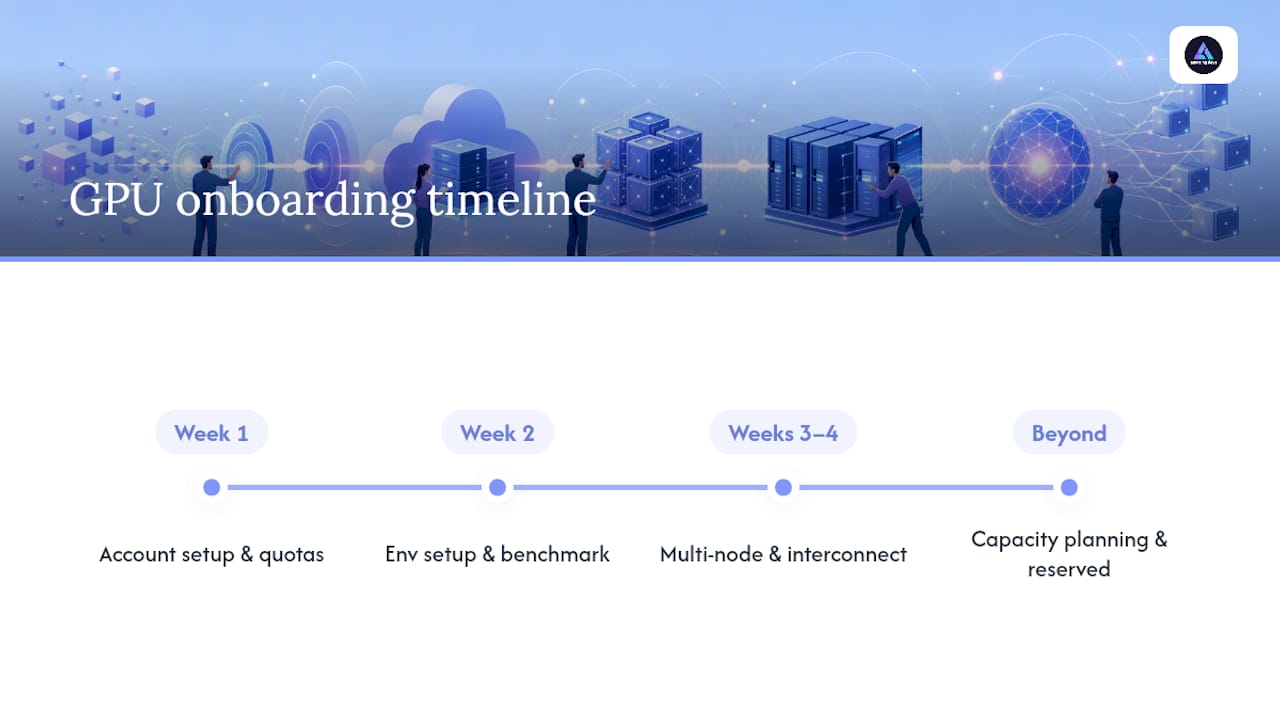
Scaling beyond that initial cluster is less about technical steps and more about capacity planning. Reserved capacity commitments typically need to be negotiated weeks ahead of when you’ll actually need the GPUs, especially for in-demand SKUs like H100 or B200 instances, where availability tightens fast across every provider on this list.
The Real Cost of a GPU Cloud Contract
The hourly GPU rate on a pricing page is the smallest number in your actual bill by the time a project ships.
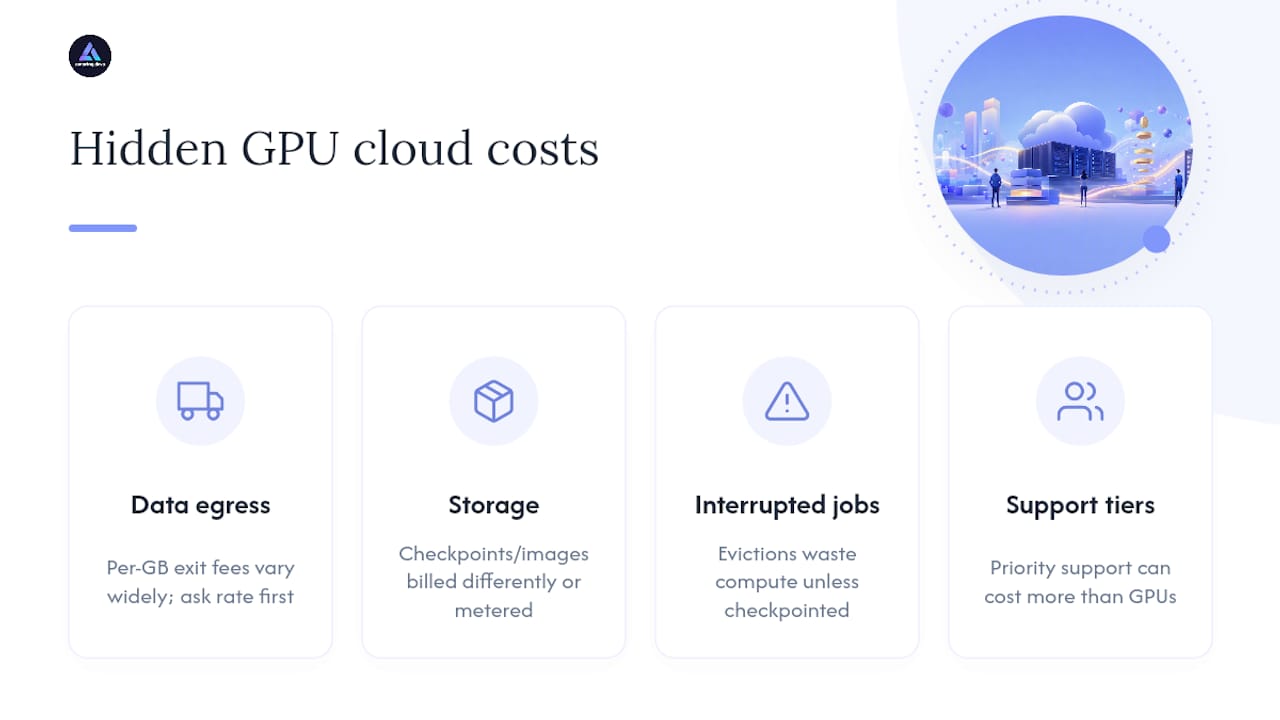
Data egress is the first hidden cost most teams miss. Moving trained model weights or inference results out of a provider’s network can run into real money at scale, and egress rates vary widely between providers, sometimes hidden several pages deep in documentation. Ask for the exact per-gigabyte rate before you move a single dataset in.
Storage for checkpoints, datasets, and container images adds up separately from compute, and providers price it differently: some bundle a baseline allotment, others meter every gigabyte from the first byte. Spot and preemptible instances introduce a different kind of hidden cost: the interrupted-job cost. An eviction mid-training run without solid checkpointing means paying for compute time that produced nothing usable.
Support tier costs round out the picture. Basic support is often included, but priority response times, dedicated Slack channels, or named account management usually sit behind a paid tier, and that tier can cost more than the GPU compute itself for smaller teams running production workloads. Modeling total cost of ownership means adding egress, storage, interrupted-job risk, and engineering time to the hourly rate before comparing any two providers head to head.
Why Staffing Readiness Matters as Much as the Provider You Pick
Choosing the right GPU cloud provider solves half the problem. The other half is having engineers who can actually operate it: managing CUDA versions, tuning multi-node training jobs, and debugging cold starts under load. Candidate engineers for this kind of work should ideally be evaluated through technical assessments and cultural-fit screening before they ever touch a client’s infrastructure. Teams that lack this bandwidth in-house are usually better off bringing in staffing support during initial ramp rather than learning provider quirks the hard way mid-project.
— Gabriel
Get the Engineering Bandwidth to Run Your GPU Cloud Stack
Picking between Runpod, CoreWeave, or Google Cloud only gets you halfway there. Someone still has to manage the CUDA versions, tune the multi-node training config, and debug why a serverless endpoint’s cold start is eating your latency budget. Specialized staffing providers supply nearshore engineers assessed specifically for technical skill and cultural fit, so you get a ramped contributor instead of a resume that looked good in an interview.
Instead of running your own recruiting pipeline while also managing GPU infrastructure, Amazing Devs handles sourcing, technical vetting, and contract logistics so your team can focus on the actual AI-native development work that GPU capacity was supposed to unlock in the first place. If your team needs engineers who can hit the ground running on a cloud GPU project, start a conversation with Amazing Devs about your staffing needs today.
Sources
- Cloud computing solutions: Scalable AI & HPC for enterprises | NVIDIA
- What Is GPU Cloud Computing? | CoreWeave
- Runpod | The AI Developer Cloud
- Cloud-gpus
FAQ
Who Are the Big 5 Cloud Providers?
The commonly cited top five hyperscale cloud providers are AWS, Microsoft Azure, Google Cloud, Alibaba Cloud, and Oracle Cloud, though GPU-specialist providers like CoreWeave and Runpod now compete directly with them for AI workloads.
Can I Get a Cloud GPU for Free?
Most providers offer limited free trial credits or a free tier capped at modest usage, but sustained training or production inference work almost always requires a paid plan once you exceed those introductory limits.
Who Are the GPU Providers?
Beyond the major hyperscalers (AWS, Google Cloud, Azure), GPU-specialist providers include Runpod, Lambda Labs, CoreWeave, Paperspace, Vultr, DigitalOcean, and GMI Cloud, each with different pricing models and SKU availability worth checking directly.
Who Are the Big 4 Cloud Providers?
The “big four” typically refers to AWS, Microsoft Azure, Google Cloud, and Alibaba Cloud, ranked by overall market share across all cloud services, not GPU-specific offerings.
Is Runpod or Lambda Labs Better for Training?
Lambda Labs focuses on dedicated instance types built for research and training clusters, while Runpod covers a wider mix of serverless, pod, and cluster options. Teams running large dedicated training runs often lean toward Lambda Labs or CoreWeave, while teams needing flexible inference and experimentation lean toward Runpod.
Is Vast.ai a Good Alternative to Runpod?
Vast.ai runs a marketplace model connecting renters to distributed GPU capacity, which can undercut Runpod on raw price but typically offers less consistency in SLA and support than a dedicated provider. Teams needing production reliability usually prioritize providers with clearer SLA and compliance documentation over marketplace pricing alone.