30–60 Day Pilot: Copilot vs Amazon Q Developer for AWS Teams
GitHub Copilot is the better default for most developers because of its wider model access and deeper GitHub integration. If your workload lives inside AWS, the CodeWhisperer lineage, now folded into Amazon Q Developer, wins on infrastructure automation and built-in security scanning. Pick Copilot for general-purpose coding across mixed stacks; pick Amazon Q Developer for AWS-native teams that need repository-wide transformation and vulnerability checks baked in.
TL;DR:
- GitHub Copilot is preferable for teams working across multiple languages, frameworks, and cloud providers, especially when integrated with GitHub workflows.
- Amazon Q Developer (formerly CodeWhisperer) excels for AWS-native teams focused on Lambda functions, S3, and infrastructure as code, offering better AWS API integration and security scanning.
- Both platforms offer free tiers, but paid features like autonomous agents and enterprise security are typically behind higher-cost plans, requiring careful pilot testing.
- Security and code provenance capabilities differ, with CodeWhisperer providing detailed license tracking and attribution, important for legal review and compliance.
- Successful AI adoption depends on pairing these tools with experienced developers who can review and guide generated code, rather than relying solely on the AI suggestions.
Table of Contents
- Copilot vs CodeWhisperer: Quick Verdict and Shortlist
- Editor Experience, Model Access, and Agent Features Compared
- Pricing and Tiers: What Teams Actually Pay in 2026
- Security, Provenance, and Enterprise Governance
- How to Choose: Evaluation Checklist and Pilot Plan
- Amazing Devs Perspective: Pairing AI Tools With Nearshore Engineering Teams
- Need Steady Engineering Capacity Beyond a Tool Swap?
- Sources
- FAQ
Copilot vs CodeWhisperer: Quick Verdict and Shortlist
Copilot fits teams that live across multiple languages, frameworks, and cloud providers. CodeWhisperer, now marketed under the Amazon Q Developer name, fits teams whose codebase is basically an AWS shop, heavy on Lambda functions, S3 calls, and CDK stacks.
Here’s how each tool maps to a common developer profile:
- GitHub Copilot best for general-purpose development across mixed stacks and teams already centered on GitHub workflows.
- Amazon CodeWhisperer / Amazon Q Developer best for developers focused on AWS SDKs, Lambda functions, and cloud-native infrastructure tasks.
- If you’re unsure, run both in a two-week pilot on a real repository before committing budget to either one.
| Dimension | GitHub Copilot | Amazon CodeWhisperer / Q Developer |
|---|---|---|
| Best for | Mixed stacks, GitHub-native teams | AWS SDKs, Lambda, cloud-native infra |
| Pricing / free tier | Free tier for individuals; paid Business and Enterprise tiers | Free tier available; paid tiers unlock agents and higher usage |
| IDE support | VS Code, JetBrains, Visual Studio, Neovim | AWS Toolkit across major IDEs |
| AWS integration | Limited, general-purpose | Deep, native AWS API awareness |
| Security scanning | Available in enterprise features | Built-in code scanning and reference tracker |
| Agent/automation | Agent mode, desktop app, cloud agents | Repository-wide transformation agents |
For a solo developer working on a personal SaaS product, Copilot’s broader language coverage usually wins. An engineering team migrating a monolith into AWS Lambda functions will get more direct value from Amazon Q Developer’s infra-aware suggestions. A security-first organization should weigh the reference tracker against Copilot’s enterprise indexing controls before choosing either one.
Editor Experience, Model Access, and Agent Features Compared
The daily experience of typing code with an AI assistant looking over your shoulder differs more between these tools than the marketing pages suggest.
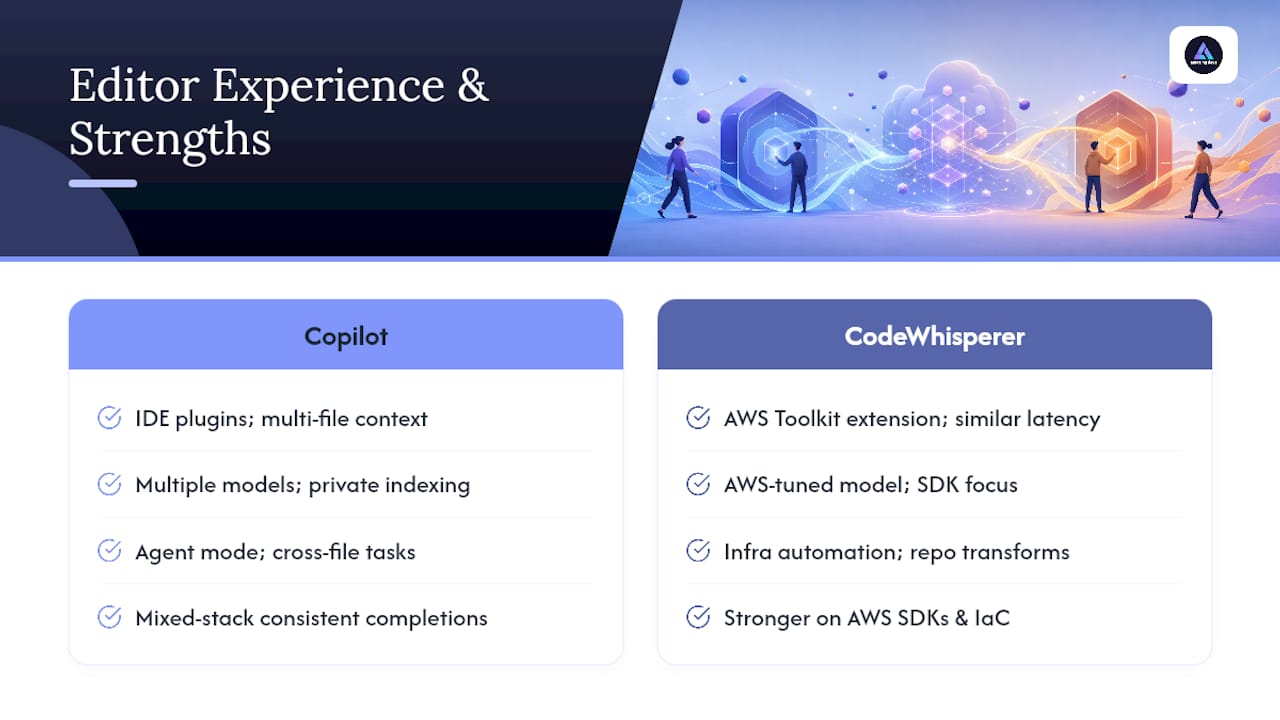
Editor integration. Copilot embeds into VS Code, JetBrains IDEs, Visual Studio, and Neovim, with a consistent acceptance flow: ghost text appears, Tab accepts, Escape dismisses. CodeWhisperer runs through the AWS Toolkit extension in similar editors, and the suggestion latency feels comparable for simple completions. Where Copilot tends to feel smoother is multi-file context. Its chat interface can reference open tabs and recently edited files without much setup.
Model access and customization. Copilot has expanded its model catalog well beyond a single foundation model, giving enterprise customers a choice of underlying models and private codebase indexing for larger organizations, according to GitHub’s product pages. CodeWhisperer’s model is tuned specifically around AWS documentation and SDK patterns, which narrows its flexibility outside that ecosystem but sharpens its accuracy inside it.
Agent and automation capabilities. This is where the two products genuinely diverge. Copilot’s agent mode and desktop app let you delegate multi-step tasks, like refactoring a module or writing test coverage, and it will work across files with less hand-holding. Amazon Q Developer has taken this further for infrastructure work specifically: it can run repository-wide transformations, the kind of task that used to mean weeks of manual migration work for a team upgrading a Java application or moving off deprecated AWS SDK calls.
Language and framework coverage. Copilot generally produces more consistent completions across a mixed stack, say, a repo with Python, TypeScript, and Go, according to independent comparison testing. CodeWhisperer pulls ahead specifically on AWS SDK calls and infrastructure-as-code templates, where it can infer intent from a comment and generate a working function for tasks like uploading a file to S3 without you looking up the API signature.
A concrete scenario: a backend engineer writing a Lambda function that reads from DynamoDB and pushes events to SQS will likely get a working first draft faster from CodeWhisperer. The same engineer writing a React component with a third party charting library will probably get better first-pass suggestions from Copilot.
Pro Tip: Don’t judge either tool from a single afternoon of testing. Suggestion quality depends heavily on how much context the assistant has, so give both tools a real repository with existing patterns to learn from before comparing outputs.
Pricing and Tiers: What Teams Actually Pay in 2026
Both vendors offer a free tier, but the real cost differences show up once you need agent features or security scanning at scale.
- Copilot’s free tier covers individual developers with usage limits; Business and Enterprise tiers add organization-wide policy controls, audit logs, and private model indexing.
- CodeWhisperer’s free tier remains generous for individual use; paid tiers under the Amazon Q Developer branding unlock higher usage caps, expanded agent automation, and enterprise administrative controls.
- Advanced features, like autonomous agents, security scanning at scale, and private model customization, are almost universally behind paid tiers on both platforms.
- Budget a 30 to 60-day pilot window before signing an annual contract, and measure adoption per seat, not just total license cost.
The real question for most teams isn’t which sticker price is lower. It’s whether the paid tier’s agent and scanning features actually reduce senior developer review time enough to justify the per-seat cost across a full team.
Security, Provenance, and Enterprise Governance
Security teams should treat suggestion quality as secondary to provenance and scanning capability when evaluating either tool for enterprise rollout.
CodeWhisperer ships with a reference tracker that flags when a suggestion resembles open-source training data and attaches repository and license information, which matters directly for legal review of generated code. Copilot’s enterprise tier adds code scanning and review suggestions but leans more on organizational policy settings than an automatic attribution log.

During a productivity study AWS ran internally, participants using CodeWhisperer were 27% more likely to complete tasks successfully and finished 57% faster on average, a result worth weighing against Copilot’s broader enterprise indexing when security review speed matters as much as raw output.
Before a pilot, ask vendors:
- Does the reference tracker or scanning log integrate with your existing SAST tooling?
- Can suggestions be filtered by license type automatically?
- What administrative controls exist for private codebase indexing?
How to Choose: Evaluation Checklist and Pilot Plan
Map your team’s actual needs to the comparison dimensions before running a single line of pilot code.
- List which languages and frameworks make up 80% of your commits.
- Note whether your infrastructure is AWS-native, multi-cloud, or on-premises.
- Decide whether security scanning and reference tracking are a compliance requirement or a nice-to-have.
- Choose two representative repositories, one infrastructure-heavy, one application-level, for the pilot.
- Set a timebox of 30 to 60 days and track PR cycle time, test pass rate, and the number of suggestions rejected outright.
Questions worth asking both vendors and your own stakeholders:
- Does the tool integrate with our current CI/CD pipeline without extra middleware?
- What happens to proprietary code sent for suggestion context?
- Can we run this without granting the assistant direct merge rights?
Red flags to watch for during any pilot include a spike in rejected suggestions after the first week, inconsistent completions across teammates on identical code, or a vendor that can’t clearly explain data handling for private repositories. Feed accepted AI suggestions through the same review gates as human-written pull requests, never a shortcut around them, and route the pipeline ownership question through your CI/CD process early so nobody merges agent-generated changes without a second set of eyes.
Pro Tip: Track suggested-but-rejected changes as closely as accepted ones. A high rejection rate on a specific file type often reveals exactly where an assistant’s training data thins out for your stack.
Amazing Devs Perspective: Pairing AI Tools With Nearshore Engineering Teams
Here’s the mistake I see engineering leaders make: they treat picking an AI assistant as the whole decision, when the harder problem is who reviews what the assistant produces. Copilot or Amazon Q Developer will speed up first drafts. Neither one replaces the judgment call of a senior engineer deciding whether a generated Lambda function actually handles the edge case your business logic depends on.
The teams that get real throughput gains pair AI assistants with people who already know the codebase, not with a rotating cast of unfamiliar contractors. That’s where staff augmentation earns its keep over simply adding another tool subscription. A nearshore developer onboarded properly, with a documented pair-programming script and a clear code-review policy, can absorb an AI assistant into daily workflow far faster than a team still figuring out its own review gates. Assistants amplify existing team discipline. They don’t create it.
— Gabriel
Need Steady Engineering Capacity Beyond a Tool Swap?
Copilot and Amazon Q Developer both speed up how fast code gets written. Neither one solves the separate problem of not having enough hands to review, ship, and maintain what gets written. An alternative to burning another quarter on tool evaluation is to focus on obtaining more senior engineering capacity, potentially sourced from nearshore locations, at a lower cost than hiring locally.
Sourcing, technical and cultural fit assessment, and contract logistics can be managed by a third party so you’re not managing a second HR process on top of your engineering roadmap. If your AWS migration needs both an agent-capable assistant and a developer who actually understands your infrastructure, staffing a nearshore engineer alongside your existing tools closes that gap faster than waiting for the next agent feature release. Check out what nearshore outsourcing actually involves and consider requesting a pilot placement to explore how a vetted developer from a nearshore location could fit into your current sprint cycle.
Sources
- Maximizing Developer Productivity with Amazon CodeWhisperer
- GitHub Copilot features
- Amazon CodeWhisperer documentation overview
FAQ
Is anything better than GitHub Copilot?
No single tool beats Copilot across every use case. Amazon Q Developer edges it out specifically for AWS-native infrastructure automation, and tools like AmmarAI’s code generator offer a different workflow worth comparing for niche generation tasks.
Is Amazon CodeWhisperer free?
CodeWhisperer, now under the Amazon Q Developer branding, offers a free tier for individual developers, with paid tiers required to unlock higher usage limits and advanced agent features.
Is Copilot better than ChatGPT for coding?
Copilot is purpose-built for in-editor completions, chat, and repository context, which gives it an edge over general-purpose chatbots for day-to-day coding tasks inside your IDE.
Which AI is best for coding?
There’s no universal answer. Copilot suits general-purpose development across mixed stacks and GitHub-centered teams, while Amazon Q Developer suits AWS-heavy infrastructure work, and the right pick depends on where your codebase actually lives.