Nearshore Playbook to Operationalize Agile with Distributed Teams
Run distributed agile as an async-first, overlap-protected, component-owned workflow. Document decisions, publish a remotely auditable Definition of Done, and measure outcomes instead of who’s online. Three moves to make this week: assign clear component ownership per team, write a decision-record template into your workflow, and swap presence tracking for Sprint Goal achievement and cycle time. The sections below walk through how.
TL;DR:
- Teams should establish clear component ownership and documented decision records to reduce dependencies and prevent architectural issues that cause workflow blockages.
- Async-first communication is essential, with live overlap reserved for complex negotiations, and escalation to calls should occur after three message exchanges.
- Scrum ceremonies need adaptation for remote work, including asynchronous backlog review and meetings tailored to the team’s time zone overlaps; recordings and shared async boards improve participation.
- Measuring outcomes such as Sprint Goal achievement and review latency provides better insight into team health and progress than presence metrics like message counts or logged hours.
- Successful distributed agile relies on iterative rollout, documented norms, purposeful team-building practices, and operational support from nearshore partners to handle onboarding and coordination.
Table of Contents
- What Does Agile with Distributed Teams Actually Mean?
- Team Topology and Architecture: Own Components to Reduce Coupling
- Async-First Communication and When You Actually Need Overlap
- How Do You Adapt Scrum Ceremonies for Remote Teams?
- Working Agreements and a Definition of Done You Can Audit Remotely
- Which Tools Actually Fit Distributed Agile Work?
- Measure Outcomes, Not Who’s Online
- How Do You Roll Out Distributed Agile Without Breaking Everything at Once?
- Building Trust Across Locations That Never Meet in Person
- Handling Cultural Differences and Time Zones Beyond the Clock
- Onboarding New Members into a Distributed Agile Team
- Leadership Practices That Actually Fit a Distributed Team
- Resolving Conflict When You Can’t Just Walk Over to Someone’s Desk
- What Five Years of Distributed Delivery Actually Teaches You
- Handling Time Zones and Coordination Tools for Distributed Sprint Planning
- What Delivering Distributed Teams Teaches You About What Actually Works
- How Amazing Devs Operationalizes Distributed Agile for You
- Sources
- FAQ
What Does Agile with Distributed Teams Actually Mean?
Distributed agile is not co-located Scrum with a video camera bolted on. It’s a different operating model built for teams that never share a room, and the assumptions that make office-based Scrum work (overheard conversations, whiteboard huddles, someone walking over to ask a question) simply don’t transfer.
The remote-native principle is the core idea: design your workflow for distance instead of trying to replicate the office through a screen. Teams that treat video calls as a substitute for hallway conversations burn out fast, because synchronous overlap is a scarce resource across time zones, not an unlimited one.
Five pillars hold up a working distributed-agile system:
- Communication that defaults to async and reserves live time for genuinely hard conversations
- Team topology that gives each group ownership of a component, not a slice of everything
- Ceremonies adapted so Sprint Planning, standups, and retros work without full-room overlap
- Tooling matched to how tightly coupled the work actually is
- Metrics that track delivered outcomes, not logged-in hours
Nearshore arrangements, where a Brazil-based team overlaps four to six hours with US business hours, make this easier than a 12-hour time-zone split, but the same design rules apply either way.
Team Topology and Architecture: Own Components to Reduce Coupling
Scrum’s basic unit is a small, cross-functional, self-managing team, and that unit falls apart when you split ownership of a single codebase across three offices that never talk in real time. The Scrum Guide treats team cohesion as a first-class requirement, not a nice-to-have, and location-based sub-teams quietly erode it by creating a headquarters group and a “remote” group that ships whatever’s left over.
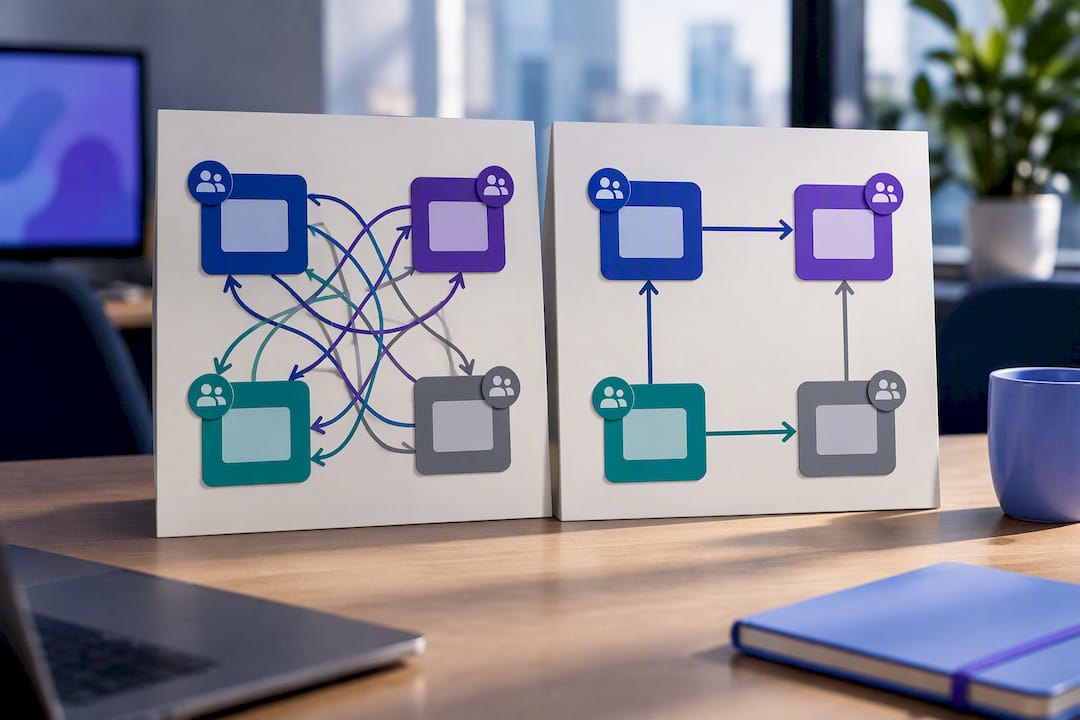
The fix is architectural before it’s procedural. Give each distributed team clear ownership of a component or service, with well-defined APIs at the boundary, so handoffs happen through a contract instead of a Slack thread at 11 p.m.
Before you split work across locations, run three checks:
- Is the team small enough that ownership is unambiguous (typically five to nine people)?
- Does everyone on the team share the same product goal, not just a shared manager?
- Are the integration contracts between components documented and versioned, not tribal knowledge held by one senior engineer?
When those three hold, coupling drops and cross-location dependency chains stop being the top cause of blocked work. When they don’t, no amount of standup discipline will fix the underlying architecture problem.
Async-First Communication and When You Actually Need Overlap
Default to async. Reserve synchronous time for the handful of interactions that genuinely need it: negotiation, complex problem-solving, conflict resolution, sprint planning trade-offs, and relationship-building. That’s the core guidance from Mountain Goat Software’s distributed-agile research, and it inverts how most teams instinctively operate: they default to a meeting and treat writing things down as an afterthought.
Async-first means the work item itself carries the full context: the decision made, the reasoning behind it, the acceptance criteria, and links to anything relevant. Nobody should have to ping someone in a different time zone just to find out why a ticket says what it says.
Three rules make this practical:
- Write acceptance criteria and open questions directly into the ticket before requesting review, not in a separate chat that will scroll away.
- Protect a two to four hour overlap window each day for the whole team, and rotate its timing across a roster if the time-zone gap is wide, so no single location always eats the inconvenient hours.
- Escalate to a call after three back-and-forth text exchanges fail to resolve something. If you’re typing a fourth message about the same ambiguity, you’re wasting more time than a fifteen-minute call would cost.
Pro Tip: Put the escalation rule in writing during your kickoff, not after the first missed deadline. “Three exchanges, then we call” only works if everyone agreed to it before tempers got involved.
Protected overlap isn’t a meeting slot. It’s a standing appointment for the kind of thinking that doesn’t compress well into a message thread, and treating it as sacred (not the first thing sacrificed for “just one more sync”) is what keeps distributed teams from drifting into permanent async silence punctuated by emergency calls.
How Do You Adapt Scrum Ceremonies for Remote Teams?
Scrum events exist to inspect and adapt, not to fill a calendar with video calls. A study on distributed Scrum event adaptation found that teams get more value from ceremonies when they split preparation from decision-making rather than trying to do both live.
Sprint Planning works best when the Product Owner and team review the backlog asynchronously first: flagging questions, estimating rough sizes, and surfacing dependencies in writing. Reserve the live session, however short, for the parts that actually need real-time negotiation, setting the Sprint Goal and resolving trade-offs between scope and capacity.
Daily Scrum has no single right format across time zones. Pick based on overlap:
- Full overlap (same time zone or near it): a short live call works fine.
- Partial overlap: a written async update per region, with a brief live follow-up only for blockers.
- Minimal overlap: one facilitated live session that the least-connected region actually attends, with written notes for everyone else, so decisions aren’t made in a room half the team never joins.
Sprint Reviews need to be accessible after the fact. Record the demo, write a short summary of what shipped and why, and let stakeholders in other time zones react asynchronously instead of requiring live attendance to have a voice in the outcome.
Retrospectives are where distributed teams often cut corners, and that’s a mistake. Run them live when you can get meaningful overlap, but use a shared async board (even something as simple as a spreadsheet) so people in the worst time-zone position can add items before the discussion happens, not just read the minutes afterward.
Working Agreements and a Definition of Done You Can Audit Remotely
A working agreement is the operating manual your team would otherwise have to reconstruct from memory every time a disagreement comes up. Without one, “done” means something different to whoever’s on the call, and decisions live in someone’s head instead of somewhere findable.
Your working agreement needs at minimum: which channel is for what (quick questions vs. decisions vs. urgent blockers), response-time expectations by channel, an escalation path, and rules about protected focus time versus interruptible time. Atlassian’s guidance on distributed teams makes the point plainly: conversations can stay private, but decisions need to be visible to anyone who’s affected by them, whenever they log on.
A lightweight decision record solves the single most expensive hidden failure in distributed work: the undocumented decision that three people remember differently six weeks later. The template only needs five fields, according to research from Mountain Goat Software:
- Decision summary (one sentence)
- Owner and date
- Alternatives considered and why they were rejected
- Linked backlog items affected
- A link back to any supporting discussion
Your Definition of Done needs the same treatment. Instead of a vague “code complete,” list concrete, checkable evidence: code written, pull request opened, review completed, automated tests passed, change merged, and any release steps confirmed.
A significant number of distributed teams report that undocumented decisions caused rework, based on patterns Atlassian has observed across remote engineering organizations. A checklist people can verify without a meeting is what actually prevents it.
Which Tools Actually Fit Distributed Agile Work?
There’s no single “best” stack for distributed agile, and chasing one is a waste of time. The right choice depends on how tightly coupled the work is, how spread out the team’s time zones are, and how much time pressure the sprint is under. Research on coordination mechanisms for dispersed teams found that matching the tool to the task’s actual dependence, rather than standardizing on whatever’s popular, is what improves coordination outcomes.
Heavily interdependent work (a shared service five people are actively modifying) needs richer, faster tools that support near-synchronous back-and-forth. Loosely coupled work, where each person owns a clear slice, can run almost entirely on async tickets and documentation.
Six categories cover what most distributed teams actually need:
- A backlog and tracker that’s the single source of truth for what’s being worked on
- An async documentation or wiki space for anything that needs to outlive a chat message
- Code review and CI tooling that surfaces status without anyone asking
- A chat tool scoped to quick, low-stakes coordination
- Video with recording enabled by default, not just for ceremonies people miss
- A decision log, which can be as simple as a tagged section in your wiki
The interaction contract matters as much as the tools themselves: chat is for questions that need an answer in minutes, the tracker holds anything about the work itself, and the wiki holds anything that needs to survive past this week. Mixing those up is how context quietly disappears into a Slack scroll nobody will ever search again.
Measure Outcomes, Not Who’s Online
Presence metrics (message counts, hours logged in, green dots on a dashboard) tell you nothing about whether work is actually moving. The Scrum Guide frames Sprint Goal achievement as the real inspection point, and distributed teams that adopt outcome metrics catch problems weeks before a presence-based dashboard would.
Track these instead:
- Sprint Goal achievement, sprint over sprint
- Cycle time from “in progress” to “done”
- Work-item aging, especially anything sitting untouched for days
- Blocked time, tracked separately from active coding time
- Review latency, the gap between “ready for review” and “reviewed”
- Escaped defects and deployment frequency
Teams that separate review latency from coding time consistently find their real bottleneck is queueing, not effort, according to research on measuring distributed team delays. A ticket that sits “waiting for review” for two days isn’t a productivity problem. It’s a process gap.
Use these numbers to diagnose, not just report. Rising blocked time often means you need more overlap, not more headcount. Long review latency usually means you need a documented prioritization approach rather than a bigger team. Growing work-item aging is often a sign tickets need slicing smaller, not that people are slacking.
How Do You Roll Out Distributed Agile Without Breaking Everything at Once?
Don’t flip the whole team to a new model overnight. A pragmatic rollout approach for distributed teams treats the transition as an iterative experiment, the same way you’d treat any product change.
- Map your actual constraints. List every location, the real time-zone gaps, and which components genuinely depend on each other.
- Agree on the basics before day one. Set the overlap window, response-time expectations, escalation rules, and a first-draft Definition of Done.
- Pilot for several sprints, not one. A single sprint won’t surface the problems that only show up when someone’s on vacation or a release goes wrong.
- Measure both delivery and team health. Sprint Goal achievement matters, but so does whether people report feeling stuck or unheard in retro.
- Change one or two practices per iteration. Trying to fix everything at once makes it impossible to tell which change actually helped.
Retrospectives are your validation loop here, not a formality. If cycle time didn’t move after you changed the overlap window, that’s useful information, not a failure.
Building Trust Across Locations That Never Meet in Person
Trust doesn’t happen by accident on a distributed team, and treating it as something that develops “naturally over time” is how teams end up with silent factions instead of one team. Documented patterns from the Agile Alliance name specific practices that accelerate it: Boot Camp, Rotating Guru, Ambassador, and structured remote pairing.
A Boot Camp brings new team members (or a newly formed distributed team) together, in person if the budget allows, for an intensive shared start. It builds the informal context that normally accumulates over months of hallway proximity.
Rotating visits and an Ambassador role, someone who temporarily embeds with a partner location, spread knowledge in both directions instead of letting it pool wherever headquarters happens to be. Structured remote pairing does something similar at the code level: two engineers in different locations solving one problem together builds working trust faster than a dozen status meetings.
- Rotate pairing partners across locations, not just within one office
- Run a lightweight psychological-safety check in retro, not just a delivery review
- Design every important meeting for whoever has the worst connection, not the best
Pro Tip: Rotate who hosts recurring meetings across locations, not just meeting times. Ownership of the agenda shifts the sense of whose meeting it actually is.
Handling Cultural Differences and Time Zones Beyond the Clock
Time-zone math is the visible problem. Cultural difference is the one that quietly causes more friction, because it shows up in things nobody puts on a working agreement: how directly people give feedback, how comfortable someone is disagreeing with a manager on a call, or whether silence in a meeting means agreement or discomfort.
A team split between the US and Brazil, for instance, often needs to actively negotiate communication style rather than assume it. Some cultures treat a direct “this approach is wrong” as normal engineering discourse; others read it as confrontational and will stay quiet rather than push back, which then gets misread as agreement. Neither style is wrong, but a team that never discusses the difference will misread each other constantly.
Put cultural norms into the working agreement explicitly, the same way you document response-time SLAs. Ask directly in your kickoff: how does this group prefer to disagree, how does it prefer to deliver bad news about a missed deadline, and what does silence usually mean here?
National holidays are the other blind spot. A distributed team spanning two countries needs a shared calendar of both sets of holidays, not just the headquarters location’s, or sprint capacity planning will quietly assume everyone’s available on days half the team has off.
Time-zone overlap and cultural fluency reinforce each other. A team with strong overlap but no cultural awareness still misfires in real time; a culturally fluent team with zero overlap still can’t resolve anything live when it matters. You need both, and neither one substitutes for the other.
Onboarding New Members into a Distributed Agile Team
A new hire on a distributed team doesn’t get the passive onboarding a co-located hire gets for free, the overheard conversations, the “come grab lunch” invitations, the chance to shadow someone’s screen for an afternoon. Onboarding has to be built deliberately, or the new person spends their first month guessing at context everyone else absorbed by osmosis.
Start with the working agreement and Definition of Done as literal onboarding documents, not something a new hire discovers by asking around. If a decision record system exists, walk them through how to search it before their first ticket, so they know the history of the codebase is discoverable rather than locked in someone’s memory.
Pair a new hire with a rotating buddy across at least two locations in the first two weeks, not just one mentor in their own time zone. That single change does more for cultural integration than any onboarding document, because it forces an early, low-stakes relationship with someone outside their immediate group.
Give new members a small, well-scoped first task with a fast feedback loop, ideally something that ships within the first week. A nearshore or newly onboarded remote team member who ships something real in week one builds confidence faster than two weeks of documentation review ever will.
Check in specifically about whether they feel comfortable speaking up in ceremonies they’re new to. Silence from a new hire in a Daily Scrum usually means uncertainty, not that everything is fine.
Leadership Practices That Actually Fit a Distributed Team
Leading a distributed agile team is a different job than leading a co-located one, and managers who just apply their old playbook over video calls tend to default to more meetings, more check-ins, and more monitoring, exactly the wrong direction.
Effective distributed leadership starts with over-communicating context, not over-communicating status. Team members need to understand why a priority shifted or why a decision was made; they don’t need a manager narrating hourly progress. Write the reasoning down where the whole team can find it later, not just in a message to the people who happened to be online.
Trust has to be built on outcomes, because a manager physically cannot observe distributed work the way they’d observe someone at a desk. Leaders who fall back on presence, expecting green status dots or immediate replies, end up managing anxiety instead of managing delivery.
Meeting equity is a leadership responsibility, not an accident. If the same location always hosts calls at a convenient hour for them and an inconvenient one for everyone else, that’s a leadership choice, and it erodes goodwill faster than almost anything else on a distributed team.
Leaders also need to actively surface quiet team members rather than assume no news is good news. On a distributed team, the person struggling the most is often the one least likely to say so in a group call, and a leader who only responds to raised hands will miss it every time.
Resolving Conflict When You Can’t Just Walk Over to Someone’s Desk
Conflict on a distributed team escalates differently than it does in person, mostly because tone is nearly impossible to read in a chat message. A blunt comment that would land as a casual joke face to face reads as hostile in text, and by the time anyone notices, two people have been quietly frustrated with each other for a week.
The three-exchange rule from earlier in this guide applies directly here: if a disagreement survives more than a few back-and-forth messages, move it to a call immediately. Text is a terrible medium for resolving tension and a very good medium for accidentally escalating it.
When conflict does surface, address it with the people directly involved first, live, before it becomes a retro topic that puts someone on the defensive in front of the whole team. Retros are for patterns, not for the first time two people work through a specific disagreement.
Written escalation paths matter more on distributed teams than co-located ones, precisely because there’s no manager naturally overhearing the tension in the room. Your working agreement should say plainly who to go to and how, so nobody has to guess whether raising something makes them look difficult.
Cultural style differences, covered earlier, often masquerade as personal conflict. Before treating a disagreement as interpersonal, check whether it’s actually a mismatch in how directly the two people are used to communicating disagreement in the first place.
What Five Years of Distributed Delivery Actually Teaches You
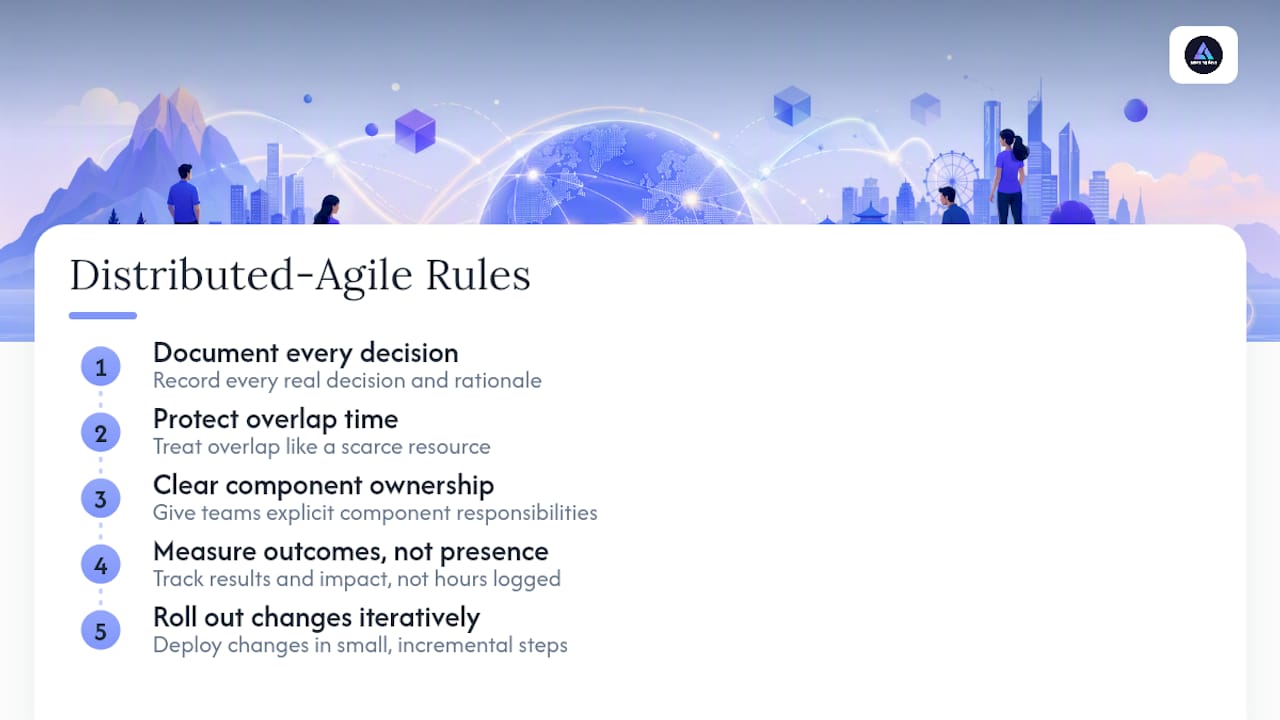
Five rules hold up across nearly every distributed-agile engagement: document every real decision, protect overlap like it’s a scarce resource (because it is), give teams clear component ownership, measure outcomes instead of presence, and roll out changes iteratively rather than all at once. Each one traces back to the same evidence covered above, from the Scrum Guide’s emphasis on cohesive teams to Mountain Goat Software’s async-first model.
A nearshore team-extension partner operationalizes these rules from day one instead of leaving a client to figure them out mid-project: curated hiring that screens for both technical skill and communication style, structured onboarding that hands new engineers the working agreement and Definition of Done on day one, contract and administrative handling so a client isn’t managing two payroll systems, and built-in time-zone coordination so overlap windows are a given rather than a negotiation. That’s the operational layer most distributed-agile advice skips entirely.
Handling Time Zones and Coordination Tools for Distributed Sprint Planning
Sprint planning remote teams run smoothest when async prework and a strong facilitation tool do most of the heavy lifting before anyone joins a call. A remote-friendly design sprint format can also work well for kickoff-style planning sessions that need structured facilitation across locations, particularly when a team is standing up a new distributed workflow for the first time and needs an outside facilitator to keep the first few sessions on track.
On the metrics side, treating engineering measurement as a maturity process rather than a one-time dashboard setup pays off. A continuous compliance and metrics maturity model offers a useful frame for teams instrumenting cycle time, blocked time, and review latency for the first time, since these metrics tend to need a few iterations before they’re trustworthy enough to act on.
What Delivering Distributed Teams Teaches You About What Actually Works
Two patterns show up again and again in distributed engagements. A team with a wide time-zone gap kept missing sprint commitments not because the work was hard, but because a single undocumented decision about API versioning surfaced differently in two locations weeks apart. Once decision records became mandatory for anything touching a shared component, that specific failure mode stopped recurring.
A second team spent months treating a daily video standup as sacred, even though barely half the team could attend live. Switching to written async updates with a short live session reserved for actual blockers cut their reported meeting fatigue and, within a few sprints, cycle time as well.
A one-page kickoff checklist worth copying: define component ownership, set the overlap window, write the Definition of Done, agree on the decision-record format, and name who owns escalation. Get those five things right before the first sprint starts, and most of the problems teams associate with “distributed work” simply don’t materialize.
— Gabriel
How Amazing Devs Operationalizes Distributed Agile for You
Everything in this guide, component ownership, documented decisions, protected overlap, outcome metrics, only works if the people executing it are set up to succeed from day one. That’s where a nearshore partner earns its keep instead of just filling a headcount gap.

Amazing Devs builds nearshore staff augmentation around exactly the practices this article describes: developers vetted for cultural fit and communication style, not just a technical screen, so they integrate into your working agreements instead of fighting them. The Team Extension Model handles onboarding, documented handoffs, and the contract and administrative work that normally eats a manager’s first month with a new hire, so your Brazilian engineers are shipping inside your existing sprint cadence within weeks, not quarters. Some nearshore providers manage time-zone coordination directly, so an overlap window with US business hours is built into how engagements get staffed.
If you’re ready to add distributed capacity without rebuilding your onboarding process from scratch, start with the nearshore staff augmentation page to see how a team extension engagement gets structured for your sprint cadence.
Sources
- Distributed Agile Teams – Mountain Goat Software
- The secret to distributed and remote teams – Atlassian
- Distributed Scrum events adaptation (journal article)
- Empirical study on coordination mechanisms for dispersed teams (2015)
- The Scrum Guide (2020)
FAQ
What Is the Best Way to Run Agile with Distributed Teams?
The most effective approach is async-first communication with a protected daily overlap window, clear component ownership per team, and outcome metrics like Sprint Goal achievement instead of presence tracking. This model comes from distributed Scrum research and holds up across time-zone gaps of every size.
How Do You Run Sprint Planning with a Remote Team?
Handle backlog review and estimation asynchronously first, then reserve a short live session for setting the Sprint Goal and negotiating trade-offs. This split, backed by research on distributed Scrum event adaptation, keeps live time focused on decisions that actually need real-time discussion.
What Metrics Should Distributed Agile Teams Track?
Track Sprint Goal achievement, cycle time, work-item aging, blocked time, and review latency rather than hours online or message volume. The Scrum Guide frames outcome-based inspection as the core mechanism for improving delivery over time.
How Does Nearshore Staffing Support Distributed Agile Teams?
Nearshore engagements typically offer four to six hours of overlap with US business hours, which supports the protected synchronous window distributed agile depends on. Amazing Devs handles the staff augmentation sourcing, cultural fit vetting, and contract logistics so a client team can focus on the working agreements and Definition of Done rather than hiring administration.
What Does Amazing Devs Charge for Nearshore Team Extension?
Pricing depends on the roles, seniority, and engagement scope you need, so it isn’t published as a flat rate. Current details are available directly through the nearshore staff augmentation page.