Four Pillar Async Stack for Remote & Nearshore Engineering Teams
For most remote and hybrid teams, the strongest async stack pairs Slack for threaded messaging, Notion as the documentation hub, and Loom for recorded walkthroughs, with Asana or Jira handling task tracking. If your team works across time zones with real overlap gaps, that combination covers most of what asynchronous work requires. Everything else on this list solves a narrower problem.
TL;DR:
- Teams with fewer than three hours of daily overlap should prioritize tools designed for delay tolerance, such as recorded video and threaded documentation, over live chat.
- Integrating Slack, Notion, and Loom covers most asynchronous communication needs, but reliance on multiple tools increases subscription costs and coordination overhead.
- Security features like SSO, audit logs, and granular permissions vary across tools and require proactive configuration before rollout to avoid vulnerabilities.
- Supporting platforms across devices and offline access is crucial for dispersed teams, especially when team members work on unreliable connections or from mobile devices.
- Building disciplined communication habits and clear workflows around decision documentation and ticket linking outweigh the choice of any particular tool for effective async collaboration.
Table of Contents
- What Are the Best Async Communication Tools for Remote Teams?
- How Do These Async Tools Compare Side by Side?
- How Do You Choose the Right Async Tool for Your Team?
- When Should You Use Each Type of Async Tool?
- How Was This Async Tools List Put Together?
- How Amazing Devs Applies Async Tools With Nearshore Teams
- What Does Async Tooling Actually Cost Once You Factor Everything In?
- How Secure Are Async Communication Tools?
- Do These Tools Work Across Desktop, Mobile, and Web?
- Do These Tools Scale for Different Team Sizes and Industries?
- What Support and Training Do Vendors Actually Offer?
- What Actually Matters When Picking an Async Tool
- Looking for a Different Kind of Fix? Consider Managed Nearshore Talent
- Sources
- FAQ
What Are the Best Async Communication Tools for Remote Teams?
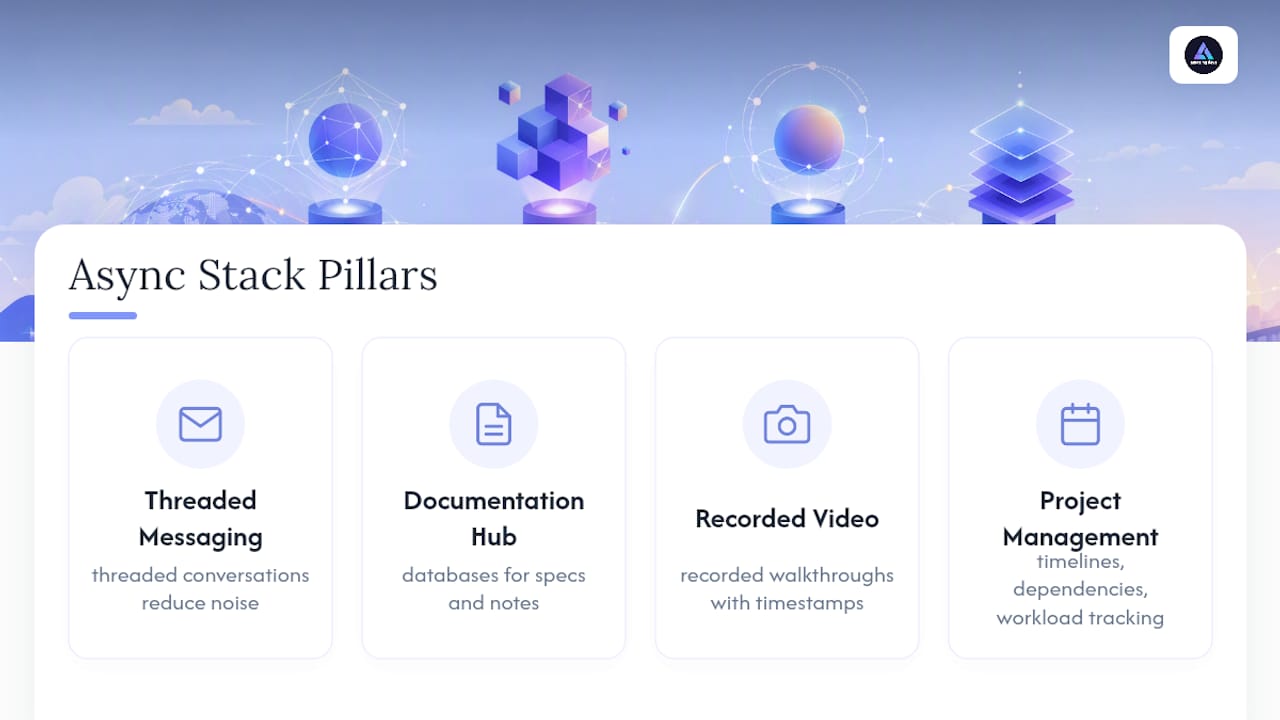
An async-first stack usually rests on four pillars: threaded messaging, a documentation or knowledge hub, recorded video, and project management software that ties updates to actual tasks. That structure comes straight from how Owl Labs frames async work for distributed teams, and it holds up whether you’re running a five-person startup or a 200-person engineering org. The tools below each nail one of those jobs. None of them try to do everything, and that’s exactly why they work.
Loom handles recorded walkthroughs better than almost anything else on the market. You hit record, talk through your screen, and send a link instead of scheduling a call. Pros: it eliminates “can you hop on a quick call” requests, and viewers can comment on specific timestamps. Limitation: longer recordings pile up fast, and searching across dozens of old videos gets tedious without good naming conventions.
Notion is the default choice for teams that need a single source of truth. Its databases can hold specs, meeting notes, and project trackers side by side. Pros: enormous flexibility, and it doubles as a lightweight project tool. Limitation: that same flexibility means teams without clear structure end up with a wiki nobody can navigate.
Slack remains the backbone of daily async communication for most teams, even though it started as a real-time chat app. Its threaded messaging keeps conversations from turning into noise, and its app ecosystem is larger than any competitor’s. Pros: near-universal adoption and deep integrations. Limitation: without discipline around channel structure, Slack becomes a firehouse that buries important decisions.
Trello is the simplest kanban tool available, and simplicity is the whole point. Pros: near-zero learning curve, and boards are easy to share outside the core team. Limitation: it struggles once you need dependencies, workload views, or reporting across multiple projects.
GitHub is not a general communication tool, but for engineering teams it functions as one. Pull requests and issue threads carry technical decisions that would otherwise get lost in chat. Pros: code and conversation live in the same place. Limitation: non-technical stakeholders rarely check GitHub, so decisions made there need to be echoed elsewhere.
Figma turns design feedback into an async process instead of a scheduling headache. Comment threads persist directly on the file, tied to specific frames. Pros: no more “which version are we looking at” confusion. Limitation: feedback can sprawl across dozens of comment threads if there’s no review cadence.
Asana gives structured teams timeline views, dependencies, and workload tracking that Trello can’t match. Pros: strong for cross-functional project visibility. Limitation: the depth of features means new users need real onboarding time before they’re productive.
Miro captures brainstorming sessions and workshops as durable artifacts instead of things that vanish once the meeting ends. Pros: templates speed up common exercises like retrospectives. Limitation: an unstructured Miro board can become just as chaotic as a whiteboard nobody photographs.
Jira is the standard for engineering teams that need rigorous ticket discipline. Pros: reporting and sprint tracking are far more mature than in general PM tools. Limitation: its complexity often frustrates teams outside engineering who get pulled into a Jira workflow.
Confluence pairs naturally with Jira for specs and decision records that need to be searchable months later. Pros: version history means you can see exactly how a decision evolved. Limitation: adoption often lags because writing in Confluence takes more effort than dropping a note in chat.
Beyond this core ten, a wider async stack draws from tools built for narrower jobs: Discourse, Twist, and Zulip for long-lived, thread-first discussions; Zapier for connecting tools together; Gyazo and Frame.io for quick visual capture and video review; Calendly and Livestorm for scheduling and async-friendly webinars; and Donut or Workvivo for keeping distributed teams socially connected. GitHub, Basecamp, Dynalist, Gokanban.io, Teamhood, Mural, Front, Gmail, Mailchimp, Hugo, Switchboard, Yac, Claap, Context, Gainsight, and AIDictation each fill smaller, more specific gaps, which the next section breaks down by use case.
How Do These Async Tools Compare Side by Side?
Choosing a tool by feature list alone misses the point. What actually matters is how a tool fits into the practical rhythm of a distributed team: how fast people can adopt it, whether it talks to the rest of your stack, and where its limits show up once you’re relying on it daily.
Most tools here follow the same pricing shape: a usable free tier for small teams, then per-user monthly pricing once you need admin controls, longer history, or advanced permissions. That consistency matters because it means the real cost driver isn’t the sticker price. It’s how many separate tools you end up paying for once each department picks its own favorite.
Common stacks that work well together: Slack plus Notion plus Loom covers messaging, documentation, and video for most product and engineering teams. Jira plus Confluence plus GitHub covers technical delivery end to end. Add Zapier to auto-post GitHub or Jira updates into Slack, and you cut a meaningful amount of manual status-checking. The trade-off with any multi-tool stack is context fragmentation. A decision made in a Slack thread, documented in Notion, and tracked in Jira only stays coherent if someone links them together, which is why linking updates back to tickets is one of the highest-leverage habits a distributed team can build.
The dimensions in the table above were chosen because they map to actual buying decisions, not vanity features. Pricing shape tells you what you’ll pay as you scale past a pilot. Integrations tell you whether the tool will sit at the center of your stack or become an island. Onboarding speed tells you how much friction you’ll absorb during rollout. Limitations are listed because every tool marketing page hides them, and a team that discovers Jira’s learning curve three weeks into rollout has already lost time it didn’t need to lose.
How Do You Choose the Right Async Tool for Your Team?
Start with your team’s actual constraints, not a feature checklist. A five-person startup with two hours of daily overlap needs something different than a 150-person org spanning four time zones with compliance requirements.
Run through this checklist before you commit:
- Map your overlap window. If your team shares fewer than three hours of overlap daily, prioritize tools built for delay tolerance (recorded video, threaded docs) over real-time chat.
- Count your existing tools. If you already run Jira and Slack, adding a fourth PM tool creates fragmentation. Look for what plugs into what you have.
- Decide who owns governance. Someone needs to own channel naming, doc structure, and archiving rules, or any tool becomes noise within two months.
- Check security requirements. Regulated industries need SSO, audit logs, and data residency options. Confirm they exist on the plan tier you’re actually buying, not just the enterprise tier in the marketing copy.
- Test search and export. A tool that can’t be searched well after 90 days of use will quietly become a graveyard of unfindable decisions.
When you get on a trial or vendor call, ask directly: What happens to our data if we cancel? Can we export everything, including comment threads and video transcripts? What are the admin controls for offboarding a departing employee? What’s the real limit on the free or trial tier, not the advertised one? Vague answers to any of these are a red flag worth taking seriously.
Watch for a few other warning signs during evaluation. A vendor that won’t commit to a specific data export format is telling you something. A tool with no visible integration marketplace usually means you’ll be stuck copying information manually within six months. And if a sales rep can’t answer a basic security question without escalating, that’s worth remembering later.
For rollout, keep the pilot small and time boxed. Pick one team, run the tool for three to four weeks, and only expand once you’ve seen real usage, not just enthusiasm on day one.
Pro Tip: Track adoption with three numbers before you scale a tool company-wide: average response lag on updates, number of decisions actually recorded in the tool (not just discussed), and the number of meetings it demonstrably replaced. Piloting with one team first before a full rollout catches problems while they’re still cheap to fix.
When Should You Use Each Type of Async Tool?
Different async jobs call for different tool categories, and mixing them up is the most common reason async communication engineering efforts stall out.
Threaded messaging (Slack, Twist, Zulip, Discourse) works best for ongoing team conversation that needs light structure but doesn’t require a formal document. Use it for quick questions, status pings, and conversations that don’t need to survive past a few weeks.
Docs and knowledge hubs (Notion, Confluence, Dynalist) are for anything that needs to be found again later: decisions, specs, onboarding material, policy changes. If you’d regret losing it in six months, it belongs in a doc, not a chat thread.
Async video (Loom, Yac, Claap, Frame.io) replaces meetings that exist purely to explain something visual. Demos, code walkthroughs, and design critiques all work better recorded than live, because viewers can pause, rewind, and comment on the exact moment that confused them.
Project and task tools (Asana, Jira, Trello, Basecamp, Teamhood, Gokanban.io) track who owns what and by when. These only stay useful if updates get logged where the work actually lives, not announced separately in chat.
Automation (Zapier) is the glue. A rule that posts new GitHub pull requests into a Slack channel, or that creates a Jira ticket from a tagged Slack message, removes the manual copy-paste that causes status drift.
A few templates worth stealing directly:
- Async standup (three-question format): What did you finish since the last update? What are you working on now? What’s blocking you? Post it in a dedicated channel or thread by a fixed time each morning, tied back to the relevant ticket number.
- Recorded demo with timestamps: Record a five to eight minute Loom, then add a comment at each key moment (“0:45, the bug reproduction starts here”) so reviewers can jump straight to what matters.
- Doc-decision template: Context (why this decision came up), Options considered, Decision made, Owner, Date, Link to any resulting tickets.
Well-run async standups keep to a short, consistent format and always link back to the ticket or doc the update refers to. That single habit, more than any tool choice, is what prevents context loss in distributed teams.
How Was This Async Tools List Put Together?
This shortlist favors tools that are actually available and billed in the United States, appear repeatedly across independent tool roundups, and offer a real trial or free tier so you can test fit before committing budget.
- Availability and trialability: every tool listed can be tried without a sales call gate, and all are billed in US dollars.
- Cross-list corroboration: Loom, Notion, Slack, Trello, GitHub, Figma, Asana, Miro, Jira, Confluence, and Zapier appear consistently across independent async tool roundups, which is a strong signal they solve real, common problems rather than niche ones.
- Integration depth and security basics: tools needed a visible integration marketplace and standard controls like SSO or audit logs on at least a mid-tier plan.
- Practitioner grounding: recommendations draw on G2’s async communication research and Amazing Devs’ own experience coordinating distributed engineering teams across time zones, where tool choice directly affects delivery speed.
How Amazing Devs Applies Async Tools With Nearshore Teams
Amazing Devs runs recruitment, onboarding, and delivery for nearshore Brazilian developers across time zones that rarely align perfectly with US client teams, so async tooling isn’t optional. It’s daily practice.
During recruitment, technical and cultural fit assessments get documented in a shared doc rather than left to memory after a call, so hiring decisions stay traceable weeks later. During onboarding, new developers get recorded walkthroughs of internal processes instead of a single live orientation call that half the team inevitably misses. During delivery, engineering updates get tied directly to tickets, echoing the same tie-updates-to-work discipline that prevents status drift on any distributed team.
One practical tip for teams hiring nearshore talent: pick your async stack before you hire, not after. A developer who joins a team with clear documentation habits and a defined update cadence becomes productive in days. One who joins a team improvising its communication tools on the fly takes weeks longer to find their footing.
What Does Async Tooling Actually Cost Once You Factor Everything In?
Sticker prices rarely tell the full story. Most tools on this list use a free tier for small teams, then move to per-user monthly billing once you need admin controls, longer message history, or advanced permissions. Slack, Notion, Asana, and Jira all follow this pattern, and per-user costs multiply fast once a team crosses 20 or 30 people.
The hidden costs show up elsewhere. Running five or six specialized tools instead of a consolidated stack means paying five or six separate subscriptions, and the overlap between them (two note-taking apps, two chat tools) is money spent solving the same problem twice. Storage limits on video tools like Loom or Frame.io can force an upgrade sooner than expected if your team records heavily. Admin overhead is real too: someone has to manage licenses, offboard departing employees, and audit who has access to what, and that time has a cost even when no invoice reflects it.
The most reliable way to control total cost is consolidation. Before adding a new tool, check whether an existing one in your stack already covers the job at a lower incremental cost than a brand-new subscription.
How Secure Are Async Communication Tools?
Security expectations vary sharply by industry, and it’s worth checking what’s actually included at your plan tier rather than what’s advertised for the enterprise tier.
At minimum, look for single sign-on (SSO), two-factor authentication, and admin-level audit logs, standard on most mid-tier and enterprise plans across Slack, Notion, Asana, and Jira. Data residency options matter for regulated industries and international teams, since some plans let you choose where data is stored and others don’t offer that control at all.
Video tools carry their own considerations. Loom and Frame.io both offer link-level permissions and expiration settings, which matter if you’re sharing recordings that include client information or unreleased product details. Document tools like Notion and Confluence support granular page-level permissions, which is worth setting up deliberately rather than defaulting to “anyone with the link can edit.”
The practical takeaway: security features exist across nearly all major tools, but they’re rarely on by default. Someone on your team needs to own configuring them, and that ownership should be assigned before rollout, not discovered as a gap after a security incident.
Do These Tools Work Across Desktop, Mobile, and Web?
Nearly every tool on this list runs on desktop, mobile, and web, which matters more than it sounds for distributed teams working across time zones. A developer catching up on updates from a phone during a commute needs the same functionality as someone at a desktop, or the asynchronous model breaks down.
Slack, Notion, Asana, Trello, and Jira all offer full-featured apps across every platform, with mobile apps that support notifications, comments, and search, not just read-only viewing. Loom’s mobile experience leans toward viewing and light commenting rather than recording, since screen recording is inherently a desktop-first activity. Figma and Miro work reasonably well on tablets for review purposes but are genuinely built for larger screens when it comes to actual design or ideation work.
One practical gap worth checking before you commit: offline support. Few of these tools handle offline editing gracefully, which matters if your team includes people traveling or working from unreliable connections. If that’s a real constraint for your team, test it directly during a trial rather than assuming it works.
Do These Tools Scale for Different Team Sizes and Industries?
Team size changes what “works” means more than most buying guides admit. Trello and basic Slack usage suit a five-person team perfectly; the same setup at 100 people usually collapses into unsearchable chaos without added structure.
Small teams (under 15 people) can often get by with free tiers across the board: Slack, Notion, Trello, and Loom’s free plan cover most needs without a single paid seat. Mid-size teams (15 to 100) typically need paid tiers for admin controls and start layering in Jira or Asana for real project tracking, plus Confluence or expanded Notion for documentation that’s actually searchable at scale. Large or regulated organizations need the security and governance features covered earlier: SSO, audit logs, data residency, and dedicated admin roles, which usually means enterprise-tier pricing across most of the stack.
Industry matters too. Engineering-heavy teams lean on Jira, GitHub, and Confluence because ticket discipline and code-linked conversation are core to the work. Design and product teams lean harder on Figma and Miro. Customer-facing teams benefit more from Front and Gainsight for shared inbox and account context. There’s no single stack that fits every industry, but the pattern holds across all of them: start minimal, add tools only when a specific gap shows up, and resist the urge to buy an enterprise-tier tool before you have enterprise-scale problems.
What Support and Training Do Vendors Actually Offer?
Support quality varies more than most comparison charts suggest, and it’s worth checking before you’re mid-rollout and stuck.
Slack, Notion, Asana, and Jira all offer tiered support: community forums and help documentation on free plans, with email or chat support unlocked on paid tiers, and dedicated account managers reserved for enterprise contracts. Loom and Figma both maintain extensive video tutorial libraries that cover most onboarding questions without needing to contact support directly. Smaller or more specialized tools, including Yac, Twist, and Teamhood, tend to lean on responsive email support and active user communities rather than large support teams, which can mean faster personal responses but fewer self-serve resources.
Training options range widely too. Some vendors, particularly Asana and Notion, run structured onboarding webinars and certification-style courses for admins. Others expect you to learn through documentation and trial and error. If your team needs structured training rather than self-guided learning, ask directly during a sales call whether live onboarding sessions are included or billed separately, since that’s a cost that rarely shows up on the pricing page.
What Actually Matters When Picking an Async Tool
Most guides to async communication treat tool selection like a checklist exercise: more integrations, better UI, cheaper per-seat pricing. That misses the real failure point. Teams don’t fail at async work because they picked the wrong app. They fail because nobody assigned ownership of the habits that make any tool work: writing decisions down, tying updates to tickets, and keeping documentation current enough to trust.
The conventional advice oversells tool choice and undersells discipline. A team using plain Slack and a shared doc with strong habits will outperform a team running Notion, Loom, and Jira together with no agreed rituals. If you take one thing from this comparison, prioritize the ritual over the tool: pick your async standup format, your doc-decision template, and your ticket-linking habit before you finalize which app hosts them.
That’s doubly true for teams working with nearshore or distributed developers, where the cost of a missed handoff compounds fast across time zones. Tooling is the easy part. Building the habit is the actual work.
— Gabriel
Looking for a Different Kind of Fix? Consider Managed Nearshore Talent
Every tool in this comparison solves a coordination problem. None of them solves a capacity problem. If your team is stretched thin trying to hire, onboard, and manage remote engineers on top of running an async stack, that’s a different challenge entirely, and it’s the one Amazing Devs was built to solve.
Amazing Devs provides pre-vetted Brazilian developers through a nearshore staff augmentation model that handles recruitment, technical and cultural fit assessment, and contract management, so your team gains engineering capacity without absorbing the overhead of building it internally. Nearshore developers from Brazil integrate into asynchronous workflows, including standups, documentation, and ticket-linked updates, facilitating smoother collaboration across time zones. If your bottleneck is finding and onboarding skilled developers rather than choosing between Slack and Notion, explore the Team Extension Model or request a talent match through Amazing Devs to see how quickly a vetted developer can join your existing workflow.
Sources
- Asynchronous communication: How to make async work for your team | Owl Labs resources
- Asynchronous communication: Best practices and tools | G2 Learn
FAQ
What is the most effective communication tool for remote teams?
There’s no single most effective tool. For most teams, the strongest combination is threaded messaging like Slack paired with a documentation hub like Notion and recorded video like Loom, so different types of updates land in the right format.
What are some good tools for collaborating remotely?
Slack, Notion, Asana, Trello, and Loom cover the core needs of most remote teams: messaging, documentation, task tracking, and recorded updates. Miro adds visual collaboration for brainstorming and workshops.
What are some good platforms for asynchronous learning?
Notion and Confluence work well for storing training material and onboarding docs that new hires can work through on their own schedule, while Loom lets experienced team members record walkthroughs once instead of repeating live training sessions.
Which tool is best for real-time collaboration versus async work?
Slack and Figma both support real-time collaboration well, with live chat and simultaneous design editing, but they’re equally strong for async use through threaded messages and persistent comments. Tools like Loom and Notion, by contrast, are built specifically for async work and don’t attempt real-time collaboration at all.
How does Amazing Devs fit into an async communication strategy?
Amazing Devs doesn’t sell communication software. It provides nearshore Brazilian developers who integrate into whatever async stack your team already runs, reducing the separate burden of hiring and onboarding engineering capacity from scratch.