5 Best Security Awareness Training Picks for 2026, Matched to Job
For most organizations, the shortlist comes down to five names: KnowBe4 for broad enterprise content and automation, Hoxhunt for engagement-driven behavior change, Cofense for SOC-integrated phishing defense, Arctic Wolf for a managed, security-led program, and Microsoft Attack Simulation Training for shops already deep in the Microsoft 365 stack. The right pick depends less on brand reputation than on whether your team needs scale, engagement, or hands-off management.
TL;DR:
- KnowBe4 offers the largest content library and multi-tenant support, making it suitable for large enterprises with extensive compliance needs.
- Hoxhunt delivers rapid engagement improvements through adaptive, gamified simulations with minimal admin overhead, ideal for organizations requiring quick wins.
- Proofpoint ZenGuide automates risk-based training linked to existing threat detection, best for organizations already using Proofpoint email security.
- Platforms like Arctic Wolf and Huntress provide managed security awareness services, reducing internal workload but at a higher ongoing cost.
- Effectiveness depends on continuous reinforcement; short pilots focusing on high-risk departments help determine the platform’s real impact before organization-wide deployment.
Table of Contents
- What Is the Best Security Awareness Training in 2026?
- Profiles of the Leading Security Awareness Training Platforms
- How Do These Platforms Actually Differ?
- How Do You Choose the Right Security Awareness Training Platform?
- What Does the Research Say About What Actually Works?
- How the Platforms Above Were Evaluated
- How Do These Platforms Handle Admin and Integrations?
- How Good Is Vendor Support Across These Platforms?
- Can These Platforms Scale as Your Organization Grows?
- What Compliance Certifications Do These Platforms Support?
- How Accessible Are These Platforms for Different Learners?
- Do Case Studies Actually Prove These Platforms Work?
- How Long Does Implementation Actually Take?
- Which Platform Actually Fits Your Situation?
- Amazing Devs: A Different Kind of Support for Your Security Program
- Sources
- FAQ
What Is the Best Security Awareness Training in 2026?
There is no single best platform for every organization. There is a best platform for your specific combination of team size, existing tech stack, compliance load, and appetite for managing a program yourself versus outsourcing it.
That said, a handful of platforms consistently surface across SANS guidance, peer-review sites, and vendor comparisons because they solve distinct problems well. If you run a 5,000-person enterprise with a compliance team breathing down your neck, KnowBe4 Security Awareness Training’s content library and reporting depth probably fits better than a scrappy engagement tool. If your last phishing test barely moved the needle and you need employees to actually care, Hoxhunt’s gamification and NINJIO’s narrative videos solve a different problem entirely.
The term “security awareness training” itself covers a wide range of delivery models, from self-service learning management systems to fully managed programs where a vendor’s analysts run the phishing campaigns and hand you a risk score. Understanding which model you actually need is the first decision, and it matters more than which logo sits at the top of any ranking.
Profiles of the Leading Security Awareness Training Platforms
Here is a category-based rundown of the platforms security teams evaluate most often, based on how each one is positioned in the market and what practitioners consistently flag in reviews.
KnowBe4 Security Awareness Training built its reputation on sheer content volume. It offers one of the largest libraries of training modules, phishing templates, and compliance courses in the category, paired with automation that assigns content based on role and risk level.
- KnowBe4 publishes phish-prone percentage reduction figures as a core marketing claim, though these are vendor-reported and should be verified against your own baseline during a pilot.
- It scales from mid-size companies to global enterprises with multi-tenant admin support, which drives up total cost of ownership if you need that tier.
Hoxhunt takes the opposite approach: fewer templates, more psychology. Its platform adapts simulation difficulty to each employee’s skill level and leans hard into gamified feedback loops that reward reporting suspicious emails.
- Hoxhunt is frequently cited in reviews for fast engagement gains, particularly in organizations coming off a stale, checkbox-style program.
- Deployment tends to run lighter on admin overhead than library-heavy platforms, since the adaptive engine handles a lot of the targeting automatically.
Proofpoint ZenGuide (also marketed as Proofpoint Security Awareness) ties training directly to real threat intelligence. It automates enrollment for users who actually clicked something risky or got flagged by Proofpoint’s email security stack.
- Proofpoint frames this as risk-based education, using automation to enroll high-risk users rather than running the same annual module for everyone.
- It fits best for organizations that already run Proofpoint email protection, since the integration is where the real value shows up.
Cofense (PhishMe) is built for security operations, not just training administrators. Its phishing reporting button feeds directly into SOC workflows, and the platform is often chosen specifically for incident-response integration rather than content breadth.
- Reviewers note Cofense’s strength in phishing detection and response pipelines, an area where broader platforms like KnowBe4 are comparatively weaker.
- It suits teams with a dedicated SOC that wants reported emails triaged automatically, not just logged for compliance.
Infosec IQ targets the mid-market with structured, role-based curricula. It is less flashy than engagement-first tools but delivers a predictable, modular training path that maps cleanly to job functions.
- Its role-based structure appeals to compliance teams who need to document exactly what each employee group was trained on.
- Deployment complexity sits lower than enterprise-scale platforms, which makes it a common fit for organizations in the low hundreds to low thousands of seats.
NINJIO stands out for its narrative video format. Short, Hollywood-style episodes replace the typical slideshow-and-quiz format, and the platform is often chosen specifically to combat training fatigue.
- Its storytelling approach shows up repeatedly in reviews as the reason completion rates stay high compared to prior programs.
- It works well as a stand-alone content layer bolted onto an existing phishing simulation tool, rather than a full end-to-end platform.
Arctic Wolf Managed Security Awareness flips the delivery model entirely. Instead of handing you a dashboard, Arctic Wolf’s security operations team runs the program, interprets the results, and folds awareness data into its broader managed detection and response service.
- This suits organizations that don’t have a dedicated person to own the awareness program day to day.
- Pricing shape reflects the managed service model, which typically bundles awareness into a broader security operations contract rather than selling it as a standalone SKU.
Mimecast Awareness Training is the natural add-on for existing Mimecast email security customers. It bundles training with the email protection stack, which simplifies procurement for teams that already have Mimecast in place.
- The bundling model is the core selling point; standalone buyers have stronger options elsewhere.
- Deployment is fastest when Mimecast is already the incumbent email gateway.
Terranova Security Awareness leans into global reach. Its content library supports a wide range of languages and accessibility formats, aimed at multinational organizations that can’t run a single English-language program across every office.
- Multilingual course design is the standout here, not gamification or automation depth.
- It fits distributed workforces where cultural and language fit matters more than raw feature count.
EasyLlama built its niche among MSPs and fast-growing SMBs. It emphasizes quick setup and a lighter administrative footprint, and several buyer guides point to it as an easy platform to scale across client accounts.
- MSP-friendly packaging is the differentiator, not a massive content library.
- Onboarding tends to run faster than enterprise platforms, which matters when a small IT team is managing training alongside a dozen other responsibilities.
SoSafe applies behavioral science more explicitly than most competitors, with a privacy-conscious framing that resonates with European-influenced compliance cultures now operating in North America.
- Its behavior-change methodology is the core pitch, positioned as more scientific than template-based phishing tests.
- It’s a common fit for organizations that weight data privacy messaging heavily in their internal culture.
Huntress Managed Security Awareness Training extends Huntress’s managed detection brand into awareness, delivered primarily through MSP partners serving small and mid-size businesses.
- The managed delivery model means the MSP, not the end client, typically administers the day-to-day program.
- It fits SMBs that already buy Huntress’s endpoint detection and want awareness bundled into that relationship.
Barracuda Security Awareness Training rounds out Barracuda’s email security suite with training content aimed at organizations already inside that ecosystem, following a bundling logic similar to Mimecast’s.
- It suits Barracuda email security customers looking to consolidate vendors rather than add a standalone tool.
- Standalone content depth runs lighter than dedicated awareness-first vendors.
CybSafe centers its pitch on measurable behavior science, publishing data-driven risk scoring designed to give security leaders defensible metrics for board reporting.
- Behavioral measurement is the clearest differentiator, aimed at teams that need to report a quantified risk trend rather than a completion percentage.
- It fits organizations under pressure to show measurable risk reduction, not just training compliance.
PhishLabs operates closer to threat intelligence than classic awareness training, with phishing defense and takedown services layered alongside simulation content.
- It fits security teams that want phishing response tied to broader threat intelligence operations.
- Standalone training content is a smaller piece of a larger threat-defense offering.
MetaCompliance Security Awareness Training packages policy management, compliance tracking, and awareness content together, aimed at organizations juggling multiple regulatory frameworks at once.
- Its compliance-and-policy bundling is the standout, useful for teams that need one system tracking both training completion and policy attestations.
- It fits mid-size organizations with active regulatory obligations across multiple frameworks.
Microsoft Attack Simulation Training (Defender for O365) comes built into the Microsoft 365 security stack, which makes it the default option for organizations already paying for Defender for Office 365 Plan 2 or Microsoft 365 E5.
- No additional vendor contract is required if you already hold the right Microsoft 365 license tier, which sharply lowers incremental cost.
- Simulation depth and content variety run thinner than dedicated awareness vendors, a trade-off many Microsoft shops accept for the integration convenience.
usecure targets small and mid-size businesses and the MSPs that serve them, with a lighter, faster-to-deploy model than enterprise-grade platforms.
- It’s built for quick MSP deployment across many small client accounts rather than one large enterprise rollout.
- Pricing shape favors smaller seat counts, where enterprise platforms often become cost-prohibitive.
How Do These Platforms Actually Differ?
Every vendor above solves “train employees on security,” but the differences show up hard once you compare them on the axes that actually drive procurement decisions.
Scale versus engagement is the biggest fork in the road. KnowBe4 and Terranova Security Awareness win on content breadth and multi-tenant administration, built for organizations running thousands of seats across multiple business units. Hoxhunt, NINJIO, and SoSafe optimize for the opposite problem: employees who are bored, disengaged, or actively resentful of yet another training module. Aggregated review comparisons consistently show KnowBe4 positioned for enterprise-scale breadth while Cofense is positioned for phishing-defense depth, which illustrates the broader pattern across the category.
Managed versus self-service is the second major split. Arctic Wolf and Huntress hand the program to a managed team; you get reporting, not administrative burden. KnowBe4, Infosec IQ, and MetaCompliance Security Awareness Training expect you to run the program yourself, which gives more control but demands more internal bandwidth.
A statistic worth sitting with: buyer-education research from G2 emphasizes that platforms should be evaluated on measurable behavior change rather than completion rates alone — a completion certificate tells you nothing about whether someone will still click the next phishing email.
A few other differentiators worth tracking:
- Automation and AI depth varies widely. Proofpoint ZenGuide and KnowBe4 both market AI-driven targeting, but the quality of that targeting differs and should be tested, not taken on faith.
- Phishing simulation realism ranges from generic templates to threat-informed campaigns modeled on real attack patterns seen in the wild, which is Cofense’s and PhishLabs’s core strength.
- Behavioral measurement separates vendors that hand you a phish-prone percentage (KnowBe4, CybSafe) from those still leaning on quiz scores and completion rates.
- Integrations matter more than most buyers expect going in: SSO and SCIM support, M365 or Google Workspace sync, and HRIS feeds for automatic enrollment all affect real-world admin time.
The trade-off underneath all of this: breadth of content usually comes at the expense of simulation realism, and deep engagement mechanics usually come at the expense of enterprise-scale administrative tooling. Very few platforms do both well, which is exactly why the shortlist splits by job-to-be-done rather than by a single “best” winner.
How Do You Choose the Right Security Awareness Training Platform?
Selecting a platform without a structured process is how organizations end up locked into an annual contract that doesn’t fit. Work through this checklist before you take a single vendor call.
- Define the program goal first. Are you chasing compliance completion, a lower phish-prone percentage, or fewer real incidents reaching your SOC? Each goal points toward a different vendor category.
- Map your stakeholders. Security owns the risk metrics, IT owns the integrations, HR owns enrollment data, and compliance owns the audit trail. Get all four in the room before you sign anything.
- List your required integrations. SSO, SCIM provisioning, HRIS sync, and M365 or Google Workspace connections should all be confirmed, not assumed.
- Check compliance mapping. If you need documentation for PCI DSS, HIPAA, or a state privacy law, confirm the platform’s reporting maps to those exact requirements.
- Set your success metrics up front. Phish-prone percentage, reporting rate, and training completion together, not any single metric alone.
When you talk to vendors, ask direct questions: how long does onboarding actually take, does the platform support SCIM provisioning out of the box, is there an API for custom reporting, and what does a pilot cost versus the full contract? Vague answers to any of these are a red flag.
Pro Tip: Run a 6 to 12 week pilot with a single high-risk department before committing company-wide. Track phish-prone percentage and reporting rate weekly, not just at the start and end, so you can see whether the trend is actually moving.
What Does the Research Say About What Actually Works?
Independent research on this topic converges on one point: training that happens once a year does almost nothing. SANS’s guidance on layered, role-based programs with continuous reinforcement reflects a consistent finding across the industry: sporadic training does not stick, and behavior decays within weeks without reinforcement.
Vendor claims about phish-prone percentage reductions deserve a specific caveat. These numbers come from vendor-published data, not independent audits, and they vary heavily by customer starting point and program maturity. Treat a claimed reduction as a directional signal worth investigating in a pilot, not a guarantee for your organization.
Automation and AI targeting, promoted by Proofpoint and others as ways to cut administrative overhead, deserve the same scrutiny. Not all “AI-driven” targeting performs equally well, and buyers should verify quality with a real pilot before assuming the label means anything specific.
Amazing Devs approaches this space from an adjacent angle. As a nearshore staffing and managed engineering partner, its work with client security and IT teams surfaces the same pattern research supports: platforms succeed when someone is actually watching the metrics and fixing the pipeline problems, not when the software runs unattended.
How the Platforms Above Were Evaluated
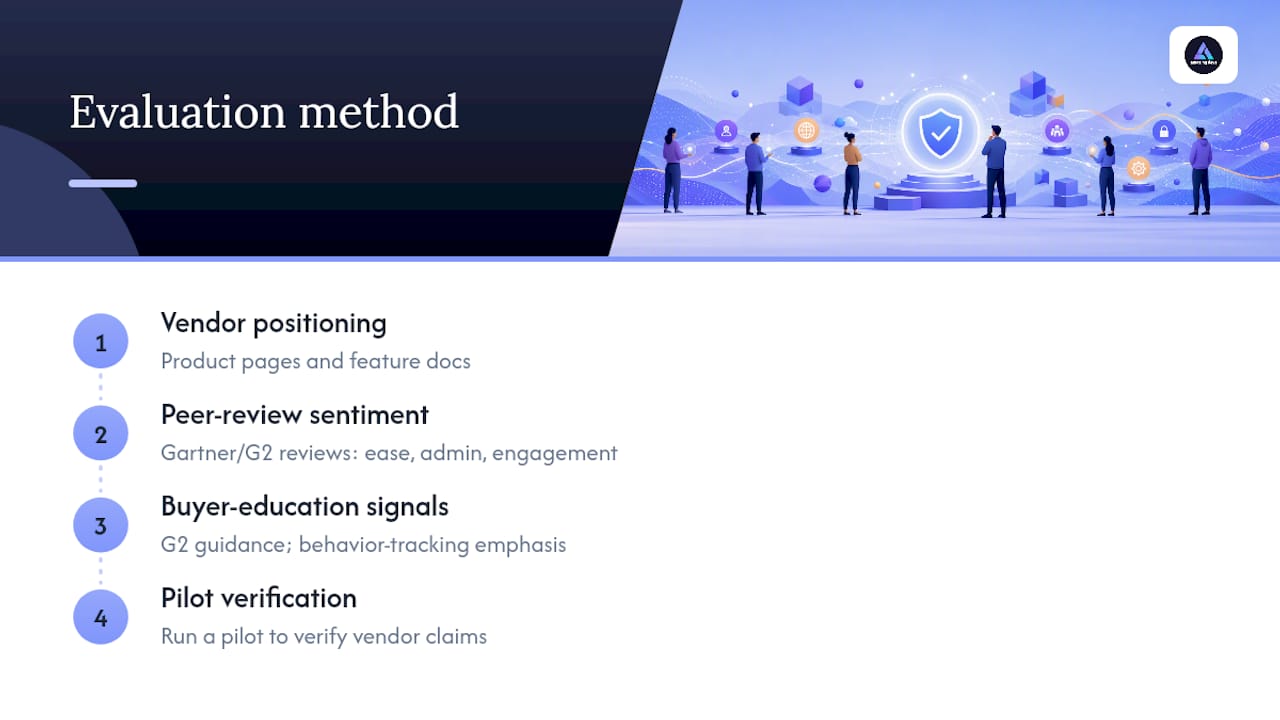
This shortlist was built by cross-referencing three signal types rather than relying on any single ranking source. First, vendor-published positioning (product pages, feature documentation) established what each platform claims to do best. Second, aggregated peer-review sentiment from sites like Gartner Peer Insights and G2 surfaced which claims held up in practice and which satisfaction drivers actually mattered to real buyers, since reviewers consistently flag different strengths across ease of deployment, admin workload, and engagement.
Third, independent buyer-education content, particularly G2’s evaluation guidance, was used to weight platforms by whether they support measurable behavior tracking rather than simple completion reporting.
No platform on this list was tested head-to-head with standardized phishing campaigns for this article. That kind of controlled benchmark exists in fragments across review-aggregator sites and RFP comparison tools like RFP.wiki, but none currently run a fully independent, apples-to-apples test across all twenty vendors named here. Where a vendor’s own performance claims appear in this piece, they are labeled explicitly as vendor-published, and the buying guide above tells you exactly how to verify them yourself with a pilot before signing a contract.
This is why the pilot recommendation shows up twice in this article. It is the only reliable way to convert a vendor’s marketing claim into a number you can actually trust for your organization.
How Do These Platforms Handle Admin and Integrations?
Deployment friction is where a lot of security awareness programs quietly fail, usually within the first month. A platform that looks great in a sales demo can still take weeks to actually integrate if SSO and HRIS syncing aren’t handled cleanly.
SSO support (SAML or OIDC) is now table stakes across nearly every platform on this list, but the depth of SCIM provisioning varies. KnowBe4 and Proofpoint ZenGuide both support automated user provisioning at enterprise scale, while smaller-footprint tools like usecure and EasyLlama lean on simpler CSV imports or lighter API connections, which is fine for a 50-person company and a real bottleneck at 5,000 seats.
M365 integration depth matters specifically for phishing simulation delivery and reporting-button placement inside Outlook. Microsoft Attack Simulation Training obviously has the deepest native tie-in here, since it runs inside the same tenant. Proofpoint and Mimecast integrate tightly with their own email security products, and Cofense’s reporting button is designed to work across mixed email environments, not just one vendor’s stack.
HRIS syncing for automatic enrollment and role-based assignment is the piece most organizations underestimate during procurement, then regret during onboarding. If your HR system changes roles or departments frequently, confirm the platform can re-sync automatically rather than requiring manual re-tagging every time someone changes teams.
How Good Is Vendor Support Across These Platforms?
Support quality tends to track directly with deployment model. Managed platforms like Arctic Wolf and Huntress bake support into the service itself. You are not troubleshooting a dashboard alone; a security team is watching the program alongside you and flagging issues before you notice them.
Self-service platforms vary more widely. Enterprise vendors like KnowBe4 and Proofpoint ZenGuide typically offer dedicated customer success managers for larger contracts, plus extensive documentation and community forums for smaller accounts. Mid-market and SMB-focused platforms like Infosec IQ, EasyLlama, and usecure tend to lean on responsive email and chat support rather than dedicated account teams, which usually fits the lower contract value but can feel thin during a complex rollout.
One pattern worth flagging during procurement: MSP-channel platforms like Huntress and usecure often route support through the MSP itself rather than directly through the vendor. That can be faster if your MSP is strong, or a genuine bottleneck if it isn’t. Ask directly who you call at 2 a.m. if a phishing simulation accidentally triggers a real incident response.
Support responsiveness is also one of the easiest things to test during a pilot. Send a genuinely tricky configuration question to support during your evaluation window and time the response. It tells you more about the real relationship than any sales call will.
Can These Platforms Scale as Your Organization Grows?
Scalability splits cleanly along the same line as content breadth. KnowBe4, Terranova Security Awareness, and Proofpoint ZenGuide are built with multi-tenant architecture that supports business units, subsidiaries, and geographically distributed teams without requiring a separate contract per division.
Platforms built for SMBs and MSPs, including usecure, EasyLlama, and Huntress, optimize for the opposite end of the spectrum: fast setup and low administrative overhead at a few dozen to a few hundred seats. They can technically scale upward, but the economics and admin tooling start to strain past a certain seat count, which is worth asking about directly if you expect rapid headcount growth.
Customization depth follows a similar pattern. Infosec IQ and MetaCompliance Security Awareness Training offer granular role-based content assignment, letting you build distinct tracks for engineering, finance, and executive teams. Story-driven platforms like NINJIO offer less granular customization by design. The format itself is the differentiator, not configurability.
For organizations expecting to double headcount within two years, ask vendors directly about pricing tiers at your projected seat count, not just your current one. A platform that looks affordable at 200 seats can price very differently at 800, and that gap catches procurement teams off guard more often than any feature gap does.
What Compliance Certifications Do These Platforms Support?
Compliance mapping is where security awareness training crosses from “nice to have” into a legal and contractual requirement. Frameworks including PCI DSS, HIPAA, SOC 2, and a growing list of state privacy laws all reference employee security training in some form, and auditors want documented proof.
Most enterprise-grade platforms, including KnowBe4, Proofpoint ZenGuide, and MetaCompliance Security Awareness Training, publish pre-built compliance course tracks mapped to specific frameworks, along with audit-ready completion reports. MetaCompliance in particular bundles policy attestation tracking alongside training completion, which simplifies audits that require both.
Smaller and MSP-focused platforms generally support the same core frameworks but with less granular reporting customization. If your auditor requires a very specific report format, confirm that during the sales process rather than after signing, since retrofitting reporting requirements after deployment is a common source of frustration.
It’s worth being precise about what “compliance certification” actually means here: no training platform itself is HIPAA-certified or PCI-certified, since those frameworks certify organizational processes, not third-party software. What you’re actually buying is content and reporting that supports your own compliance documentation. Any vendor claiming outright certification to a framework that doesn’t certify software products is worth questioning directly.
How Accessible Are These Platforms for Different Learners?
Accessibility gets overlooked in most procurement conversations until an employee can’t complete a mandatory training module and compliance flags it. Screen reader compatibility, closed captioning, and adjustable playback speed are baseline requirements, not premium features, for any platform serving a workforce with varied ability levels.
Terranova Security Awareness leads specifically on multilingual and accessibility design, built for global organizations running training across offices where English isn’t the primary language. That matters beyond simple translation. Cultural context in phishing examples and training scenarios affects whether content actually resonates with employees in different regions.
NINJIO’s video-first format naturally supports captioning and works well for employees who process narrative content more easily than text-heavy modules. Text-heavy, module-based platforms like Infosec IQ and KnowBe4 support accessibility standards but rely more on traditional reading comprehension, which can create friction for some learner populations.
Mobile accessibility is worth checking directly, particularly for distributed or frontline workforces without regular desktop access. Not every platform offers a fully functional mobile experience; some just render a shrunk desktop version that’s technically accessible but genuinely painful to use on a phone.
Do Case Studies Actually Prove These Platforms Work?
Vendor-published case studies follow a predictable pattern: pick a customer, cite an impressive percentage improvement, and present it as proof the platform works. That pattern isn’t dishonest, exactly, but it is incomplete. A phish-prone percentage that dropped from 30% to 8% tells you almost nothing about whether that customer had a mature security culture already in motion, a uniquely engaged workforce, or simply a low starting baseline that was easy to improve from.
The more useful pattern in vendor case studies isn’t the headline number. It’s the program design underneath it: which cohorts got targeted first, how often simulations ran, and whether the reported improvement held steady over multiple quarters or spiked once and faded. A single strong quarter proves far less than a steady downward trend sustained over a year.
This is also exactly why independent buyer guidance keeps pointing back to pilots rather than published case studies as the real evidence. Your organization’s starting phish-prone percentage, industry, and existing security culture are different from whichever customer got featured in a vendor’s marketing deck. The only case study that actually predicts your outcome is the one you run yourself, over a defined pilot window, with your own baseline as the comparison point.
How Long Does Implementation Actually Take?
Timeline expectations vary enormously depending on deployment model, and vendors don’t always volunteer the realistic number during a sales call.
Self-service platforms with straightforward integrations, like usecure or EasyLlama, can go from contract signature to first phishing simulation within one to two weeks for a small or mid-size organization. Enterprise platforms with SCIM provisioning, multi-tenant setup, and custom role-based content mapping, such as KnowBe4 or Proofpoint ZenGuide at scale, realistically run four to eight weeks before the first meaningful campaign launches, especially if your IT team is juggling other priorities simultaneously.
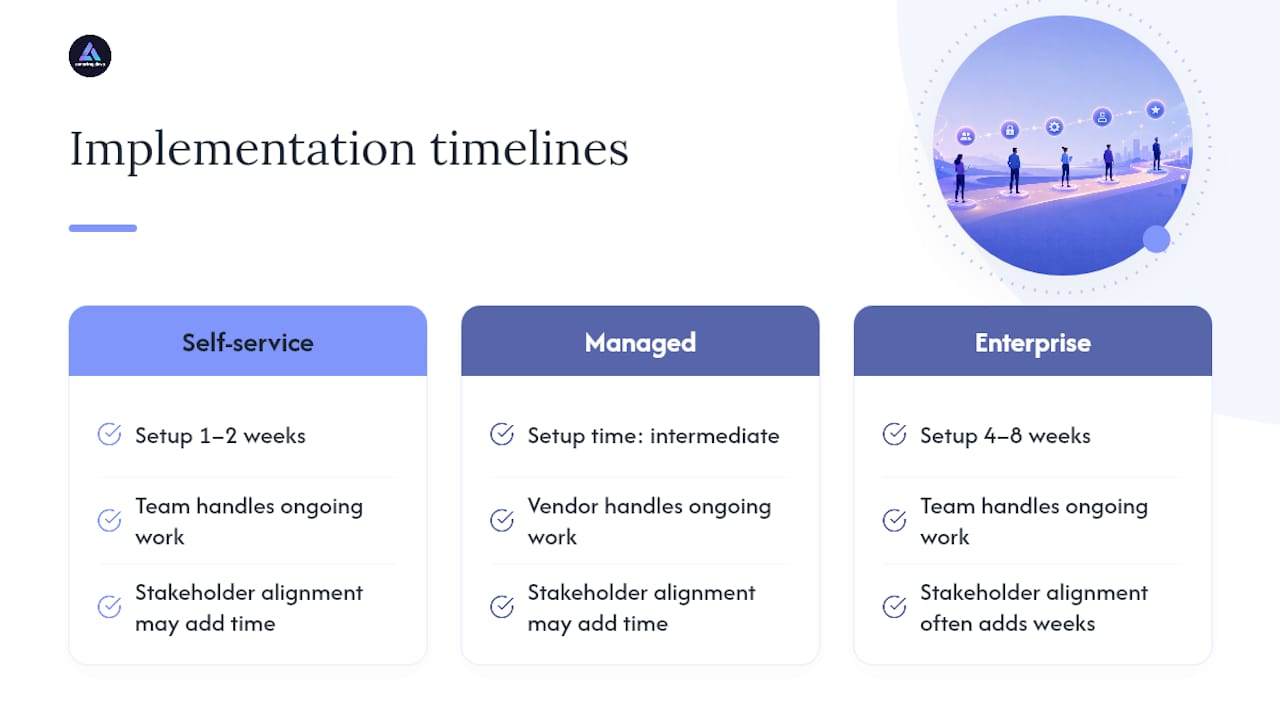
Managed platforms like Arctic Wolf sit somewhere in between on raw setup time but shift the ongoing burden away from your team entirely once onboarding completes.
The single biggest onboarding delay across every platform category isn’t the software. It’s internal stakeholder alignment: getting HR to confirm the enrollment data feed, getting legal to sign off on phishing simulation language, and getting IT to whitelist simulation domains in your email security stack. Budget real calendar time for those internal steps, not just the vendor’s stated onboarding window, and confirm with the vendor upfront what support they provide for stakeholder-facing onboarding materials.
Which Platform Actually Fits Your Situation?
If your program is brand new, start narrower than you think you need to. A platform with heavy automation and enterprise reporting is wasted on an organization that hasn’t run its first phishing simulation yet. Pick something with a fast pilot path, run it against one high-risk department, and let that data shape the real procurement decision.
If you’re scaling an existing program, the constraint usually isn’t content, it’s admin overhead and integration depth. That’s where multi-tenant platforms with mature SSO and HRIS syncing earn their higher price tag.
If your actual goal is fewer real compromises reaching your SOC, engagement metrics matter less than incident-response integration. Weight that over gamification scores every time.
— Gabriel
Amazing Devs: A Different Kind of Support for Your Security Program
Amazing Devs isn’t a security awareness training vendor, and it won’t pretend to be one. What it offers sits a layer underneath the platforms discussed above: the nearshore engineering talent that actually builds and maintains the integrations, dashboards, and automated reporting pipelines your chosen SAT platform needs to work well inside your existing stack.
If your team just picked a platform and now needs someone to wire up SCIM provisioning, build a custom risk-scoring dashboard that pulls from your HRIS and your SAT vendor’s API, or automate remediation workflows for repeat phishing offenders, that’s engineering work most security teams don’t have spare hands for. Amazing Devs connects you with vetted developers who handle exactly that kind of integration and automation work, assessed for both technical skill and cultural fit before they ever join your project.
Curious what nearshore staff augmentation could take off your plate during a security awareness rollout? Start a conversation with Amazing Devs about your integration needs and see how fast a matched engineering team can get to work.
Sources
- I Evaluated G2’s 7 Best Security Awareness Training …
- KnowBe4 vs Cofense (2026): Data‑driven comparison
FAQ
What Should Security Awareness Training Include?
A strong program includes phishing simulations, role-based content targeted to job function, microlearning delivered continuously rather than annually, and measurable behavior tracking like phish-prone percentage and reporting rate, following the layered approach SANS recommends.
Is Security Awareness Training Effective?
It’s effective when reinforced continuously and measured by behavior change rather than completion rates. A one-time annual module has little lasting impact, since retention decays within weeks without follow-up reinforcement.
Where Can I Find Free Security Awareness Training?
Some vendors, including Microsoft Attack Simulation Training, are included at no extra cost within existing Microsoft 365 E5 or Defender for Office 365 Plan 2 licenses, making them a practical free-to-you option if you already hold that license tier. Beyond that, most dedicated platforms require a paid subscription, though many offer limited trial or pilot access.
How Much Does Security Awareness Training Typically Cost?
Pricing varies by seat count, required integrations, and whether the program is managed or self-service, with enterprise platforms typically priced higher due to multi-tenant administration and deeper automation. Ask vendors for pilot pricing specifically, since full-contract quotes rarely reflect what a short evaluation period actually costs.
How Do I Choose Between Enterprise and MSP-Focused Platforms?
Match the platform to your seat count and internal capacity: enterprise platforms like KnowBe4 fit organizations with dedicated administrators and complex integration needs, while MSP-focused options like usecure or EasyLlama fit smaller teams wanting faster deployment with less overhead.