Best Vector Databases for RAG Teams and When to Hire Engineers
Pinecone wins for zero-ops managed simplicity, Qdrant for raw filtered-query speed, Weaviate for hybrid search out of the box, and Milvus for billion-scale collections. If you’re already running Postgres or just need to prototype fast, pgvector and Chroma get you to production without new infrastructure. The right pick depends less on benchmarks and more on your team’s ops budget and scale.
TL;DR:
- Qdrant offers the fastest filtered-query performance with latencies as low as 1.2 milliseconds in million-vector workloads, thanks to its optimized Rust code and quantization.
- Milvus is ideal for billion-scale collections but requires significant operational expertise to manage its distributed, multi-node architecture effectively.
- Pinecone provides a fully managed, zero-ops service best suited for teams with limited operational capacity, though its costs can become unpredictable at high scale.
- For teams already on PostgreSQL, pgvector allows vector search without extra infrastructure, but performance declines past 20 million vectors.
- Benchmark results depend heavily on dataset, embedding dimension, and filter complexity, so testing with your actual data is essential before choosing a system.
Table of Contents
- What Are the Best Vector Databases for RAG Right Now?
- What Should You Actually Measure When Comparing Vector Databases?
- Which Vector Database Fits Your Use Case?
- How Do the Top Vector Databases Compare Side by Side?
- How Do You Actually Choose the Right Vector Database?
- How Do You Integrate and Deploy a Vector Database in Production?
- Why Teams Get the Build vs. Buy Decision Wrong
- Need Engineers to Build or Run Your Vector Search Stack?
- Where to Verify These Claims Yourself
- Sources
- FAQ
What Are the Best Vector Databases for RAG Right Now?
Picking a vector database comes down to matching three things: your scale, your filtering needs, and how much operational work your team can absorb. Here’s the one-line verdict on each major option before you dig into the details.
- Pinecone — managed, serverless, zero-ops; best when your team has no bandwidth for infrastructure work and wants predictable API behavior. Offers a free tier for testing before usage-based billing kicks in.
- Qdrant — open-source, self-hosted or managed; best for performance-sensitive RAG with heavy metadata filtering. Free to self-host; managed cloud has a free tier.
- Weaviate — open-source with native hybrid search; best when BM25 keyword matching plus dense vectors matters for relevance. Free self-hosted; managed cluster options scale by usage.
- Milvus — distributed, cloud-native; best for collections in the hundreds of millions to billions of vectors. Free open-source; Zilliz Cloud offers managed billing.
- Chroma — embedded, developer-first; best for local prototyping before you commit to production infrastructure. Fully free and open-source.
- pgvector — a PostgreSQL extension; best for teams that already run Postgres and want to avoid standing up new infra for moderate-scale workloads.
- Redis (vector search) — in-memory; best for sub-millisecond latency needs paired with existing caching infrastructure.
- Turbopuffer — S3-native serverless; best for cost-sensitive archives where RAM costs would otherwise be prohibitive at scale.
- Elasticsearch / OpenSearch — multu-model search platform; best for teams that already run Elastic and want vectors folded into existing search infra.
- MongoDB Atlas Vector Search — best for MongoDB shops that want document storage and vector search in one managed platform.
- Faiss — a library, not a database; best for teams building custom, GPU-accelerated search infrastructure or research pipelines.
- Vespa — best for billion-scale deployments that need learned ranking and tensor operations, not just nearest-neighbor lookup.
Two more worth knowing: Cloudflare Vectorize targets edge-deployed apps running on Cloudflare Workers, and LanceDB and sqlite-vec serve embedded, file-based use cases similar to Chroma but with different storage formats. Turso Vector extends lib SQL for teams already on Turso’s edge database platform.
What Should You Actually Measure When Comparing Vector Databases?
Benchmarks get thrown around casually, but three numbers matter more than the rest combined: recall@k, latency percentiles, and how gracefully the system handles metadata filters. Get these wrong and you’ll pick a database that looks great in a demo and falls over in production.
- Recall@k measures how many of the true nearest neighbors your query actually returns in the top k results. A system with 95% recall@10 is missing one relevant result out of twenty on average, which matters a lot in a legal or medical RAG pipeline and a lot less in a casual recommendation feed.
- Latency percentiles (p50/p95/p99) tell you what a typical query costs versus what your slowest 1% of queries cost. Averages hide the tail; a p50 of 5ms with a p99 of 400ms means some fraction of your users are having a bad time.
- Metadata filtering strength determines whether the database can pre-filter before running the nearest-neighbor search or has to scan and discard after the fact. Systems with proper payload-index pre-filtering maintain recall even under selective filters; systems without it either scan too much or drop relevant results silently.
- Hybrid search support — combining BM25 keyword ranking with dense vector similarity — has become close to mandatory for document-heavy RAG. Hybrid search materially improves retrieval quality for queries that need exact-term matches, like product SKUs, legal citations, or proper names, which pure dense retrieval tends to miss.
- Hosting model shapes your total cost of ownership more than any per-query benchmark. A managed service like Pinecone trades money for time; a self-hosted option like Qdrant or Milvus trades time (yours, or an engineer’s) for lower unit economics at scale.
Embedding dimension and model choice also affect everything downstream. A 1536-dimension OpenAI embedding costs more to store and search than a 384-dimension sentence-transformer output, and that difference compounds across tens of millions of vectors.
Pro Tip: Never trust a vendor’s headline benchmark number without checking what dataset and embedding model it used. A recall@10 of 99% on a clean, low-dimensional academic dataset can look completely different on your noisy, high-dimensional production embeddings.

Which Vector Database Fits Your Use Case?
Pinecone: the managed default
Pinecone remains the reference point for teams that want vector search without owning any infrastructure. Its serverless architecture autoscales without capacity planning, and the API surface is deliberately narrow: upsert, query, delete, done. Pinecone’s positioning as the zero-ops managed option holds up well against self-hosted alternatives, though usage-based billing can produce unpleasant surprises once you’re indexing tens of millions of vectors with frequent updates.
- Pros: no servers to patch, predictable API, strong docs, fast to prototype with.
- Cons: cost scales with usage in ways that are hard to forecast; less control over index internals than open-source alternatives.
Qdrant: built for filtered speed
Qdrant is written in Rust and optimized specifically for the case most RAG systems actually hit: a nearest-neighbor search combined with a metadata filter (tenant ID, date range, document type). Benchmarks show p50 latencies as low as roughly 1.2 milliseconds with binary quantization on million-vector workloads, while preserving high recall. Binary quantization compresses vectors into a fraction of their original memory footprint, which is why Qdrant tends to run cheaper per vector than competitors at comparable recall.
- Pros: excellent filtered-query performance, low memory footprint via quantization, open-source with a managed cloud option.
- Cons: smaller ecosystem than Elasticsearch or MongoDB; tuning quantization settings takes some trial and error.
Weaviate: hybrid search as a first-class citizen
Weaviate bakes BM25 keyword scoring and dense vector similarity into a single query path, with fusion algorithms that blend both signals into one ranked list. It also ships modular embedding integrations, so you can generate vectors inside the database rather than managing a separate embedding service. That native hybrid approach is a big reason hybrid search has become close to table-stakes for document-heavy RAG pipelines that need exact-term recall alongside semantic similarity.
- Pros: genuinely native hybrid search, not a bolt-on; modular vectorizer plugins; solid GraphQL and REST APIs.
- Cons: more moving parts to configure than a pure vector store; self-hosted clusters need real operational attention.
Milvus: the billion-scale workhorse
Milvus was architected from the ground up for distributed, sharded vector search, and it shows in how it handles collections that dwarf what single-node systems can manage. Milvus is consistently the recommended pick for 100 million to billion-scale deployments, thanks to its distributed query nodes and support for multiple index types, including GPU-accelerated ones.
- Pros: genuinely built for massive scale; multiple index types (HNSW, IVF, DiskANN) to tune for your recall/speed/memory trade-off; GPU acceleration available.
- Cons: operational complexity is real. Running Milvus well means understanding its coordinator, data node, and query node architecture, not just installing a package.
Chroma: the prototyping favorite
Chroma’s entire design philosophy is “get out of your way.” A Python developer can have embeddings stored and queryable in about five lines of code, with no separate service to stand up. Chroma is repeatedly recommended for rapid prototyping precisely because it removes the infrastructure decision from the early stages of a project, letting teams validate a RAG concept before committing to production architecture.
- Pros: trivial local setup, simple API, genuinely free.
- Cons: not designed for the concurrency or scale demands of a high-traffic production system; most teams outgrow it and migrate.
pgvector: no new infrastructure required
If your application already runs on PostgreSQL, pgvector lets you add vector columns and run similarity search using SQL you already know. That means transactional consistency with the rest of your data and no separate system to monitor. Teams that want to avoid new infrastructure for small to moderate workloads consistently land on pgvector as the pragmatic choice, particularly under roughly 5 to 20 million vectors.
- Pros: SQL-native filtering, transactional guarantees, zero new infra if you’re already on Postgres.
- Cons: performance degrades relative to purpose-built vector stores as collections grow past tens of millions; indexing (HNSW or IVFFlat) requires care at scale.
Redis: sub-millisecond retrieval for latency-critical apps
Redis Stack added vector search to a platform already known for in-memory speed, which makes it attractive when you’re already using Redis for caching and want vector lookups in the same round trip. Recent additions like FT.HYBRID push Redis toward the same hybrid-fusion capability that Weaviate offers natively.
- Pros: genuinely fast for latency-critical paths; unifies caching and vector search in one system you likely already run.
- Cons: in-memory storage means RAM cost scales directly with vector count, which gets expensive fast at large scale.
Turbopuffer: cost efficiency at archive scale
Turbopuffer takes the opposite bet from Redis: instead of keeping everything in RAM, it stores vectors on S3 and layers a serverless query engine on top. That architecture choice matters because cost-sensitive, large-archive workloads are increasingly moving toward S3-native, disk-backed designs that cut RAM cost per terabyte dramatically compared to fully in-memory systems.
- Pros: dramatically lower cost per vector at large scale; serverless, no cluster to manage.
- Cons: cold-start latency on infrequently accessed data; younger product with a smaller track record than incumbents.
Elasticsearch and MongoDB Atlas: vectors inside a platform you already run
Elasticsearch (and its OpenSearch fork) added dense vector fields to an already mature full-text search engine, while MongoDB Atlas Vector Search folds vector indexes into MongoDB’s document model. Both are attractive not because they’re the fastest option, but because teams already running these platforms can add vector capability without introducing a new system to operate, monitor, and secure.
- Pros: no new infrastructure if you’re already on Elastic or MongoDB; mature security, backup, and monitoring tooling inherited from the base platform.
- Cons: vector search is a bolted-on feature, not the core design goal, so pure vector performance tends to trail specialized stores.
Faiss: the building block, not the database
Faiss isn’t a database at all. It’s a C++ library with Python bindings that implements highly optimized approximate nearest-neighbor algorithms, and it’s what several vector databases use internally under the hood. Teams reach for Faiss directly when they’re building custom, GPU-accelerated search infrastructure or running research workloads where they need full control over indexing behavior.
- Pros: best-in-class raw ANN performance; GPU support; total control over index construction.
- Cons: you build everything else yourself, persistence, replication, filtering, monitoring, none of it comes free.
Vespa: ranking at extreme scale
Vespa handles billion-scale hybrid ranking with a feature most competitors lack entirely: first-class tensor operations that let you run learned ranking models directly inside the query path. That makes it the choice for teams running complex ranking pipelines at massive scale where learning-to-rank matters more than simple nearest-neighbor lookup.
- Pros: genuinely unique capability for production ML ranking at scale; battle-tested at large search workloads.
- Cons: steep learning curve; overkill for teams that just need standard similarity search.
How Do the Top Vector Databases Compare Side by Side?
| Database | Hosting Model | Best For | Scale Sweet Spot | Hybrid Search | Filtering Strength | Ops Complexity |
|---|---|---|---|---|---|---|
| Pinecone | Managed | Zero-ops teams | 1M to 100M+ | Via metadata + rerank | Moderate | Very low |
| Qdrant | Self-hosted or managed | Filtered, low-latency RAG | 1M to 100M | Native | Strong | Low to moderate |
| Weaviate | Self-hosted or managed | Hybrid BM25 + vector | 1M to 100M | Native | Strong | Moderate |
| Milvus | Self-hosted or managed (Zilliz) | Billion-scale collections | 100M to billions | Via plugin | Moderate | High |
| Chroma | Embedded/self-hosted | Prototyping | Under 1M | Limited | Basic | Very low |
| pgvector | Self-hosted (Postgres) | Postgres-native teams | Under 20M | Via SQL + BM25 extension | Strong (SQL) | Low |
| Redis | Self-hosted or managed | Sub-ms latency | 1M to 10M | Via FT.HYBRID | Moderate | Moderate |
| Turbopuffer | Managed (S3-native) | Cost-sensitive archives | 10M to billions | Native | Moderate | Low |
| Elasticsearch | Self-hosted or managed | Existing Elastic users | 1M to 100M+ | Native (BM25 core) | Strong | Moderate to high |
| MongoDB Atlas | Managed | Existing MongoDB users | 1M to 50M | Limited | Moderate | Low |
| Faiss | Embedded library | Custom GPU infra | Any (DIY) | None built-in | None built-in | High (DIY) |
| Vespa | Self-hosted or managed | Extreme-scale ranking | 100M to billions | Native | Strong | Very high |
The DB-Engines popularity ranking consistently places Pinecone, Milvus, Qdrant, Weaviate, and Chroma near the top of the vector DBMS category, a signal of ecosystem maturity and community support rather than a performance guarantee. Weaviate and Qdrant lead on native hybrid fusion and filtering, Pinecone stays the default for zero-ops setups, Milvus and Vespa own the billion-scale tier, and Chroma and pgvector remain the fastest path to a working prototype. Every benchmark number in this space is dataset and embedding-model dependent, so treat published latency figures as directional, not as guarantees you’ll replicate on your own corpus.
How Do You Actually Choose the Right Vector Database?
Running a structured proof of concept beats reading ten comparison articles. Here’s a process that fits inside a single sprint.
- Define your real constraints first. Write down expected vector count at launch and at 12 months, expected queries per second, how selective your metadata filters typically are, and how often embeddings need refreshing (a product catalog that updates hourly behaves very differently from a static document archive).
- Build a PoC with your own data, not a demo dataset. Load a representative sample, at least 100,000 vectors if you can, and run your actual query patterns against it. A vendor benchmark on a clean dataset tells you nothing about how the system behaves on your messy production embeddings.
- Measure recall@k on your own queries. Compare returned results against a hand-labeled ground truth set of 50 to 100 realistic queries. This is the single most skipped step, and it’s the one that actually predicts user-facing quality.
- Measure p95 latency with filters applied, not without. Unfiltered nearest-neighbor benchmarks are close to meaningless for RAG, since almost every production query carries some filter (tenant, date, document type, permission).
- Calculate cost per 1 million vectors at your expected scale, including storage, query volume, and any managed-service markup, before you commit.
- Ask vendors directly about backup and restore procedures, autoscaling behavior under load spikes, and support SLA response times. A vague answer here is itself a signal.
Watch for red flags during evaluation: opaque or usage-based pricing with no calculator, vendors who resist letting you test filtered-query performance on your own data, and benchmark claims you can’t reproduce with published methodology.
Pro Tip: Run your PoC with the exact embedding model and dimension you plan to use in production. Switching from a 384-dimension model to a 1536-dimension model later can double your storage and meaningfully change which database performs best.
How Do You Integrate and Deploy a Vector Database in Production?
Getting a vector database into production reliably takes more than picking the right product. The embedding pipeline itself is often the harder engineering problem.
- Embed-on-write versus embed-on-read is your first architectural decision. Embedding on write (at ingestion time) keeps query latency low but means reprocessing everything if you change embedding models; embedding on read adds latency but stays flexible.
- Batch your embedding calls. Sending one document at a time to an embedding API wastes throughput; batching 50 to 100 documents per call cuts cost and latency substantially for most providers.
- LangChain and LlamaIndex both ship native connectors for Pinecone, Qdrant, Weaviate, Chroma, Milvus, and pgvector, which means switching vector backends often requires changing a few lines of configuration rather than rewriting your retrieval logic.
- Migrate in stages. Export vectors and metadata, run recall validation against the new store before cutover, and keep the old system live in shadow mode until you’ve confirmed parity on real queries.
- Monitor query latency percentiles, index build time, and memory usage as your core operational signals, not just uptime.
- Cost control comes from quantization and tiered storage. Binary or scalar quantization can cut memory footprint significantly, and moving cold, rarely queried vectors to disk-backed tiers (as Turbopuffer does by design) keeps costs down as your archive grows.
Pro Tip: Schedule backup validation, not just backups. A backup you’ve never restored from is a hypothesis, not a safety net.
Why Teams Get the Build vs. Buy Decision Wrong
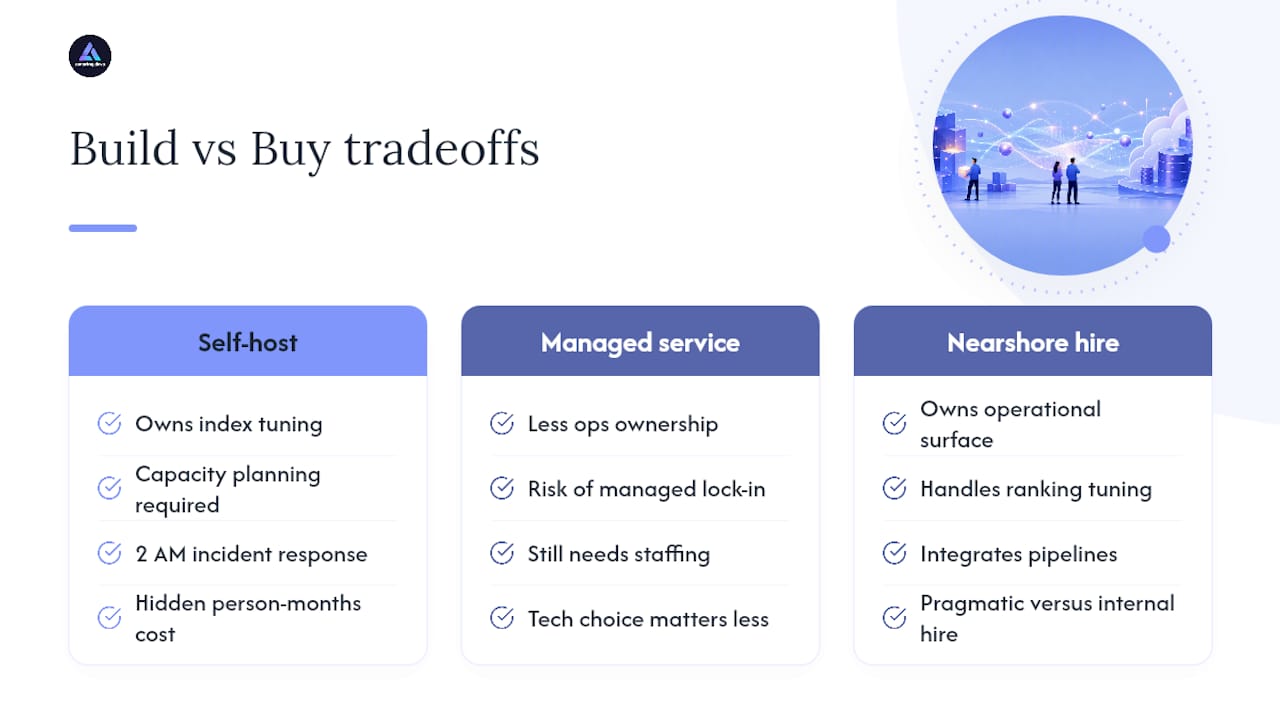
Most teams underestimate what running a vector database actually costs in person-months, not dollars. Self-hosting Qdrant or Milvus well means someone owns index tuning, capacity planning, and 2 AM incident response when a shard falls behind, and that someone rarely has spare bandwidth for it on top of their actual job.
Hiring a nearshore engineer to own that operational surface, or to handle the harder work of continuous ranking tuning and pipeline integration, is often more pragmatic than either fully managed lock-in or an internal hire competing against machine learning engineer salaries that keep climbing. The technical choice between Pinecone and Milvus matters less than whether you have the staffing to operate whichever one you pick.
— Gabriel
Need Engineers to Build or Run Your Vector Search Stack?
Picking the right database from this list solves half the problem. Someone still has to build the embedding pipeline, tune the index, and keep the whole thing running once real traffic hits it, and that’s where most teams actually get stuck. Nearshore Brazilian engineers are available who can implement your embedding pipeline, operate a self-hosted Qdrant or Milvus cluster, or run a migration between vector stores, often without the months-long recruiting cycle associated with local hiring.
Engagements can run as team augmentation or as managed project work, with candidates undergoing technical and cultural fit assessments. If your team has the architecture figured out but not the hands to build it, see how nearshore outsourcing works or go straight to requesting a consultation to talk through your specific stack.
Where to Verify These Claims Yourself
- The top 5 vector databases — a comparative breakdown covering hybrid search and Milvus’s scale positioning.
- Best Vector Databases in 2026: Complete Comparison Guide — detailed latency and quantization figures for Qdrant and Vespa.
- Comparing the best open source vector databases — the open-source landscape across Chroma, pgvector, and Faiss.
- DB-Engines Ranking — live popularity tracking across the vector DBMS category.
- Best AI Vector Databases 2026 – Full Comparison — pricing and hosting model breakdowns, including Turbopuffer’s S3-native design.
Sources
- The top 5 vector databases
- Best Vector Databases in 2026: Complete Comparison Guide
- Best AI Vector Databases 2026 – Full Comparison | Awesome Agents
- Comparing the best open source vector databases
- DB-Engines Ranking – popularity ranking of vector DBMS
FAQ
Are Vector Databases Dead?
No. Demand for retrieval infrastructure has grown alongside RAG adoption, though the category is consolidating as multi-model platforms like Elasticsearch and MongoDB Atlas add native vector support alongside dedicated stores.
What Is Replacing a Vector Database?
Nothing is fully replacing dedicated vector databases yet, but multi-model systems (Postgres with pgvector, MongoDB Atlas, Elasticsearch) are absorbing vector search into platforms teams already run, reducing the need for a standalone system in moderate-scale use cases.
Which Vector Database Is the Best in 2026?
There’s no single best option: Pinecone leads for zero-ops managed simplicity, Qdrant and Weaviate lead for filtering and hybrid search, and Milvus and Vespa lead for billion-scale workloads. The right choice depends on your scale, filtering needs, and available ops resources.
Which Vector Database Is Fastest?
Qdrant reports p50 latencies near 1.2 milliseconds on filtered queries using binary quantization, among the fastest published figures for million-vector workloads, though actual speed depends heavily on your dataset, filter selectivity, and embedding dimension.
Should I Hire Engineers or Use a Managed Vector Database?
If your team lacks bandwidth for index tuning and incident response, a managed option like Pinecone reduces operational load; if you need custom ranking or tighter cost control at scale, staffing a nearshore engineer through Amazing Devs to operate a self-hosted store is often the more cost-effective path.