Developer Teams: Test Remote Pair Programming Tools in 30–60 Minutes
For most engineering teams, the fastest path to reliable remote pairing is Hopp for dedicated daily pairing, GitHub Codespaces or CodeSandbox SDK for zero-setup cloud sessions, and Microsoft Visual Studio Live Share for teams standardized on VS Code who already have a call running. Each solves a different bottleneck: latency, setup friction, or editor parity. The shortlist below breaks down which one fits your actual workflow.
TL;DR:
- Teams pairing daily should prioritize Hopp for its low latency and high video fidelity, despite needing a native app installation.
- Cloud environments like GitHub Codespaces and CodeSandbox SDK are ideal for quick setups without local configuration but lack built-in audio or video integration.
- For teams with mixed IDEs or strict security needs, CodeTogether and Visual Studio Live Share offer seamless collaboration without additional costs or plugins.
- Purpose-built apps such as Tuple or Hopp provide precise remote control and lag-free interaction, making them best for high-frequency, long-duration pairing sessions.
- Choosing the right tool requires testing under real conditions, focusing on latency, session persistence, and the ability to recover after connection drops.
Table of Contents
- What Are the Best Remote Pair Programming Tools Right Now?
- How Do the Top Tools Compare Side by Side?
- Which Tool Fits Your Team? A Closer Look at Each Option
- How to Choose the Right Tool and Run a Trial
- How We Tested These Remote Pairing Tools
- When a Tool Isn’t the Real Fix
- When Hiring Vetted Pairs Beats Switching Tools
- Sources
- FAQ
What Are the Best Remote Pair Programming Tools Right Now?
The best remote pair programming tools split into three real categories: purpose-built pairing apps, IDE collaboration extensions, and browser-based cloud IDEs, each trading off latency, setup time, and editor fidelity differently. Screen-sharing and remote-control quality varies enough between them that picking the wrong category costs you hours of friction every week, not just a bad afternoon.
Here’s the ranked shortlist, with the tool each one beats out on its specific job:
- Hopp — best for teams that pair daily and want the lowest latency and highest video fidelity available; free tier exists, paid plans unlock team features.
- GitHub Codespaces — best for GitHub-native teams that want cloud dev containers spun up in seconds; free tier included with usage caps, paid tiers scale by compute hour.
- CodeSandbox SDK — best for web teams pairing on frontend projects with zero local setup; free tier available, paid plans add private workspaces.
- Microsoft Visual Studio Live Share — best for VS Code and Visual Studio shops that need shared debugging and terminals; completely free, no paid tier exists.
- Replit — best for quick browser pairing and technical interviews with built-in voice and video on paid plans; free tier is generous for solo and light collaborative work.
- Tuple — best for Mac-first engineering teams that want a dedicated, low-latency remote-control app; no free tier, flat monthly pricing per seat.
- CoderPad — best for interview teams that need language runners and structured technical assessments; free trial available, pricing scales by interviewer seats.
- CodeTogether — best for mixed-editor teams spanning VS Code, IntelliJ, and Eclipse; free tier for open sessions, paid tier adds persistent rooms.
Duckly, Codeanywhere, HackerRank, Replit Multiplayer, and CodeSandbox CDE round out the field for more specific jobs. HackerRank leans toward recruiting and assessment rather than day-to-day pairing. Codeanywhere and Duckly serve teams that want container-backed or audio-first pairing without committing to a full cloud IDE subscription. Replit Multiplayer and CodeSandbox CDE are the collaborative editing layers inside their respective platforms rather than standalone products, worth knowing about if you’re already inside those ecosystems.
How Do the Top Tools Compare Side by Side?
The attributes that actually matter in a pairing session are narrower than most comparison charts suggest: does the tool give both people real control, does it handle audio and video without a second app, and does the session survive someone’s Wi-Fi dropping for ten seconds.
| Tool | Best For | Pricing | Platform/Editor Support | Audio & Video Built In | Remote Control / Multi-Cursor | Session Persistence |
|---|---|---|---|---|---|---|
| Hopp | Frequent daily pairing, low latency | Free tier; paid plans for teams | macOS, Windows, Linux | Yes | Full remote control + multi-cursor | Yes |
| GitHub Codespaces | GitHub-native cloud workspaces | Free tier with usage limits; paid by compute hour | Browser or VS Code, any OS | No | Multi-cursor via Live Share integration | Yes |
| CodeSandbox SDK | Zero-setup web project pairing | Free tier; paid for private workspaces | Browser-based, any OS | No | Live cursors, shared terminal | Yes |
| CoderPad | Technical interviews with code execution | Free trial; paid per interviewer seat | Browser-based | Optional integration | Shared editor, limited remote control | Session-based |
| HackerRank | Assessments combined with live coding | Paid, enterprise-focused | Browser-based | No | Shared editor only | Session-based |
| Replit | Quick browser pairing and interviews | Generous free tier; paid unlocks AV | Browser-based, any OS | Yes (paid plans) | Multiplayer live cursors | Yes |
| CodeTogether | Cross-IDE pairing | Free for open sessions; paid for persistent rooms | VS Code, IntelliJ, Eclipse, browser | No | Multi-cursor across IDEs | Paid tier only |
| Microsoft Visual Studio Live Share | VS Code/Visual Studio shops | Free | VS Code, Visual Studio | No | Co-editing + co-debugging | Session-based |
| Duckly | Lightweight pairing with built-in audio | Free tier; paid for teams | VS Code, JetBrains IDEs | Yes | Shared workspace, cursor sync | Yes |
| Tuple | Mac-first low-latency pairing | No free tier; flat per-seat pricing | macOS only | Yes | Full remote control | Yes |
| Codeanywhere | Containerized cloud workspaces | Free trial; paid by container | Browser-based, any OS | No | Shared editor | Yes |
| CodeSandbox CDE | Embedded cloud dev environments | Bundled with CodeSandbox plans | Browser-based | No | Live cursors | Yes |
The pattern that jumps out: cloud IDEs like Codespaces and CodeSandbox SDK win on setup speed but almost universally skip built-in audio and video, since CodeSandbox and similar platforms assume you’re already on a call through Zoom or Slack. Purpose-built apps like Hopp and Tuple flip that trade-off, bundling AV and full remote control at the cost of needing a native app install; to understand how such collaboration tools impact productivity, see this rollen av samarbetsverktyg i moderna arbetsmiljöer. IDE extensions like Live Share sit in the middle: no AV baked in, but the tightest possible integration with your actual debugger and file system, a design choice Microsoft’s own documentation confirms was intentional rather than an oversight.
Which Tool Fits Your Team? A Closer Look at Each Option
Picking the right tool means matching its actual design intent to how your team pairs, not just scanning a feature list. Here’s what each one gets right, where it falls short, and who should actually use it.
-
GitHub Codespaces spins up a full VS Code environment in the browser or locally, backed by a cloud container tied to your repository. It’s best for teams already living inside GitHub who want a new contributor coding within minutes of an invite, no local environment setup required. The standout is how tightly it ties into GitHub’s existing permission model and dev container specs. Pros: fast onboarding, consistent environments across the team. Cons: no built-in audio or video, so you’re pairing pretty much always alongside a separate call; compute costs can add up for heavy daily use. Pricing includes a free tier with monthly usage limits, then billing shifts to compute hours consumed.
-
CodeSandbox SDK is a cloud-based environment purpose-built for web projects, with live cursors and shared terminals baked into the browser experience. It’s best for frontend and full-stack web teams who want to pair on a React or Node project without anyone cloning a repo locally. The differentiator is how little friction exists between “click a link” and “we’re both editing the same file.” Pros: genuinely zero setup, strong for quick pairing invites with contractors or candidates. Cons: like most cloud editors, CodeSandbox requires a separate call for audio and video, and editor parity with a full IDE isn’t perfect for complex tooling. Free tier covers casual use; paid plans add private workspaces and more resources.
-
CoderPad was built for technical interviews, not day-to-day pairing, and it shows in the feature set: language runners that execute code across dozens of languages, and an interface designed for one interviewer watching one candidate think out loud. It’s best for hiring teams running structured technical screens rather than engineers pairing on production code. Pros: broad language execution support, purpose-built interview ergonomics. Cons: thinner on real-time remote control, and it’s overkill (and the wrong tool) for daily pairing workflows. Pricing runs on a free trial followed by per-seat plans scaled to interview volume.
-
Hopp is a purpose-built pairing app engineered around one problem: generic conferencing software makes coding sessions blurry and laggy. Hopp’s own product design targets sub-100ms latency and 4K screen sharing by default, with full keyboard and mouse control handed to either participant. It’s best for teams that pair for hours every day and feel every bit of lag as friction. Pros: the fidelity and responsiveness genuinely outperform screen-share-plus-Zoom setups; multi-cursor and remote control both work smoothly. Cons: it’s a dedicated app rather than something embedded in your existing IDE, and it’s another tool to get the whole team to install. Offers a free tier, with paid plans for team-wide rollout.
-
HackerRank combines a large assessment question bank with live coding sessions, aimed squarely at recruiters and hiring managers rather than engineering pairs. It’s best for teams that want candidate evaluation metrics alongside the coding exercise itself. Pros: deep question library, structured scoring. Cons: not designed for ongoing team pairing at all, and the interface reflects that. Pricing is enterprise-focused with no meaningful free tier for teams.
-
Replit runs as a full browser-based cloud IDE with multiplayer editing, and unlike most cloud editors, it bundles voice and video chat directly into paid plans. It’s best for fast, casual pairing sessions and interviews where you don’t want to juggle a separate call app. Pros: the built-in AV genuinely closes a gap most cloud IDEs leave open; a free tier is generous enough for solo projects and light collaboration. Cons: voice and video require a paid plan, and it’s less suited to large, complex codebases than a full local environment.
-
CodeTogether solves a problem the other cloud tools ignore: what happens when one developer lives in VS Code and their pair uses IntelliJ or Eclipse. It works as a plugin across all three, plus lets a browser-only guest join without installing anything. It’s best for teams with mixed editor preferences who refuse to standardize. Pros: genuinely cross-IDE, flexible join options. Cons: no built-in audio or video, and persistent rooms are locked behind the paid tier. Free tier covers ad-hoc open sessions.
-
Microsoft Visual Studio Live Share is the extension most VS Code and Visual Studio teams reach for first, because it’s free and already sitting in the extension marketplace. It provides real-time collaborative editing, co-debugging, and shared terminals, all inside the editor you already use, according to Microsoft’s Live Share documentation. It’s best for teams fully standardized on Microsoft’s editors who don’t want to add another paid subscription. Pros: completely free, deep debugger integration that generic screen-share tools can’t match. Cons: no built-in audio or video, so you’re always pairing this with a separate call, an intentional design choice rather than a missing feature according to the official Live Share FAQ.
-
Duckly targets the same daily-pairing use case as Hopp and Tuple but leans lighter, with workspace sharing and built-in audio designed specifically for pairing rather than general conferencing. It’s best for smaller teams that want pairing-first UX without a heavyweight app. Pros: audio is built in, sessions persist across reconnects. Cons: smaller ecosystem and less brand recognition than Hopp or Tuple, so support resources are thinner. Free tier available, with paid plans for team rollout.
-
Tuple is a dedicated macOS pairing app with a reputation for polish and speed among Mac-first engineering shops. It’s best for teams that have standardized on Apple hardware and want the highest-fidelity remote control available on that platform. Pros: low-latency screen sharing that feels closer to sitting next to someone than a Zoom call; interface is refined and distraction-free. Cons: macOS only, so mixed-platform teams are out of luck, and there’s no free tier to test before committing. Pricing is flat, per-seat, billed monthly.
-
Codeanywhere offers container-backed cloud workspaces accessible entirely from the browser, aimed at teams that want reproducible, isolated environments for every project. It’s best for teams juggling multiple codebases with different dependency requirements who don’t want local environment drift. Pros: containerization means environments stay consistent across the team. Cons: no built-in audio or video, and the interface is less polished for pure pairing than dedicated apps. Free trial available, then billed by container usage.
-
Replit Multiplayer is the collaborative editing layer built into Replit rather than a separate product, giving live cursors and shared editing to anyone already working inside a Repl. It’s best for teams already using Replit as their primary cloud IDE who want pairing without adding another tool. The trade-off is that it only makes sense if you’re committed to Replit’s ecosystem already.
-
CodeSandbox CDE refers to CodeSandbox’s cloud development environment layer, bundled into its broader platform rather than sold as a standalone tool. It’s best for teams already inside CodeSandbox who want the collaborative editing and container infrastructure without switching platforms.
How to Choose the Right Tool and Run a Trial
Picking a tool without testing it under real conditions is how teams end up with three pairing apps installed and zero of them actually used. Run every serious candidate through the same short checklist before rolling it out to the wider team.
Decision criteria checklist:
- How often does your team actually pair? Daily pairing justifies a dedicated app like Hopp or Tuple; occasional pairing favors a free extension like Live Share.
- Does editor parity matter? If your team runs different IDEs, CodeTogether solves that; if everyone’s on VS Code, Live Share is simpler.
- How much latency can you tolerate? Screen-heavy design or video work punishes lag far more than a text editor session does.
- Do you need self-hosting or tighter security controls? Some teams can’t run cloud IDEs at all due to compliance requirements.
- What’s the real budget? Free tools like Live Share and CodeTogether’s open sessions cost nothing; Tuple and Hopp’s paid tiers need buy-in.
A 30 to 60 minute trial plan should cover the conditions that actually break pairing sessions in production use, not just a happy-path demo. Test video quality at both 5 Mbps and a throttled 2 Mbps connection to see how the tool degrades. Hand off remote control between both participants and watch for input lag under normal office Wi-Fi. Push multi-cursor editing hard, both people typing in the same file at once, to catch sync bugs before they cost you a real session. Confirm file sharing and session handoff work cleanly when one person needs to step away and hand the driver’s seat to someone else.
Ask vendors directly: what happens when a connection drops mid-session, does the session recover automatically, and is there a hard cap on session length. A tool that can’t answer those questions clearly during a sales trial usually can’t answer them in production either.
Pro Tip: Run your trial with the same two people who’ll actually use the tool daily, not a demo team. Latency and remote-control quality feel completely different once you’re debugging a real, messy branch instead of a clean sample project.

How We Tested These Remote Pairing Tools
The evaluation behind this comparison focused on the metrics that actually predict whether a pairing session feels smooth or exhausting: measured latency during remote control handoff, video frame quality at both 5 Mbps and 2 Mbps bandwidth, whether multi-cursor edits stayed correctly synced under heavy simultaneous typing, and how responsive remote control felt over a typical office connection. Vendor documentation and official product pages supplied baseline feature claims, cross-checked against hands-on trial sessions wherever a tool offered a usable free tier or trial period.
The tools that held up best under real testing weren’t necessarily the ones with the longest feature list. They were the ones built around one job: keeping two developers’ cursors, keyboards, and voices in sync without the person watching feeling a half-second behind.
Amazing Devs draws on its own pair-programming interview practice when evaluating these tools, using structured pair programming interview scripts developed for technical hiring to stress-test how each platform performs under real collaborative coding conditions, not just marketing demos.
When a Tool Isn’t the Real Fix
Here’s the uncomfortable truth most tool roundups skip: if your team pairs badly, a better app won’t fix it. Live Share and Hopp both solve latency and control problems. Neither solves a team that doesn’t know how to hand off the keyboard or give useful feedback mid-session.
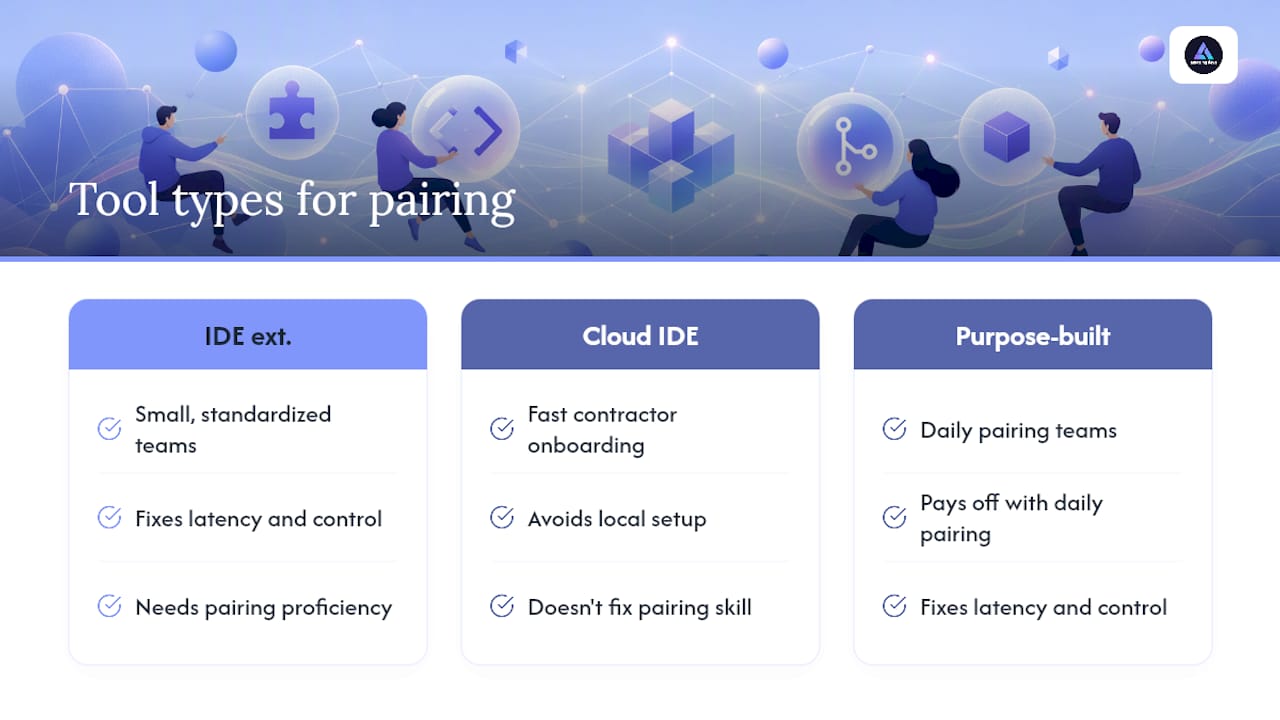
IDE extensions like Live Share make sense when your team is small, standardized, and already good at pairing. Cloud IDEs like Codespaces or CodeSandbox SDK earn their keep when you’re onboarding contractors or candidates fast and don’t want to wait on local setup. Purpose-built apps like Hopp or Tuple pay for themselves once pairing becomes a daily habit and lag starts costing real time.
I’ve seen engineering managers spend months chasing the “right” tool when the actual gap was skill: nobody on the team had ever been taught how to pair well, remotely or otherwise. One team I know of solved more by adopting a structured rotation and clearer driver/navigator roles than by switching from Zoom screen share to a dedicated app. The tool matters. The habit matters more.
— Gabriel
When Hiring Vetted Pairs Beats Switching Tools
Sometimes the real bottleneck isn’t your pairing software at all. It’s that you don’t have enough senior developers who know how to pair well in the first place. Swapping from Live Share to Hopp won’t fix a team that’s short-staffed or missing the specific skill set a project needs.
Amazing Devs takes a different angle: rather than another tool to configure, it provides pre-vetted Brazilian developers matched for both technical skill and cultural fit, already comfortable working pair-first inside remote teams. The nearshore staff augmentation model handles contracts and the bureaucratic overhead of hiring across borders, so you’re adding a capable pair to your team without the traditional hiring slog. For teams that need to scale an engineering function rather than just fix a tooling gap, the Team Extension Model plugs experienced developers directly into your existing workflow and pairing habits. If your next step is deciding whether to hire or keep shopping for software, start by checking current openings and team options to see what fits your project.
FAQ
What is a good tool for pair programming?
The right tool depends on how your team pairs. Hopp works well for teams pairing daily who want low latency and full remote control, while Microsoft Visual Studio Live Share is a strong free option for teams already standardized on VS Code.
Is pair programming still a thing in 2026?
Yes, pair programming remains a common practice, especially on distributed teams handling complex or high-stakes code. Purpose-built tools like Hopp and IDE extensions like Live Share exist specifically because demand for smooth remote pairing hasn’t slowed down.
What is the 80/20 rule in programming?
The 80/20 rule, or Pareto principle, in programming generally refers to the idea that roughly 80% of a program’s execution time is spent in about 20% of its code, which is why performance tuning usually focuses on a small number of bottlenecks rather than the whole codebase. It’s a rough heuristic, not a fixed statistic, and applies to debugging and optimization priorities more than to team workflow decisions.
Do remote pairing tools work for technical interviews?
Yes. Tools like CoderPad and HackerRank are built specifically for interview scenarios, with language runners and candidate evaluation features that general pairing apps don’t include. Amazing Devs also uses structured pair programming interview scripts to evaluate candidates under realistic collaborative coding conditions.
How much do remote pair programming tools cost?
Pricing varies widely by category. Cloud IDEs like GitHub Codespaces and CodeSandbox SDK offer free tiers with usage limits before switching to consumption-based billing, while dedicated apps like Tuple charge flat per-seat fees with no free tier at all. Microsoft Visual Studio Live Share remains completely free.