Best Log Management Tools in 2026: Compared by Cost and Fit
The best log management tool is the one your team can run well at your log volume. For most US startups and scaling companies that means a hosted service with published pricing (Datadog, Grafana Cloud, Loggly or Papertrail). Teams with security or compliance duties, or very high volume, look at Splunk, Elastic or self-hosted Loki. Any of them still needs engineers to wire up sources, write queries, tune noisy logs and keep costs under control. If that capacity is what you are short of, we place pre-vetted Brazilian developers into your team through nearshore staff augmentation.
TL;DR
- Small teams with modest volume: Papertrail, Loggly or the Grafana Cloud free tier have published prices and little setup.
- Teams already on an observability suite: Datadog keeps logs, metrics and traces in one place, at a per-GB price you can model.
- Enterprise security and long retention: Splunk and Elastic offer the deepest search, but Splunk’s cost is by quote and Elastic’s depends on how you run it.
- Self-hosting (Loki, Graylog, OpenSearch, SigNoz) removes license fees but moves the cost to engineer hours.
- Whatever you pick, plan who will own it. That decision shapes your real bill more than the logo does.
Table of Contents
- What log management software does
- How to compare log management tools
- The leading options at a glance
- Hosted tools: Datadog, Loggly, Papertrail
- Enterprise and security-led: Splunk and Elastic
- Cost-efficient and open source: Loki, Graylog, SigNoz, OpenSearch
- Splunk alternatives: how to pick
- Which tool for which team size
- The cost nobody puts in the comparison table
- Where Amazing Devs fits
- Our perspective
- FAQ
- Sources
What log management software does
Log management software collects log lines from your applications, servers and cloud services, stores them in one place and lets you search and alert on them. When a deploy breaks checkout at 2 a.m., the log tool is where an engineer finds the exact error.
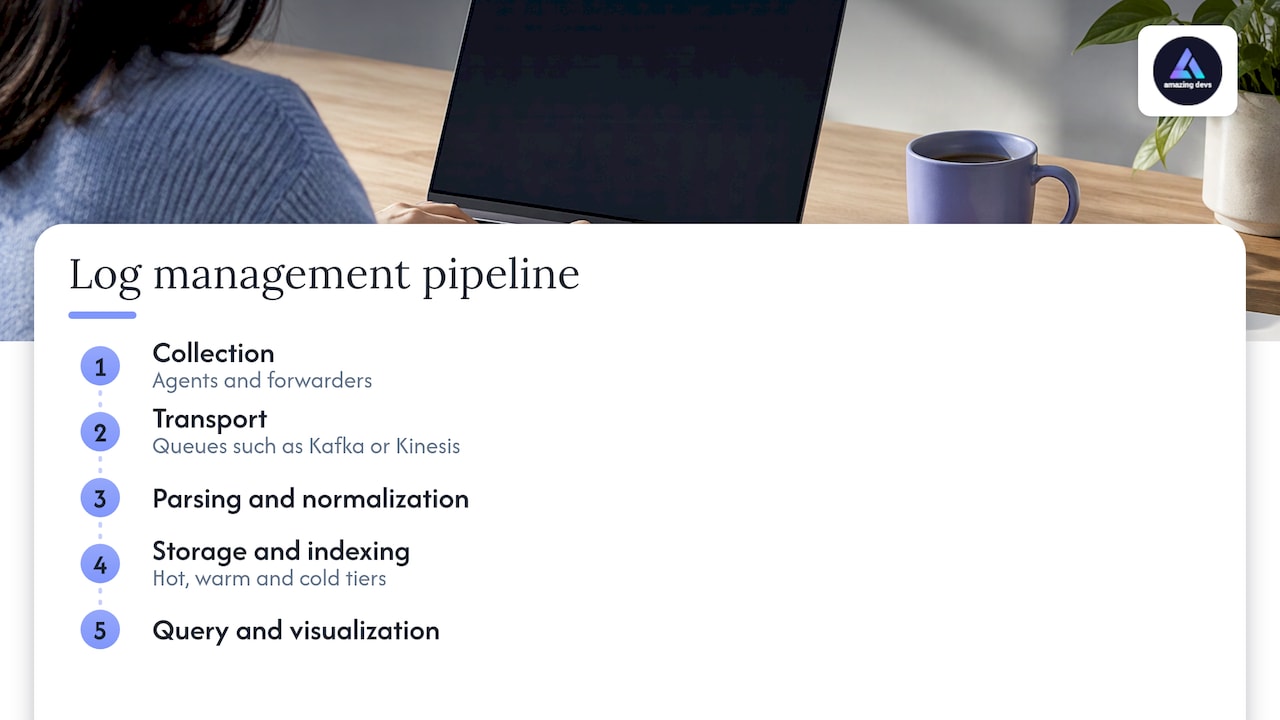
New Relic describes a working pipeline as five layers: collection (agents and forwarders), transport (queues such as Kafka or Kinesis), parsing and normalization, storage and indexing across hot, warm and cold tiers, and query and visualization. Each layer is a place where someone has to make decisions. Vendors differ in how many of those layers they take off your hands.
How to compare log management tools
Four questions sort the field faster than any feature grid.
1. How many GB per day do you produce? Nearly every price below scales with ingest. Parseable’s guide advises inventorying sources and volume first and pricing the full retention period, including a case where volume grows tenfold.
2. Who runs the servers? Cribl’s guide notes that self-hosted tools such as Elastic Stack and Graylog give full control but take time to manage clusters and upgrades, while SaaS platforms reduce that work but may limit customization.
3. Do logs feed security work? If auditors or a SOC consume your logs, you need immutable storage, audit trails and compliance reporting. Logmanager lists these among the key requirements for security and compliance teams, alongside support for PCI-DSS, HIPAA and SOC 2.
4. Do you want logs next to metrics and traces? Observability suites let an engineer jump from a spike to the log line behind it. Index-light stores trade that for lower storage cost.
Logmanager also warns that in container-heavy environments, log rate and short container lifetimes punish slow indexing and coarse pricing. It recommends filtering noisy logs before they reach billable storage. That filtering is engineering work, and it is where most savings come from.
The leading options at a glance
Prices below come from each vendor’s own page where one exists. They are list prices for the period the page was read and change, so confirm on the vendor page before you budget.
| Tool | Best for | Deployment | Published entry price |
|---|---|---|---|
| Datadog | Teams wanting logs, metrics and traces together | SaaS | $0.10 per GB ingested, plus $1.70 per million events indexed (15-day retention, billed annually) |
| Splunk | Enterprise security and compliance | Cloud, on-premises, private cloud, air-gapped | Ingest or workload pricing, quote-based |
| Grafana Loki / Grafana Cloud | Cheap storage at high volume | Self-hosted or cloud | Free tier of 50 GB per month; paid from $0.05/GB process, $0.40/GB write, $0.10/GB retain |
| Elastic Stack | Deep full-text search, full control | Self-hosted or cloud | Depends on deployment |
| Loggly | Small teams wanting predictable plans | SaaS | Free Lite plan; Standard from $79/month billed annually |
| Papertrail | Simple hosted search and alerts | SaaS | From $7.00 per month |
| Kiwi Syslog Server | Syslog, SNMP traps and Windows events on-premises | On-premises | Licensed edition from $999 |
| LogicMonitor | Hybrid infrastructure monitoring | SaaS | $19, $37 or $50 per Hybrid Unit (Essentials, Advanced, Signature) |
Hosted tools: Datadog, Loggly, Papertrail
Datadog
Datadog is the natural pick when you already run its monitoring. Its log pricing is public: $0.10 per ingested or scanned GB per month, and Standard Indexing at $1.70 per million log events for 15-day retention, with the on-demand indexing rate higher. It also offers out-of-the-box parsing for more than 200 log sources, which cuts setup time.
PostHog’s comparison highlights Datadog for moving directly from an error to the exact log line that caused it. The cost to watch is the indexed-events line. A chatty service can multiply that figure, so decide early what gets indexed and what is only ingested.
Loggly
Loggly suits teams that want plans with clear limits. Lite is free at 200 MB per day with 7-day retention; Standard starts at $79 per month billed annually for 1 GB per day and 15-day retention; Pro starts at $159 per month; Enterprise starts at $279 per month with custom volumes. The trial runs 30 days. Logmanager groups Loggly among the options for smaller IT teams that want minimal setup and predictable costs.
Papertrail
Papertrail is the lightest of the group. It is cloud-hosted, starts at $7.00 per month, and prices by log volume and searchable retention. It sends alerts to services such as Slack and PagerDuty. If your need is “centralize logs, search them, get paged,” it covers that with little to configure.
Enterprise and security-led: Splunk and Elastic
Splunk
Splunk Enterprise can run in a private cloud, on-premises or in air-gapped environments, with data-ingest or workload pricing and unlimited users. Its Observability Cloud, which is a separate product, lists $15 per host per month for Infrastructure, $60 for App and Infra, and $75 for End-to-End, billed annually.
Splunk’s strength is security operations. PostHog describes it as the pick for mature security operations and compliance audits at large scale. Struct’s Nimesh Chakravarthi notes that Splunk indexes every field by default, which makes ad-hoc full-text search fast across large volumes. The cost of that depth is why so many teams search for Splunk alternatives, and why a Splunk deployment usually wants dedicated admins.
Elastic Stack
Elastic offers full-text search with control over how logs are stored and queried. PostHog lists it among the main Splunk alternatives, with search at petabyte scale and a security product for SIEM. Elastic can run self-managed or in its cloud, so the cost is as much staff time as license. Better Stack reports that Elastic’s logsdb index mode compresses stored data by up to 65 percent against raw volume.
Cost-efficient and open source: Loki, Graylog, SigNoz, OpenSearch
Grafana Loki indexes labels rather than the full text of each line. PostHog explains that this makes retaining large volumes affordable but gives up the full-text search Splunk users rely on. Grafana Cloud’s logs product is built on Loki, with a free tier limited to 50 GB ingested per month and 14-day retention.
Other open-source names come up repeatedly. Better Stack lists OpenObserve, Grafana Loki, SigNoz, Graylog, Syslog-ng and Highlight.io as open-source log tools, and notes that self-hosting gives control but requires your team to deploy and maintain the infrastructure. The Knowledge Engineers puts the trade-off plainly: self-run options can cost no license fee but cost engineer hours for upgrades, storage and backups.
That last sentence is the most useful line in this article for a growing company. Free software is not free when the person maintaining it is a senior engineer you pay to ship product.
Splunk alternatives: how to pick
If you are leaving Splunk, decide first what you used it for.
- Security detection and audit: stay with SIEM-capable products. PostHog notes Splunk keeps its edge because SIEM is a core product rather than an add-on. Elastic Security is the closest like-for-like in the research.
- Application troubleshooting: Datadog or Grafana Loki cover this at lower operational weight.
- High volume, cost pressure: Loki or SigNoz. Struct says that for pure log analytics, Loki or SigNoz deliver equivalent search at 10 to 20 times lower cost. That is the vendor-blog comparison, so run your own numbers before you commit.
- Self-hosted continuity: Graylog or OpenSearch. OSSAlt’s guide names Graylog the most direct Splunk replacement for log management.
Migration is where people underestimate the work: rebuilding dashboards, translating saved searches, re-pointing agents and running both systems in parallel. It is a project with a start and an end, which is a good fit for added engineering capacity.
Which tool for which team size
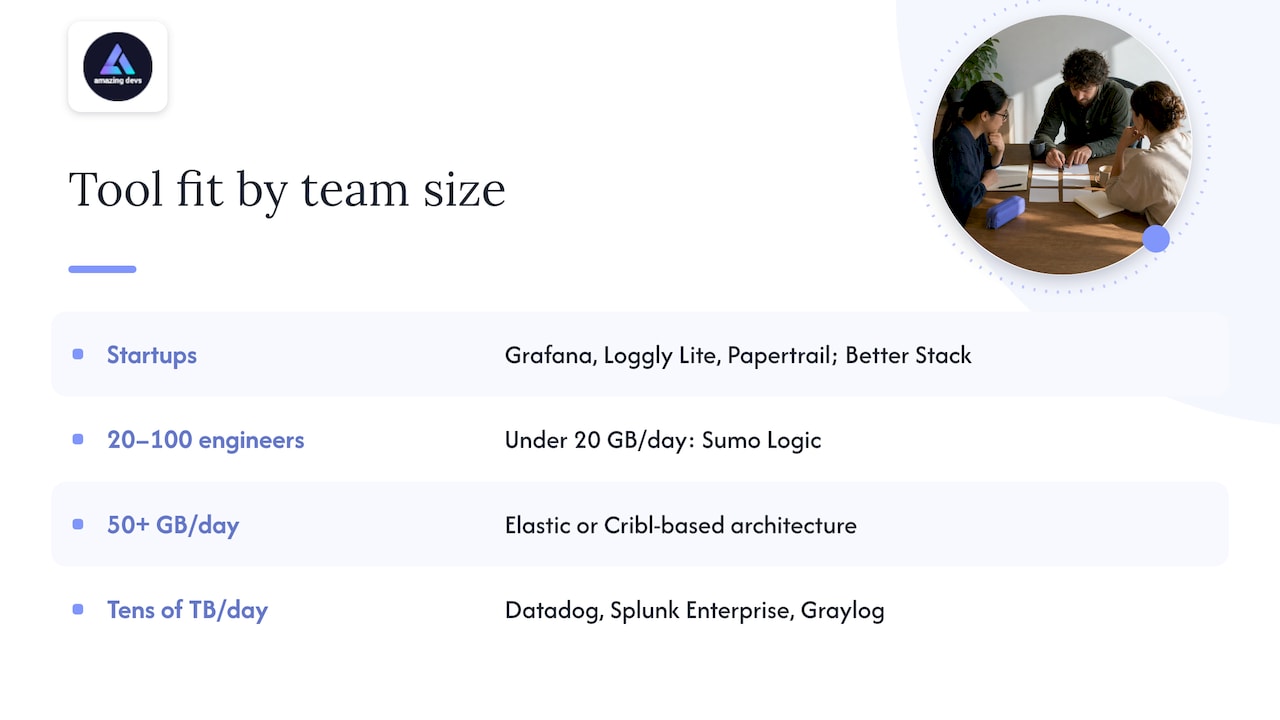
Startups under a handful of engineers. Start with a free or low-cost hosted tier: Grafana Cloud’s free allowance, Loggly Lite or Papertrail. Middleware suggests Better Stack for early-stage startups that want clean logging with uptime monitoring. The goal is searchable logs in an afternoon, not a platform.
Scaling teams, 20 to 100 engineers. Cost per GB starts to matter. VendorBenchmark’s Fredrik Filipsson says that under 20 GB per day of ingest, Sumo Logic often gives the best balance of cost, capability and simplicity, while at 50+ GB per day the economics favor Elastic or a Cribl-based architecture. This is the stage where a pipeline that filters and routes logs pays for itself.
Enterprises. Logmanager points to Datadog, Splunk Enterprise and Graylog for organizations handling tens of terabytes per day. Compliance, retention and access control dominate the decision.
The cost nobody puts in the comparison table
Every table, including the one above, prices software. The larger line is usually the people. Someone has to:
- Instrument services and standardize log formats.
- Build parsing, dashboards and alerts that on-call engineers trust.
- Review ingest weekly and cut noisy sources before they bill.
- Upgrade, patch and scale self-hosted clusters.
- Test that critical paths actually produce the logs you will need in an incident.
For teams hiring in the US, these are the roles that take longest to fill. That is where we come in.
Where Amazing Devs fits
We do not sell log software. We staff the people who set it up and run it. Amazing Devs provides nearshore developers from Brazil through nearshore staff augmentation and the Team Extension Model. Our process covers sourcing, technical and cultural fit assessment, and contract management, so you do not run the hiring and paperwork yourself. We also support AI-enabled and traditional software engineering roles, which matters as more teams look to AI-native engineers to build parsing, triage and alerting workflows.
If your logging rollout needs verification, our nearshore QA contractors can help test that services emit the right events. For how a remote engineer’s output is measured once they join, see our guide to diagnosing remote developer performance with SPACE and DORA. Working across US-aligned hours is covered in our piece on timezone management strategies.
To discuss the engineers your logging and observability work needs, start at getamazingdevs.com.
Our perspective
The most common mistake we see in tool selection is treating it as a purchase. It is a staffing decision with a purchase attached.
A hosted tool with a clean price page still needs someone to decide what gets indexed. A self-hosted stack needs someone to own upgrades. A migration off Splunk needs people who can rebuild searches and run two systems side by side. The software is the visible part, the engineering is the lasting part.
That is why we pair a tool decision with a hiring decision. Our approach is built around rigorous assessment for technical and cultural fit, with contracts and bureaucracy handled for you, so a new engineer can be productive on your stack quickly. If you are weighing a build-in-house path against external help, our comparison of in-house versus vendor development lays out how to choose.
Gabriel
FAQ
What is the best log management tool for a startup?
A hosted tool with a free or low entry tier is usually the right start. Grafana Cloud offers 50 GB per month free, Loggly has a free Lite plan, and Papertrail starts at $7.00 per month. Move to a larger platform when volume or compliance needs grow.
What are the best Splunk alternatives?
The research most often names Datadog, Elastic, Grafana Loki, Graylog and OpenSearch. Choose by what you used Splunk for: Elastic or Datadog for broad coverage, Loki for low-cost storage at volume, and a SIEM-capable product if security detection is the core use. PostHog’s Splunk alternatives comparison walks through the trade-offs.
Is open-source log management really free?
There is often no license fee, but you pay in infrastructure and engineering time. The Knowledge Engineers notes that self-run options cost engineer hours for upgrades, storage and backups. Budget for an owner before you choose self-hosting.
How should I compare log management software costs?
Price your actual daily volume across the full retention period, and include a case where volume grows tenfold, as Parseable advises. Add the staff time to run it. Then run the same dataset through two or three finalists.
Sources
- Datadog pricing
- Splunk pricing
- Grafana pricing
- Loggly plans and pricing
- SolarWinds Papertrail
- Kiwi Syslog Server free vs. full comparison
- LogicMonitor pricing
- New Relic: centralized log management
- Parseable: 10 best logging tools in 2026
- Cribl: top 10 log management tools
- Logmanager: top log management tools in 2026
- PostHog: best log monitoring tools
- PostHog: best Splunk alternatives
- Struct: best log management tools
- Better Stack: Dynatrace vs Elastic
- Better Stack: open source log management tools
- The Knowledge Engineers: log management software
- Middleware: log management tools
- VendorBenchmark: log management pricing benchmark
- OSSAlt: open source Splunk alternatives