DocuSign Alternatives in 2026: How to Choose and What They Cost

The best DocuSign alternative is the one whose pricing model matches how many documents you send and who sends them. For most small teams that means BoldSign, SignWell, Zoho Sign, Dropbox Sign or signNow. For teams already living in Adobe or a CRM, it means Acrobat Sign or PandaDoc. If much of your signing volume is contractor paperwork for engineers, you can also shrink the queue itself: when you hire Brazilian developers through Amazing Devs, we manage the contracts, so your team signs far fewer of them.
TL;DR
- Teams leave DocuSign mostly over unpredictable bills: envelope caps, per-seat pricing and paid add-ons, not over the quality of signing.
- For occasional signing, free plans from BoldSign (25 envelopes a month), Zoho Sign and SignWell cover a lot. Teams sending steadily should compare flat or unlimited plans.
- Under the US ESIGN Act and state UETA laws, signatures from mainstream platforms are binding. Compare audit trails, authentication and integrations instead.
- Engineering hires create a stream of contracts and NDAs. Our nearshore model takes contract management off your hands, which cuts how much you need to sign.
Table of Contents
- Why teams look for a DocuSign alternative
- What to compare before you switch
- Are the alternatives legally binding in the US?
- The main DocuSign alternatives compared
- Which one fits your situation
- The signing you can avoid: developer contracts
- Promo: add developers without adding paperwork
- Our perspective
- FAQ
- Sources
Why teams look for a DocuSign alternative
According to CIO’s August 2026 piece on what to look for, bills grow unpredictably as usage rises, because of envelope limits and per-transaction pricing. Pricing pages also rarely make clear which features are included and which are paid add-ons. An envelope is one sending of a document (or bundle) to its signers, and counting it when it is sent rather than when it is completed makes limits arrive sooner.
The trigger is often the renewal. DANIAN’s 2026 analysis describes a team that signs an annual contract at five users, grows to ten, and sees its annual line move from $2,700 to $6,500 at renewal. That jump is when people start comparing.
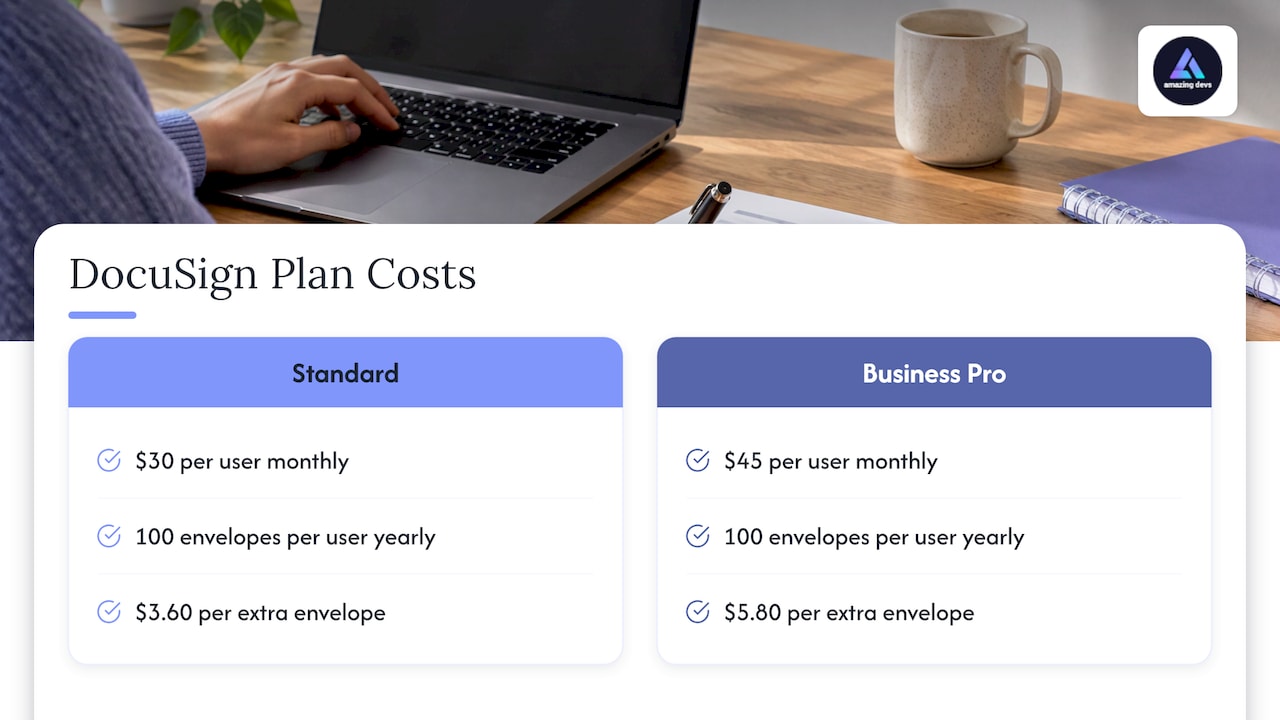
The published list prices explain the pressure. SignWith’s September 2026 check of DocuSign’s pricing found Personal at $11 a month on an annual plan (one user, five envelopes a month), Standard at $30 per user per month and Business Pro at $45 per user per month. Both of the latter include 100 envelopes per user per year. There is no free plan. SignSend’s comparison calculates that a 10-person Standard account costs $3,600 a year for 1,000 envelopes, with overages at $3.60 per envelope on Standard and $5.80 on Business Pro. Vendors revise these prices, so confirm them on each vendor’s own page before you budget.
Two other frustrations show up. FormAssembly (September 2026) notes that data collection, document generation, approval routing and system updates often sit in separate tools, and a pure e-signature product only handles one of the four. And Stacktie’s analysis points out that the separate-tool problem follows you to any vendor, so switching only fixes the parts that are really about price.
What to compare before you switch
Use a short list of criteria and test them against your own paperwork.
- How usage is charged. Per user, per envelope, per sender or flat per organization. BlueInk’s small-business guide says to start from your monthly document count, the number of people who need access, and how much price predictability matters.
- What is in the base plan. Signeasy’s 2026 comparison notes that paid senders, allowances, authentication, integrations and API access all change real spend.
- Security and evidence. OneSpan’s buyer’s guide suggests checking multi-factor authentication, identity verification, tamper-sealing after each signature, and whether you can archive the signed file and audit trail in your own systems.
- Integrations and API. Stacktie flags the API tier as the gate that can get worse after switching, citing Zoho Sign’s Enterprise-only APIs and Dropbox Sign’s separate API product.
- Fit with how you work. Signeasy recommends running one of your own contracts through a trial: rebuild a repeat template, send to several signers, test reminders and connect your systems.
Are the alternatives legally binding in the US?
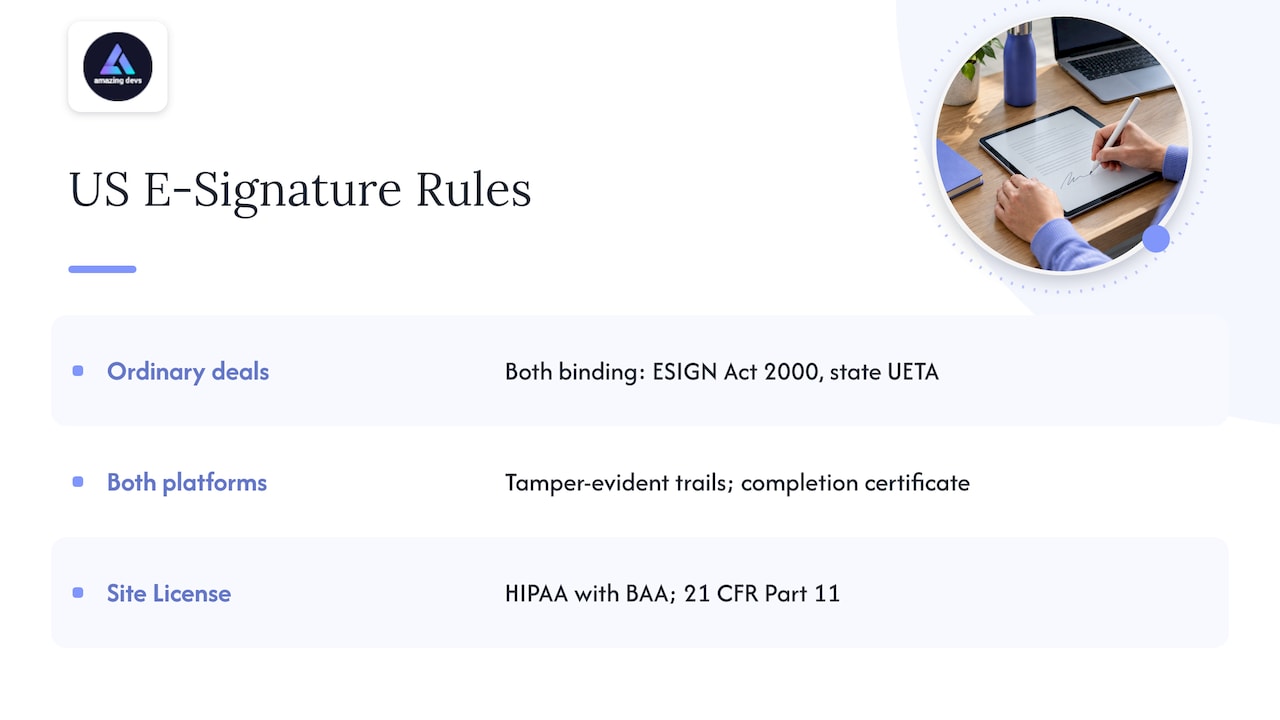
For ordinary business contracts, yes. SignSend’s comparison of Zoho Sign and DocuSign states that in the US both produce signatures that are binding under the federal ESIGN Act of 2000 and state UETA laws, and both keep tamper-evident audit trails and stamp a completion certificate. The real differences are cost, fit with your software and how your counterparty reacts to an unfamiliar brand.
For regulated work, check the specifics. EsignCompare’s April 2026 signNow review says HIPAA (with a business associate agreement) and 21 CFR Part 11 are available only on signNow’s Site License tier. If you handle health data, our guide to HIPAA-compliant development covers what US developers must ship.
The main DocuSign alternatives compared
The figures below are published plan prices and limits from the sources named in the text, as reported in 2026. Prices and limits change, so check each vendor’s pricing page.
| Tool | Free option | Entry paid price | Notable strength |
|---|---|---|---|
| BoldSign | 25 envelopes/month, 2 templates, 1 user | $5/user/month | Generous free tier |
| signNow | No free plan, 7-day trial | $8/month, unlimited users | Low entry price for larger teams |
| SignWell | 3 documents/month | $10/month per sender | Small teams, Zapier connections |
| Zoho Sign | 5 envelopes/month, 1 user | $10/user/month | Fits Zoho users |
| Dropbox Sign | Limited free signing | $15/month, 1 user | Unlimited requests on paid plans |
| Adobe Acrobat Sign | No free plan | $16.99/licence/month (Standard) | PDF-native, unlimited seats |
| PandaDoc | 5 documents/month (Docflare) | $19/user/month annual | Proposals and payments |
| DocHub | 5 eSignatures/month | From $16/month | Editing plus signing |
Sources: free-plan and entry prices for BoldSign, signNow, SignWell, Zoho Sign and Dropbox Sign come from The SDR List’s 2026 pricing roundup. Adobe and Dropbox annual-billing prices come from HelpRange’s November 2026 comparison. PandaDoc’s free limit comes from Docflare’s comparison, its price from PandaDoc’s May 2026 comparison, and DocHub’s from Zapier’s guide.
Budget platforms for small teams
BoldSign, SignWell and Zoho Sign are the usual first stops. SignWell’s paid tier suits teams where only a few people start contracts: Signeasy’s table lists $30 a month on an annual plan for three senders. SignWell also publishes support for ESIGN, UETA, eIDAS, SOC 2 Type II and HIPAA-oriented workflows with a BAA, plus more than 9,000 connections through Zapier, per BrandJet’s September 2026 review.
signNow stands out for unlimited users. BestGuide’s review confirms it is run by airSlate, with unlimited users on all plans, a 7-day no-card trial, and up to 100 signature invites per account per year on annual Business Premium and Enterprise plans, with extra invites billed pay-as-you-go.
Dropbox Sign and Adobe Acrobat Sign
Dropbox Sign (formerly HelloSign) is the simple switch. Layer3 Labs’ August 2026 test found unlimited signature requests on every paid plan, with DocuSign pulling ahead only when you need payment collection at signing, web forms or conditional routing. HelpRange reports audit trails on every request and signing in 22 languages.
Adobe describes Acrobat Sign as a standalone solution for medium and large businesses, with unlimited seats, strong integrations and industry-ready compliance. It makes sense if your contracts already live as PDFs in Adobe.
Proposal and sales-driven workflows
If signatures close revenue, look at PandaDoc. Bind Legal’s small-business guide says it is strongest when proposals drive revenue, with deep Salesforce and HubSpot integration and built-in payment collection. Per-seat costs compound quickly: Portant’s HubSpot comparison puts five users at $245 a month on PandaDoc and $325 on DocuSign Business Pro.
For heavier contract lifecycle software, Bind Legal cites Vendr data on Ironclad: a median contract of $40,492 a year across 372 purchases. Our own comparison of contract management software walks through 14 tools.
Regulated and enterprise signing
OneSpan Sign targets regulated industries: a Professional plan at $22 per user per month with a five-user minimum, support for 21 CFR Part 11 and eIDAS qualified signatures, and remote online notarization in 44 states plus DC. Pick it when authentication and transaction evidence carry real weight.
Open source and self-hosted
DocuSeal and OpenSign offer free self-hosting. SignWell’s comparison lists DocuSeal’s cloud Pro plan at $20 per user per month and OpenSign’s Professional plan from $29.99 a month. Self-hosting means your engineers maintain the server, updates and backups, which is a cost to count.
Which one fits your situation
- A few signings a month: a free tier. BoldSign’s 25 envelopes a month is the most generous in the sources above.
- A small team where a few people send: SignWell or Zoho Sign, depending on whether you use Zapier or Zoho.
- A growing team with many occasional signers: signNow for unlimited users, or Dropbox Sign for unlimited requests.
- Seasonal bursts: Zapier’s guide says eSignatures.com’s pay-as-you-go model suits needing, for example, 20 contracts in June and none the rest of the year.
- Sales and proposals: PandaDoc.
- Regulated or pharma work: OneSpan Sign, or signNow’s Site License tier.
The signing you can avoid: developer contracts
A growing engineering team generates a steady flow of agreements: contractor agreements, NDAs, statements of work, amendments and offboarding paperwork. Every one of them counts against an envelope cap or a seat.
When you add engineers through our nearshore staff augmentation service, we handle contract management and the bureaucracy of hiring in Brazil. That removes a large block of paperwork from your own signing queue, whichever e-signature tool you use. You still need a solid confidentiality agreement in place; our guide to NDAs for contractors covers what it should include, and the rest of the hiring paperwork is part of what we manage.
Promo: add developers without adding paperwork
We place pre-vetted Brazilian developers with US startups and established businesses. Each candidate goes through a technical and cultural-fit assessment, and we manage the contracts, so your team scales without the usual hiring overhead. The Team Extension Model is the place to start if you want engineers who work as part of your team.
If you want to compare engagement types first, read outsourcing vs staff augmentation, or go straight to our home page to describe the roles you need.
Our perspective
Most of the pain in a DocuSign bill comes from volume you did not plan for. Signature counts rise when a company hires, and hiring engineers is one of the fastest ways to multiply agreements.
That is why we think about contracts as part of the hiring model, not a separate chore. Our approach to nearshore staffing is built around managing contracts and the administrative complexity for you, alongside a rigorous recruitment and assessment process that checks technical and cultural fit.
Pick the e-signature tool that matches your usage pattern, then reduce the paperwork feeding it. For a team that needs developers quickly, putting contracts in our hands is the shortest path.
Gabriel
FAQ
What is similar to DocuSign but free?
BoldSign’s free Essential plan includes 25 envelopes a month, two templates and one user, per The SDR List. Zoho Sign offers five envelopes a month for one user, and SignWell offers three documents a month. Open-source tools such as DocuSeal and OpenSign are free to self-host.
Are DocuSign competitors as legally valid as DocuSign?
For standard US business contracts, mainstream platforms produce signatures that are binding under the ESIGN Act and state UETA laws, with audit trails and completion certificates, according to SignSend. For HIPAA or FDA Part 11 work, confirm the specific plan includes the compliance you need.
Why do companies leave DocuSign?
Mostly cost predictability. CIO’s 2026 article cites envelope limits, per-transaction pricing and unclear add-on pricing. Renewals after team growth are a common trigger.
Which alternative is best for a small team?
It depends on who sends. If only a few people initiate contracts, a per-sender plan like SignWell’s can work. If many people send, compare unlimited-user or unlimited-request plans such as signNow or Dropbox Sign, and run one real contract through a trial first.
Sources
- CIO: Docusign alternatives for teams
- DANIAN: Open-source DocuSign alternatives
- SignWith: free DocuSign alternatives
- SignSend: e-signature pricing comparison
- SignSend: DocuSign vs Zoho Sign
- FormAssembly: DocuSign alternatives
- Stacktie: DocuSign alternatives compared
- BlueInk: small-business guide
- Signeasy: electronic signature software
- OneSpan: DocuSign alternatives guide
- EsignCompare: signNow review
- The SDR List: e-signature pricing
- HelpRange: e-signature comparison
- Docflare: best DocuSign alternatives
- PandaDoc: electronic signature software
- Zapier: Docusign alternatives
- BrandJet: DocuSign alternatives for small businesses
- BestGuide: signNow review
- Layer3 Labs: Dropbox Sign vs DocuSign
- Adobe: Acrobat Sign
- Portant: DocuSign alternatives for HubSpot teams
- Bind Legal: small-business contract software
- CT Acquisitions: e-signature for M&A
- SignWell: free eSignature software