Remote Sprint Planning for Distributed Teams: Save Live Time
A remote sprint planning meeting has to end with three things: a clear Sprint Goal, a set of selected Product Backlog items, and a concrete starting plan the Developers can act on immediately. The Scrum Guide caps this event at eight hours for a one-month sprint, scaled down for shorter ones. Hitting that outcome remotely takes more deliberate facilitation and a shared visual workspace than an in-room session ever did.
TL;DR:
- For two week sprints, timebox goal setting, backlog review, estimate disputes, task design, and closeout; add a five minute break every 50 to 60 minutes.
- Before the call, refine backlog items with acceptance criteria, flag dependencies, estimate capacity around leave and on call duties, and confirm shared time zone overlap.
- Have Developers estimate asynchronously, then spend live meeting time only on items with wide disagreement or high uncertainty; keep the overlap window consistent between sprints.
- For one week sprints, combine backlog review and estimate discussions, and skip formal breakout planning unless genuine unknowns remain; longer sprints need proportionally extended agenda blocks.
- End by publishing the Sprint Goal, confirmed Sprint Backlog, unresolved risks, and named owners; Developers can detail remaining tasks as new information emerges during the sprint.
Table of Contents
- Who Attends and What the Meeting Is Actually For
- A Practical Remote Sprint Planning Agenda and Timeboxing
- Preparation Checklist: What Must Be Ready Before the Meeting
- Remote Tools and Team-Room Setup That Actually Work
- Facilitation Techniques for Distributed Teams
- Estimation Strategy and Synchronous Overlap
- Common Remote Anti-Patterns and How to Avoid Them
- Follow-Up, Artifacts, and How to Close the Meeting
- Operational Priorities for Distributed Sprint Planning
- Another Option: Consider Nearshore Staffing to Stabilize Remote Sprints
- FAQ
- Sources
Who Attends and What the Meeting Is Actually For
Three roles show up to sprint planning, and each one carries a distinct job. The Product Owner brings the “why”: a proposed Sprint Goal and a prioritized, refined slice of the Product Backlog. The Scrum Master runs the event, protects the timebox, and makes sure the conversation stays structured instead of drifting. The Developers decide what they can realistically commit to and start shaping how the work will get done.
That split maps directly onto the three questions the Scrum Guide says sprint planning must answer:
- Why is this sprint valuable, which becomes the Sprint Goal.
- What can be done this sprint, which means selecting Product Backlog items.
- How will the chosen work get done, which starts the initial plan or decomposition.
In a distributed setting, these responsibilities do not change, but accountability gets fuzzier without physical cues. A Scrum Master facilitating remotely needs to assign speaking order, call on quiet Developers directly, and confirm out loud who owns each decision before moving to the next topic. Skipping that step is usually the moment remote planning sessions quietly lose their structure.
A Practical Remote Sprint Planning Agenda and Timeboxing
The timebox scales with sprint length: it can be several hours for a one-month sprint and shorter for shorter sprints. The structure inside that window matters more than the total time.
A workable sequence for a two-week sprint looks like this:
- Open with context and the proposed Sprint Goal, 15 to 20 minutes.
- Review and confirm which backlog items support that goal, 30 to 45 minutes.
- Flag and discuss only the estimates with high variance or disagreement, 30 minutes.
- Break into small groups to sketch how the top items will get done, 45 to 60 minutes.
- Reconvene to confirm the final Sprint Goal and Sprint Backlog, 20 minutes.
- Assign immediate next steps and first actions for day one, 10 minutes.
For a one-month sprint, stretch each block proportionally and add a second short break. For a one-week sprint, compress steps two and three into a single pass and skip formal breakout decomposition unless the backlog includes real unknowns.
Remote sessions lose energy faster than in-person ones, so pacing needs to be explicit rather than assumed. Build in a five-minute micro-break every 50 to 60 minutes, state the exact reconvene time out loud, and have the host, not a volunteer, manage transitions between agenda items so nothing drifts.
Pro Tip: Post the agenda with timestamps in the team room before the call starts, so latecomers can orient themselves without interrupting the flow.
Preparation Checklist: What Must Be Ready Before the Meeting
Sprint planning works only when the meeting is used for alignment and decisions, not discovery. That means the inputs need to exist before anyone joins the call.
- Backlog items are refined with clear acceptance criteria and known dependencies flagged.
- Capacity is estimated ahead of time, accounting for holidays, on-call rotations, and planned time off.
- Time-zone overlap windows are confirmed so the live session happens when the most people can actually attend.
- The team room is built in advance with a Sprint Goal template, one card per candidate item, and a risks area.
- Async estimation results, if the team uses them, are summarized and visible before the call opens.
- A short list of subject-matter experts is identified, with a plan for pulling them in only if a specific item needs them.
Teams that skip this prep tend to spend the first half of the meeting doing work that should have happened days earlier, which eats directly into the time reserved for actual planning decisions.
Remote Tools and Team-Room Setup That Actually Work
The tool stack for remote sprint planning does not need to be elaborate, but it does need to be consistent. A shared visual whiteboard handles the Sprint Goal, item cards, and risk notes in one place that everyone can see and edit at the same time. A video platform with breakout room support lets the group split for focused sub-discussions. A persistent backlog system, separate from the whiteboard, holds the Sprint Backlog and tracks it after the meeting ends.
- Use one canonical team-room URL for every sprint planning session, saved somewhere the whole team can find without asking.
- Preseed the board with templates for the Sprint Goal, item cards, and a risks column before the call starts.
- Run a two-minute tech check for audio, camera, and screen-share permissions as people join, rather than mid-meeting.
- Record the session and keep a transcript available, with action items copied into the tracker, not left buried in chat.
For visual annotation and structured feedback during planning discussions, some teams borrow patterns from design review workflows, such as pinning comments to specific areas of a shared artifact instead of relying on open-ended chat threads.
Pro Tip: Assign one person, not the facilitator, to own the tracker during the meeting so action items get captured in real time instead of reconstructed afterward.
Facilitation Techniques for Distributed Teams
Reading the room is harder on video, and that gap is where remote sprint planning breaks down most often. Scrum recommends virtual Liberating Structures, specifically 1-2-4-All, Shift & Share, Lean Coffee, and Min Specs, as repeatable microstructures that scale a session from whole-group context-setting down to small-group problem solving and back.
- 1-2-4-All: individuals think silently for one minute, pair up for two minutes, form groups of four for four minutes, then share one output per group with everyone.
- Shift & Share: small groups rotate through pre-set stations or topics, each contributing a quick addition before moving on.
- Lean Coffee: the group proposes topics, votes on priority, and timeboxes discussion per topic, useful for surfacing planning concerns nobody scheduled time for.
- Min Specs: groups agree on the smallest set of rules a solution must satisfy, which works well for scoping ambiguous backlog items quickly.
Facilitators get more out of these patterns when they prepare one shared artifact per breakout group ahead of time, a slide, a board area, or a doc, preseeded with prompts so the outputs are comparable and fast to synthesize. Breakout rooms are especially useful for resolving high-variance estimates and technical risks: send the disagreement into a small group, have them reconvene with a single visual artifact, and discuss only the artifact rather than re-litigating the whole conversation.
Virtual Liberating Structures give remote teams repeatable, inclusive micro-patterns that move a meeting from context-setting to decision-making without losing quieter voices, according to Scrum.org’s remote facilitation guidance.
A facilitator checklist for remote runs: pre-assign breakout spaces before the call, control breakout timing with a visible countdown, collect one output per group, and spend reconvened time on decisions rather than re-explaining what each group already covered.
Estimation Strategy and Synchronous Overlap
Estimating every backlog item live is the single biggest time sink in remote sprint planning. A better workflow splits estimation into async and sync phases, reserving the limited overlap window for the items that actually need a conversation.
- Developers submit initial estimates asynchronously before the meeting, using whatever scale the team already uses.
- The facilitator compiles results and flags items with wide disagreement or unusually high uncertainty.
- Only flagged items get live discussion time during the sync window, capped at a set number of minutes each.
- Small-group estimation zones handle complex items in parallel rather than one at a time in front of the full group.
- Estimates get revisited mid-sprint if new information changes the picture, rather than treated as final at planning.
Qualitative research on dispersed Agile teams found that teams perform best when they reserve a predictable synchronous overlap window for high-bandwidth collaboration and rely on disciplined asynchronous handoffs for everything else. That overlap window should stay consistent sprint over sprint, so people can plan around it instead of negotiating it each time.
For teams spread across large time differences, this means designing the meeting as a sequence of short synchronous bursts and async handoffs rather than one long call. A timezone management approach that protects a fixed daily overlap window, combined with a documented handoff process for async work, reduces the coordination delay that otherwise eats into actual planning time. Pairing that with a solid async communication stack keeps the routine estimates moving without needing everyone online at once.
Common Remote Anti-Patterns and How to Avoid Them
Remote sprint planning tends to fail in some common ways, such as over-commitment, over-planning, low engagement or dominance by a few voices, and skipping planning altogether. Addressing these requires managing capacity conservatively, limiting upfront task decomposition, ensuring inclusive participation, and scheduling re-alignment when needed.
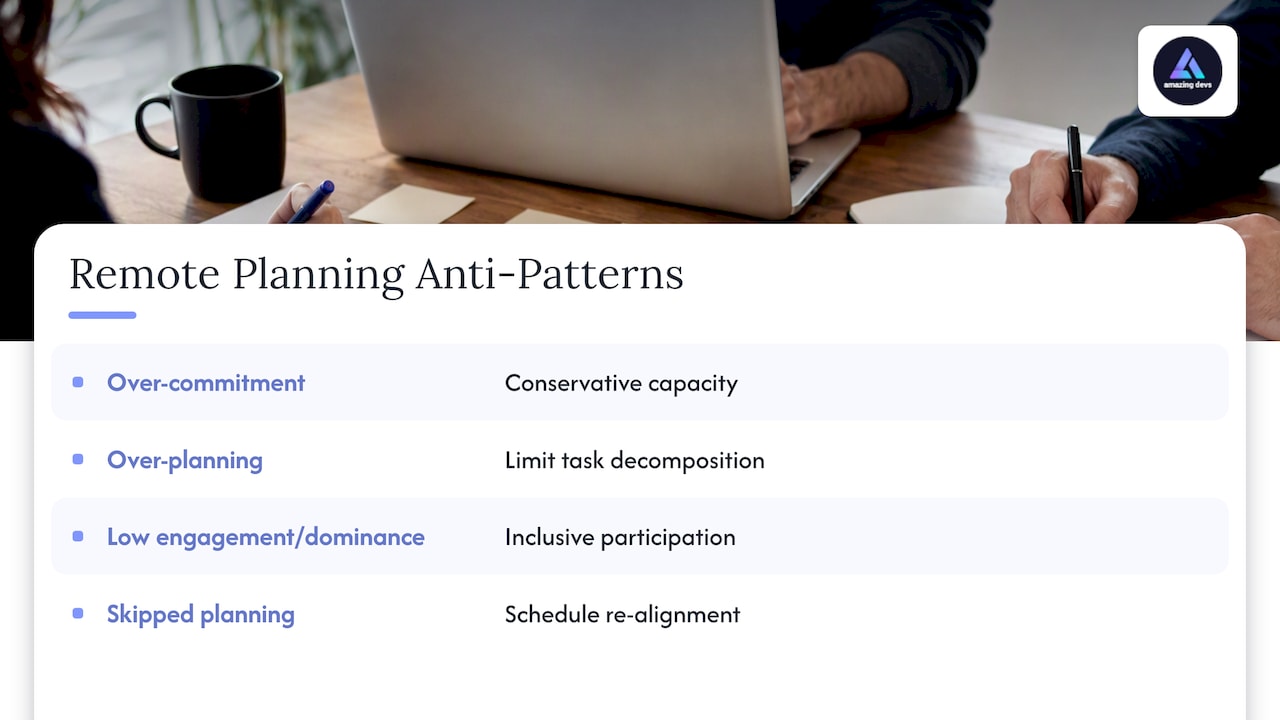
These patterns show up more often in distributed teams simply because the informal cues that catch them in person, a confused face, a hallway comment, are missing on video.
Pro Tip: If the same person answers first in every estimation round, assign a rotating “first responder” role so the group hears different perspectives before anchoring on one voice.
Follow-Up, Artifacts, and How to Close the Meeting
The meeting is not done when the call ends. Before anyone logs off, publish the final Sprint Goal, the confirmed Sprint Backlog, named owners for any spike or investigation work, and a short list of unresolved risks.
- Post the Sprint Goal and Sprint Backlog somewhere the whole team checks daily, not buried in meeting notes.
- Assign an owner to each unresolved risk or spike, with a rough date for revisiting it.
- Keep an action tracker visible so follow-ups do not quietly disappear.
- Schedule a short, separate session for any item too complex to resolve in the planning window, rather than letting planning run long.
The Daily Scrum is where this plan earns its keep. Checking progress against the Sprint Goal each day, and against a shared Definition of Done, keeps the Sprint Backlog honest and gives the team room to adapt instead of discovering problems at sprint review. Tracking progress consistently, using whatever metrics the team already trusts for developer performance, closes the loop between what planning promised and what the sprint delivers.
Operational Priorities for Distributed Sprint Planning
The trade-off at the center of remote sprint planning is simple: the more work you push into async preparation, the more the limited synchronous time can be spent on actual decisions instead of status updates. Visual aggregation, one board, one artifact per breakout group, is what makes that trade-off work in practice rather than just in theory.
Teams that switch from “estimate everything live” to “estimate async, discuss outliers live” tend to notice the same thing first: planning meetings get shorter, and the conversations that remain are the ones that actually needed a room full of people. That shift rarely happens by accident. It happens because someone designed the meeting that way on purpose.
— Gabriel
Another Option: Consider Nearshore Staffing to Stabilize Remote Sprints
Sometimes the harder problem isn’t the meeting format, it’s that the team itself doesn’t have steady capacity to plan around. We provide nearshore staff augmentation, pairing client teams with vetted Brazilian developers who are assessed for both technical skill and cultural fit before they ever join a sprint.

That consistency matters for planning specifically: a team that isn’t absorbing new hires every quarter spends less time re-explaining context and more time actually deciding what the sprint goal should be. We also manage contracts and the bureaucratic overhead that normally slows down scaling a distributed team, through our Team Extension Model.
- Developers can be matched for technical and cultural fit before placement.
- Contract management can be handled so teams can focus on sprint work, not paperwork.
- Capacity can stay predictable sprint over sprint, which helps keep planning estimates closer to reality.
If unstable team capacity is the real obstacle behind messy sprint planning, explore our staffing options to see whether a nearshore team extension fits.
FAQ
What Is a Sprint Planner?
A sprint planner usually refers to either the Scrum Master facilitating the sprint planning event or a tool used to track the Sprint Backlog and sprint progress. In the Scrum framework itself, there’s no dedicated role called “sprint planner”: planning is a shared responsibility across the Product Owner, Scrum Master, and Developers.
Is Agile Still Relevant in 2026?
Agile and Scrum remain the dominant framework for software teams structuring iterative work, and the Scrum Guide continues to define the core events, including sprint planning, that most distributed teams still use. The practices around it, especially remote facilitation techniques, have simply matured to fit distributed and hybrid teams.
What Is the Difference Between Scrum and Sprint?
Scrum is the overall framework for organizing agile work, including roles, events, and artifacts. A sprint is one specific event within that framework: a timeboxed period, typically one week to one month, during which a team works toward a Sprint Goal.
How Much of the Sprint Backlog Must Be Defined During Sprint Planning?
The Scrum Guide requires that sprint planning produce a Sprint Goal, a selected set of Product Backlog items, and a plan for delivering them, but it does not require every task to be fully defined upfront. Developers typically plan enough of the first days’ work to start confidently, then decompose further as the sprint progresses.
Sources
- The Scrum Guide (2020)
- Scrum
- Qualitative study of adaptive time-coordination tactics in dispersed Agile teams